
Sbu Subscriptions
Matteo Giuditta
No ratings yetFinanceAges 4+
Screenshots



About this app
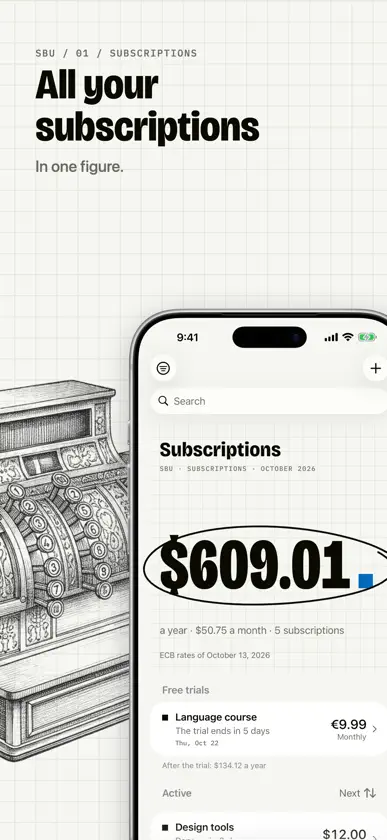
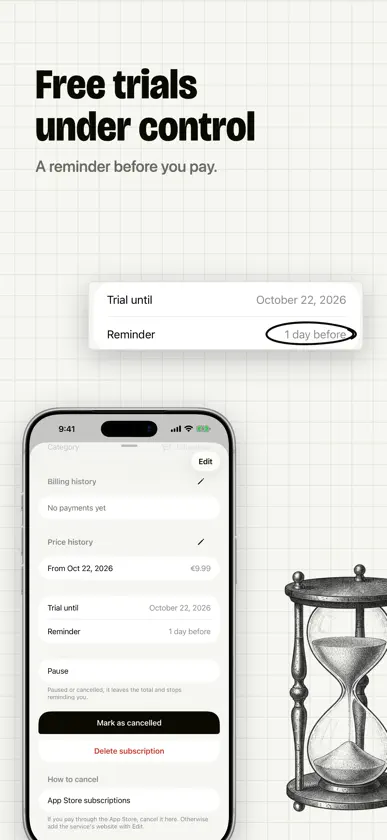
Add your subscriptions and at the top you see what you spend a year, or a month. Before each renewal a reminder tells you the day and the amount. - Unlimited subscriptions, from a list of known services or your own - Weekly, monthly, quarterly and yearly cycles, every N days, weeks, months or years, one-off or in instalments - What you spend in one figure, with other currencies converted at the ECB rates included in the app, or at your own - Free trials with the days left and the price after the trial - Reminders before each renewal and before a trial ends, at the time you choose - Payments calendar with the month's total and what's still to pay - Price changes from a date, payment history and Mark as paid - Categories, lists and payment methods; sort, group, filter and search - Pause, cancel and reactivate without losing anything - Help to cancel: the service's website or your App Store subscriptions - Widgets for the Home Screen and the Lock Screen - Siri, Shortcuts and Spotlight - Export and import as CSV, from a spreadsheet too - iCloud stays off until you turn it on: then your subscriptions sync across your devices, through your own iCloud - Share a list with anyone, through iCloud and only when you choose: they see it read only, with its total - Light and dark, Dynamic Type, VoiceOver Sbu does one thing: it tells you what your subscriptions cost, so no renewal takes you by surprise. No subscription. No in-app purchases. No account. No ads. No tracking. Data stays on your device.
What's new
Version 2.1.0 · Oct 22, 2026
Three tabs: Subscriptions, Calendar and Settings. The payments calendar is one tap away. The detail opens in a sheet: the price up top, what you've spent so far, how long you've been subscribed, the latest payments and prices. Mark as cancelled is the main button of the detail. Each row says in how many days it renews, and you change the order above the list. If notifications are off, the form tells you and takes you to Settings. Under the figure, Share the figure makes a picture on squared paper to send to anyone.
More from Matteo Giuditta


You might also like
 Simple Subscriptions TrackerAhmed Kubbi
 SubList: Subscription Tracker圣罡 汤
 Subscription Tracker: OrbitFlooben Ltd
 DB Secure AuthenticatorDeutsche Bank AG
 Pera Algo WalletAlgorand llc
 RelaxBanking MobileBCC Sistemi Informatici S.p.A.
 Immobiliare.it MutuiIMMOBILIARE.IT MUTUI SRL
 Unipol AssicurazioniUNIPOL Assicurazioni spa