
ShootBinder
Yuya Kawai
No ratings yetPhoto & VideoAges 4+
Screenshots




About this app
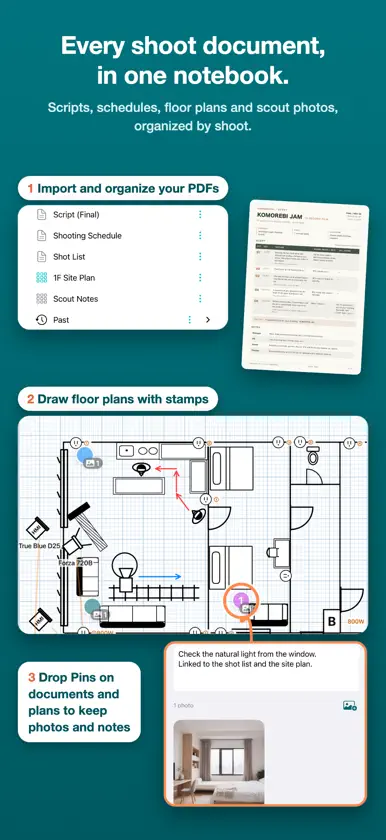
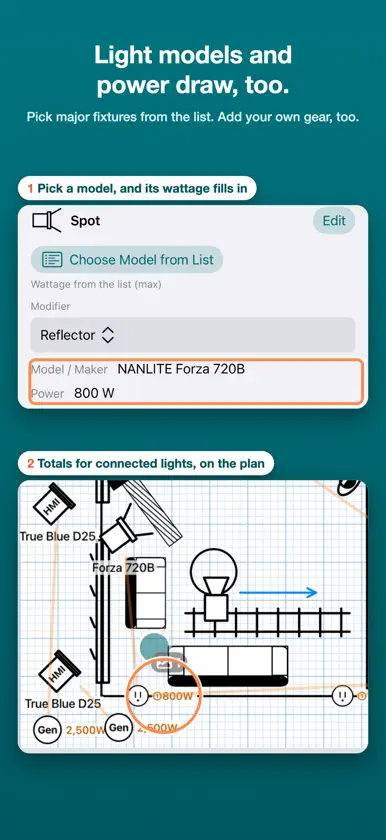
Scripts and shot lists stay as PDFs. Draw the floor plan with stamps, right on the scout. ShootBinder is a production notebook for iPad and iPhone, built by a working gaffer on real scouts and shoot days. Import the PDFs you already receive, mark them up, and link photos and related documents together, from prep through the shoot. MARK UP THE DOCUMENTS YOU ALREADY USE Import scripts, schedules, shot lists and floor plans as PDFs and organize them into projects and folders. On iPad, write directly on the page with Apple Pencil. Add shapes and text boxes for notes and reminders. Invert the screen on dark sets. PUT CAMERAS AND PEOPLE ON THE PLAN Place stamps for cameras, dollies, people, lights, stands, flags, windows, doors and outlets. Add freehand lines, straight lines and polylines with curves to draw the setup. Each stamp can carry gear details, notes and photos. On iPad, circle anything you draw often to save it as a custom stamp for any project. CONNECT PLACES AND DOCUMENTS WITH PINS Drop a Pin on a floor plan or shot list and attach photos and notes. Draw a line from Pin to Pin to link them; linked Pins share one number in every document. Jump from a spot on the plan to the matching shot, and from the shot to the scout photos. SWITCH SETUPS WITH SHOOTING PLANS Keep the room's layout as is and switch camera, talent and lighting positions for each setup. Link Pins on the shot list to the setup they belong to. WORK WITH TWO DOCUMENTS SIDE BY SIDE On iPad, view a floor plan next to a shot list in split view. When a document is revised, view old and new side by side and drag your notes and placed items across. SHOOT ON SET, ORGANIZE IN THE PROJECT With the iPad or iPhone camera, shoot a series of photos straight into the project, grouped as you go. Place photos on a plan or attach them to Pins and stamps. Add videos to Pins or to the page, too. On iPhone you can also read documents and edit stamps, shapes and text. PLAN LIGHTING GEAR AND POWER Choose fixtures and modifiers, then draw a line from each light to an outlet to total the wattage you've entered. Lay out breaker panel circuits and switches, too. SEE THE SUN'S PATH ON YOUR PLAN Set the location on the compass stamp and the shoot date on the sun stamp to see that day's sun path and times on the plan, plus an estimate of when the sun hits the windows. SHARE WITH YOUR CREW, EACH WITH THEIR OWN NOTES With ShootBinder Pro, share a project view-only, with people you invite or anyone with the link. Recipients open it for free and can write "My notes" in handwriting or text. Their notes are shown only to them and never change the original. USE IT ON YOUR OWN DEVICES, HAND IT TO THE CREW Projects sync between your iPad and iPhone on the same Apple Account. Documents stored on the device work without a signal. Export documents with their photos and notes as a PDF for crew who don't use ShootBinder, or send a project, document or folder as a package to those who do. Try markup, photos, links and shooting plans with the sample project and guided tour. - Your first project is free, with every feature. More projects and sharing your own projects require ShootBinder Pro (one-time purchase). Opening a project shared with you is free. - Handwriting with Apple Pencil and split view are available on iPad. iPhone shows handwriting. - Sync between your devices and sharing use your own iCloud storage (not the developer's servers). If your iCloud storage is full, sync stops. Your data on the device stays usable, and unsent changes are sent once space is available. - A shared project uses the owner's iCloud storage, not the recipients'. If the owner's iCloud storage is full, updates stop reaching recipients. - Sharing is view-only; real-time collaboration is not supported. A package gives the recipient an independent copy. - Power totals are a planning estimate based on the values you enter. They do not guarantee electrical safety or that a breaker will not trip.
What's new
Version 1.0.6 · Nov 13, 2026
- You can now add videos. In Photos, switch between Photos and Videos. Group videos, attach them to Pins, or place them on a page, just like photos. Double-tap a video on a page to play it. - Video files aren't sent to iCloud by default. To send one, long-press it and choose Send to iCloud. By default, videos are sent only on Wi-Fi. - Choose Include Videos when exporting a project or document. - Items in Recently Deleted are no longer removed automatically. To remove them, tap … in the project list and choose Empty Trash. - Your pen and marker colors and widths are remembered. Shapes now have their own width, separate from the pen. - iPad: Pin and stamp details now open next to where you tap. Tap Open in Panel to show them in the panel. - You can change a link number to any number that isn't in use. Deleted links no longer appear in Pin details or count toward a plan's links. - Shared links sent through LINE now open the app. - 1.0.6 doesn't sync with version 1.0.5 or earlier. Please update both your iPad and iPhone. People you share with won't receive your updates until they update too.
In-app purchases
The most popular purchases on the App Store.
- ShootBinder ProConsumable$9.99


