
TextSmith
Edward Juden
No ratings yetProductivityAges 4+
Screenshots




About this app
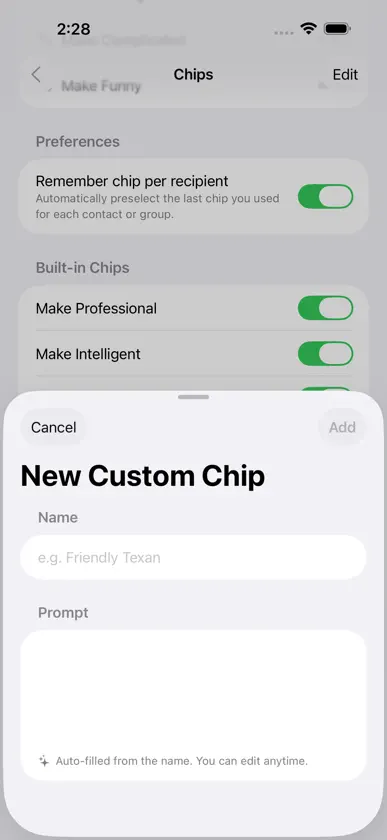
Transform your iMessage conversations with AI-powered style — right inside Messages. TextSmith is an iMessage extension that rewrites your text messages in any style you choose. Tap a style chip and your message is instantly transformed — Professional, Funny, Romantic, Gen Z, or any custom style you create. Preview the result, then insert it directly into your conversation with one tap. Key Features • 20 Built-In Style Chips — Choose from styles like Fix Grammar, Professional, Funny, Intelligent, Shorter, Romantic, Sarcastic, Gen Z, Shakespearean, Pirate, and more. Six are enabled by default — toggle the rest on whenever you like. • Custom Styles — Create your own style chips with custom prompts. Want a Friendly Texan or Shakespearean tone? Name it, describe it, and TextSmith handles the rest. • Seasonal Styles — Special limited-time styles appear automatically for holidays and events, keeping your messages fun and timely. • Built-In Translation — Translate your styled message into 30+ languages before sending. Choose an output language and your transformation is delivered in that language automatically. • Translate Only — Need a quick translation without any restyling? When you select an output language, a Translate Only chip appears so you can translate your message exactly as written — preserving your original tone, style, and intent. • Live Preview — See exactly how your transformed message will look before inserting it into the conversation. • Per-Recipient Memory — TextSmith remembers the last style you used for each contact or group, so your preferred tone is always ready. • Drag-and-Drop Chip Order — Rearrange your style chips in any order you like. Put your favorites first. • Works Right in Messages — No app switching needed. TextSmith lives in your iMessage app drawer and works with any conversation. • iPhone and iPad — Fully optimized for both devices. How It Works 1. Open a conversation in Messages and tap the TextSmith icon in the app bar. 2. Type your message in the TextSmith text field. 3. Choose a style chip to transform your text — or select an output language and tap Translate Only for a straight translation. 4. Preview the result, then tap Insert to add it to your message.
What's new
Version 1.1.7 · Jul 24, 2026
New in this version: • Easier-to-find message box — The compose field is now highlighted, so it's obvious where to type. • Collapse button — Shrink the expanded view back down without leaving your conversation. • Bug fixes and performance improvements.
In-app purchases
The most popular purchases on the App Store.
- 200 TokensConsumable$9.99
- 10 TokensConsumable$0.99
- 50 TokensConsumable$3.99
More from Edward Juden


You might also like
 SmartCart - A Grocery AppDavid De La Rosa
 Orbit EventsGlobal Support Services
 Meal Viewer: Kitchen VaultMICHAEL JOHN S WILLER
 Milk Collection DairySkyraan Technologies
 Food Stock - Grocery ListJovan Milenkovic
 Template Creator for MessagesFeature Finder LLC
 Rhetoriq - Dialects, TranslateRobert Bourne
 AI Image & Video DetectorZyur
 LandMile - Mileage TrackerChin Jui Kuo
 RackLink DiscoveryMiddle Atlantic