
CoreWing
Zhuhai Kuyi Technology Co., Ltd.
No ratings yetUtilitiesAges 4+
Screenshots


About this app
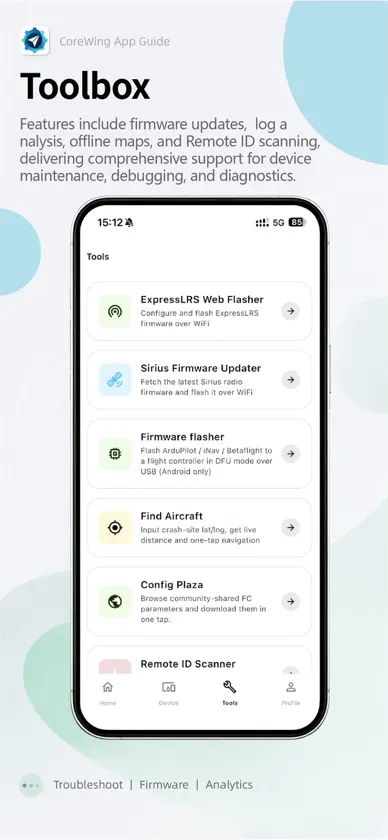
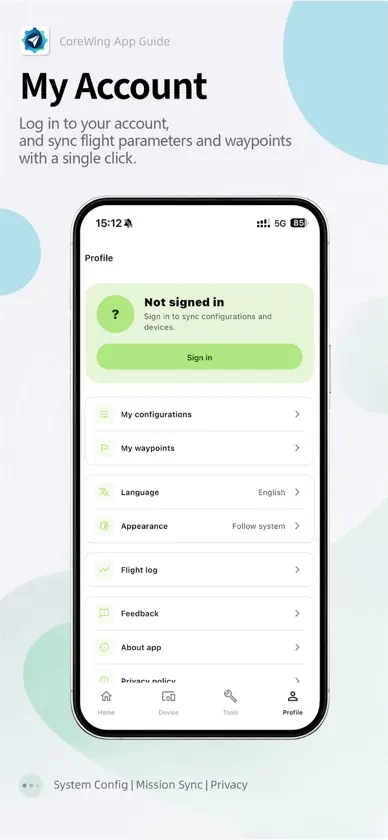
CoreWing Team proudly introduces the all-new CoreWing App. Whether you use INAV or ArduPilot, this app enables professional-level tuning directly from your mobile device. Free yourself from the computer: connect your phone directly to the flight controller, view and modify parameters in real time, and enjoy a smooth and efficient debugging experience. With a clean and intuitive interface, the app is easy to use. Combined with one-click setup features, even beginners who are new to flight controller tuning can quickly complete aircraft configuration. More powerful features are waiting for you to explore. Key Features • Parameter Setup: Supports Mavlink / MSP protocols and provides a complete parameter configuration interface, delivering an experience close to native ground control stations. Real-time parameter reading, writing, and one-click setup make tuning easier and more efficient. • Telemetry View: Displays key flight data in real time, including voltage, current, battery capacity, altitude, flight distance, GPS status, heading, aircraft position, and more, helping you stay fully aware of your aircraft status. • Waypoint Planning: Designed for ArduPilot firmware, supporting multiple waypoint types and one-click mission upload. Take full control of autonomous flight missions. • Map Navigation: Supports switching between vector and satellite maps, displays real-time flight tracks, and provides automatic map-follow mode for more intuitive positioning. • Flight Logs: Records flight data and supports flight track replay, allowing every flight to be reviewed and traced. • Firmware Update: Supports one-click flashing of ArduPilot and INAV firmware without installing drivers, making firmware upgrades easier than ever. • Module Update: Supports one-click firmware updates for CoreWing wireless modules, bringing continuous optimization and a better user experience over time. • Parameter Storage: Supports cloud saving and sharing of ArduPilot and INAV parameters, making it easy to reuse configurations anytime and share them with fellow pilots. • ELRS Firmware Update: Supports firmware flashing for ELRS transmitters and receivers, making upgrades simple and worry-free for more stable flights. • Find My Aircraft Tool: No need to panic after an unexpected crash. Enter the coordinates to quickly locate your aircraft and easily recover your device. Connection Methods Supports BLE / WiFi connection for CoreWing flight controllers. Compatible with flight controllers running CoreWing INAV / ArduPilot firmware. Contact Us Thank you for choosing the CoreWing App. If you have any questions or suggestions, feel free to contact us through the following methods: • Tap “Me — Feedback” in the app to submit your issue • Follow our official WeChat account: CoreWing • Call our official customer service hotline: +86 15018866740
What's new
Version 2.1.7 · Nov 6, 2026
New • Blackbox analysis — a new Blackbox Analysis tool opens Betaflight / iNav blackbox logs. The viewer opens in landscape fullscreen with graphs filling the screen and controls that hide during playback; zoom, range markers, multi-flight logs and built-in layouts are supported. Also includes spectrum analysis (7 chart types, filter markers, export and compare), log info and stats, map, craft attitude, sticks, field values and lap timing, plus CSV / GPX export and workspace files compatible with the desktop app. • Flip-a-switch mode channel detection (ArduPilot) — the flight modes page and the setup wizard's mode step can now find the mode channel by simply flipping the switch on your radio. • Product images for third-party BLE devices — identified third-party devices show their product image and model name in the scan list, device cards and device details. Improvements • Smoother ArduPilot OSD editing: only a preview moves while dragging and the parameter is written on release, overlaps are highlighted in red with the drop position shown in advance, and tapping empty space selects the nearest item. • Cleaner Bluetooth scan: only CoreWing devices in the main area; identified third-party devices are listed first under "Other Bluetooth devices". • Tricopters show suggested motor spin directions and a separately labelled tail servo; frame diagram labels no longer overlap. • The setup wizard now suggests the receiver serial port that is actually wired. Fixes • Fixed a crash when opening telemetry on some Android devices. • Fixed the telemetry map occasionally breaking and staying broken on every visit. • Fixed 3D models showing only the grid background on iOS. • Fixed flight logs, downloaded cloud configs and custom device covers going missing after an iOS app update. • Fixed the Moonlight PC picture being cropped at the sides. • Fixed occasional layout glitches on the home tutorials and Tools tab.


