
Screenshots


About this app
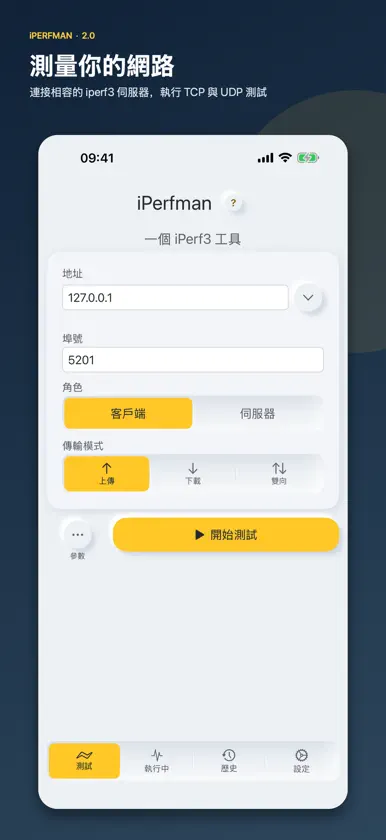
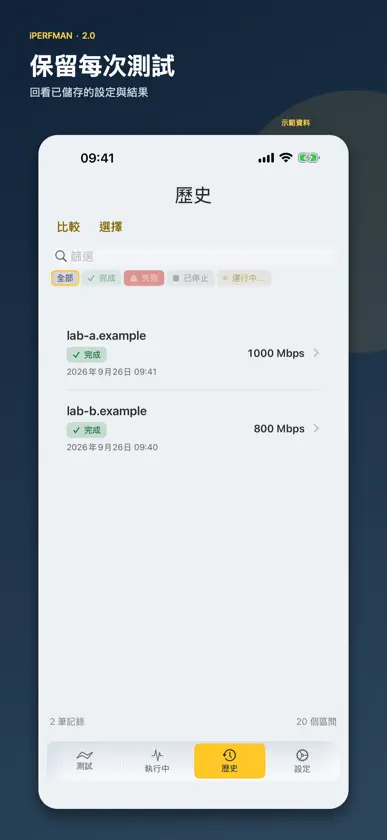
iPerfman 用於測量裝置與相容的 iperf3 伺服器之間的網路效能。在 iPhone、iPad 和 Mac 上執行 TCP 或 UDP 測試。免費版每天可測試三次;Pro 解鎖不限次數測試與進階控制。 測量與排查: - 選擇上傳、下載或雙向測試,分別查看兩個方向的結果。 - 用即時圖表觀察吞吐量;在可測量時查看 UDP 抖動與封包遺失、TCP 重傳及往返時間。 - 儲存測試設定與每個時間間隔的結果,之後重新測試或回看歷史記錄。 - 啟動伺服器時綁定指定的 IPv4/IPv6 介面,或監聽所有介面。 可透過月付、年付訂閱或一次性永久購買解鎖 Pro。Pro 提供每日不限次數測試、進階 iperf3 參數、歷史結果比較及完整報告匯出。符合資格的使用者可享年付方案 7 天免費試用。已購買的永久權益繼續有效。 iPerfman 透過 IperfSwift 使用 iperf3 3.22。測速需要相容的伺服器或另一台裝置;它不是網際網路測速服務。Apple TV 版採用獨立介面,功能範圍有所不同。 隱私權政策:https://iperfman.com/en/privacy 使用條款:https://iperfman.com/en/terms 支援:https://iperfman.com/en/support
What's new
Version 2.1 · Nov 3, 2026
iPerfman 2.1 brings a shareable speed receipt and a choice of speed units to everyone, nine iperf3 connection options to Pro, and many fixes. New for everyone - Speed receipt: share a saved result as an image. The server address is hidden unless you choose to show it. Available on iOS and iPadOS 16 or later and macOS 13 or later. - Speed display unit: choose Auto, Mbps or Gbps. Auto now picks one unit from each test’s peak, so readings from a test that passes 1 Gbps no longer mix Mbps and Gbps. - Online help opens the user manual on iPerfman.com in the app’s language. The privacy policy and terms of use also follow the app’s language. New in Pro - Connection options in Additional Parameters: address family (Automatic, IPv4 or IPv6), client port, block size, socket buffer, TCP MSS, TCP NoDelay, TOS byte, IPv4 Don’t Fragment and Get server output. Like the rest of Additional Parameters, they require Pro. They are saved with each record and carried into Retest, comparisons and reports. Improvements and fixes - The test engine is now iperf3 3.22. Option limits and defaults are unchanged. - An invalid port now shows an error before the test starts, instead of connecting to port 5201. In Additional Parameters (Pro), durations must be whole seconds; a value such as 0.5 is now rejected before the test starts. - Live, history and comparison charts now use the same axis range for the same results. - IPv6 endpoints are shown as [address]:port. - History details keep their charts and summaries up to date, even in very large histories. - The log view previews the last 32 KiB of a long log; sharing or saving still gives you the complete file. - On iPhone and iPad, text scales up to the largest standard size (XXXL); larger accessibility sizes display at that size. Several screens that were cut off at large text sizes now fit. - Settings are grouped into Preferences, About and Legal. Switches have clearer edges in dark mode, and when the appearance follows the system, pages that are already open switch with it.
In-app purchases
The most popular purchases on the App Store.
- 年度 ProSubscription · 7 days free trialUSD 2.99 / year
- 月度 ProSubscriptionUSD 0.99 / month
- Lifetime ProConsumableUSD 1.99
- 專業版ConsumableUSD 5.99
More from 伟 葛


You might also like
 HE.NET Network ToolsHurricane Electric, LLC
 iPerf - Speed Test ToolSurge Networks Inc.
 Network Speed Tester ClientLakehorn AG
 IxChariot EndpointIxia
 TestIperf3Aleksandr Myskin
 YgciPerf3康聪 陈
 iPerf NetTest尧 付
 Internet Speed Test –FiberTestred Mango Analytics Private Limited
 ProxMobo – Proxmox VE & PBSPeng Lyu
 iPerf Falcon博 邢