
Screen Time Control -NoMore
SnackTime, Inc.
No ratings yetProductivityAges 4+
Screenshots




About this app
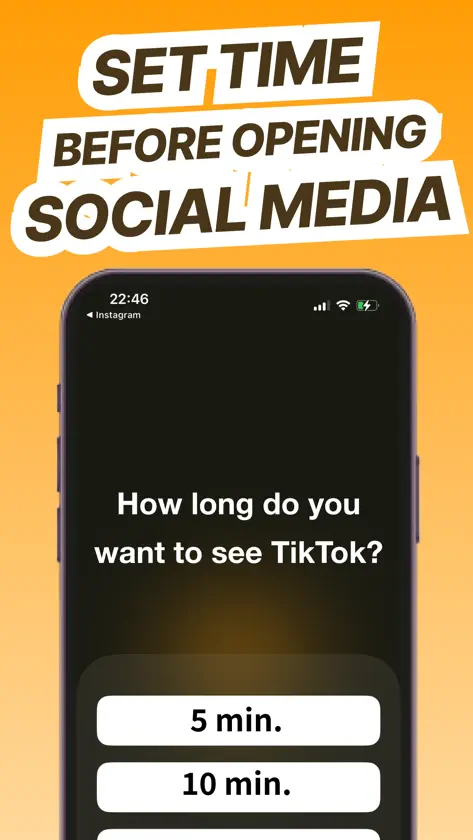
You’ve arrived at this app because you want to rethink how you use your smartphone—and that alone is something to be proud of. Just by searching for an app to help with restrictions, you’ve already taken the first step toward changing your habits. That small step, repeated consistently, can take you farther than you ever imagined. NoMore is here to quietly support you on that journey. By reducing screen time, you’ll be able to focus more deeply on studying, work, or hobbies. You’ll find more mental space, and your daily life will gradually come into balance. NoMore was created to support exactly that kind of change. ---------- That said, lasting change needs a system that’s sustainable and stress-free. Just as extreme diets are harmful and likely to rebound, extreme digital detoxes or harsh restrictions can feel frustrating and often lead users to delete the app. Overly strict limits don’t last. But if it’s too easy to bypass the restriction, it doesn’t work either. That’s why NoMore is designed with “not too weak, not too strong” limits—just enough to create a lasting experience without frustration. Instead of completely blocking access, NoMore lets you open apps if you really want to. But to do so, you’ll need to complete a brief breathing task, which helps prevent mindless app opening. This subtle friction makes you pause—and helps you open apps only when truly necessary. This approach is supported by behavioral science: adding small obstacles or distancing yourself from bad habits makes them easier to change. ---------- In addition, NoMore lets you set time limits—like “only 5 minutes” or “only 10 minutes”—before opening social media or games. When the set time ends, the app automatically closes, helping you avoid slipping into 30-minute or hour-long scroll sessions without realizing. Many users have told us this feature has been a real lifesaver. ---------- NoMore doesn’t rely on a “Start” button to begin blocking. After all, if you can tap that button, you’re already in study mode or focus mode. But the real danger is before that—when you’re aimlessly picking up your phone. Right after waking up, while on the toilet, in bed before sleep, or when taking a short break after a task or study session— NoMore steps in with a gentle brake before those moments turn into hours of mindless scrolling. We’ve also chosen not to rely on time-based blocking like “limit from 10pm to 11pm.” Because even if you block nighttime use, what if you end up scrolling all day? Instead, NoMore focuses on gently intercepting unconscious app launches throughout the entire day. ---------- You don’t have to be perfect. Even stopping yourself once a day from opening an app out of habit is real progress. Let’s shape your days with NoMore—little by little. Make space for what matters: studying, working, playing, and becoming more of who you want to be.
What's new
Version 1.0.71 · Jul 21, 2026
- A cooldown feature: once the time limit is reached and the app is blocked, it can’t be reopened for a few minutes. - A feature that lets you set time periods when apps won’t be blocked.
In-app purchases
The most popular purchases on the App Store.
- Monthly PlanSubscriptionUSD 5.99 / month
- Annual PlanSubscription · 3 days free trialUSD 43.99 / year
More from SnackTime, Inc.


You might also like
 LambLock: Screen Time ControlKODO Inc.
 Zentime: Screen Time ControlRyunosuke Nagase
 StayOff - 不做手機控,自律番茄鐘升 徐
 OAZUKERaizo Kawaguchi
 掌控螢幕使用時間,自律,专注,时间管理: Focusyudai hirose
 螢幕使用時間鎖 專注鐘:鎖手機、上鎖App、戒手機成癮、考試OnOff Labs
 Applimits - 螢幕使用時間限制ButterFalcon
 BlankPage - stay focusedKiyoshi Nakamura
 FavFocusJumpei Naka
 封鎖App與應用鎖 - LockKunSora Yazawa