
SIDeck Studio
Osama Hasan
No ratings yetProductivityAges 12+
Screenshots




About this app
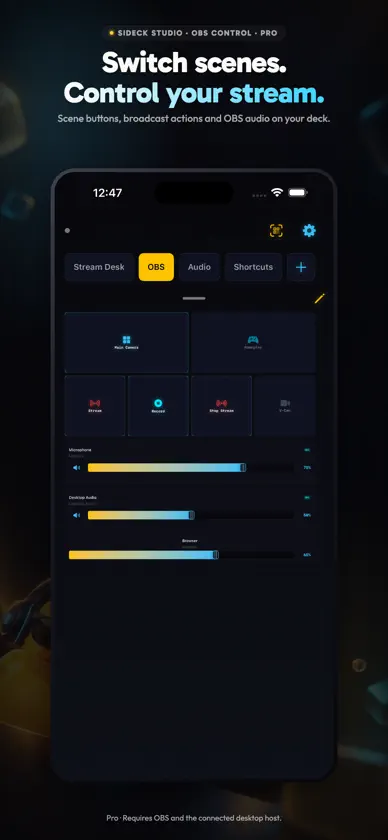
Turn your iPhone or iPad into a custom control deck for your Windows PC or Mac. Put app-volume faders, OBS controls and macros together in Custom Modes. BUILD YOUR DECK Arrange and resize blocks, use a template or start with your own layout. Free includes one mode with up to six blocks, two assigned audio apps and six saved macros. Pro supports up to 20 modes with 40 blocks per mode. Saved Pro macros are uncapped; each macro button still uses a block. CAMERA & MIC FOR OBS With Pro, send your iPhone camera and microphone to OBS over local Wi-Fi. Use supported lenses, zoom, background effects and face-tracked AR props. Effects and lenses depend on your device. AUDIO AND OBS CONTROL Balance app volume from your deck and add OBS input faders or mute controls. Pro adds dedicated broadcast action blocks, scene switching, live previews and hold-to-talk or hold-to-mute controls. Supported OBS hotkeys and the current-scene block are available on Free. MACROS AND WIDGETS Run saved desktop macros from your deck, Home Screen or Lock Screen widgets. Your paired desktop must be reachable. Pro internet macros use the relay; they do not replace local audio or OBS control. STREAMER.BOT With Pro, use supported actions, chat, variables and event blocks in Custom Modes. Requires Streamer.bot running on a Windows desktop and the relevant host connection. SAVED COMPUTERS Save up to five desktop profiles on Free, or unlimited profiles with Pro. Choose the computer you want to control; its desktop host must be reachable. GET STARTED 1. Install the free SIDeck Studio desktop host from sideckstudio.com. 2. Sign in to SIDeck Studio and pair with your desktop using its QR code or supported manual connection. 3. Build a mode and assign your controls. Requires the desktop companion running on a supported Windows PC or Mac. Local controls require an available local connection; OBS features require OBS Studio. English and Arabic are supported. Pro is an optional auto-renewing App Store subscription. Pricing and trial eligibility appear before purchase. Manage or cancel renewals in Apple subscription settings. Privacy: https://sideckstudio.com/privacy Terms: https://sideckstudio.com/terms
What's new
Version 1.1.13 · Oct 5, 2026
Custom Modes is now the active control interface. Build audio, OBS and macro controls together; Classic Tabs is no longer available. Camera & Mic Desk: use your iPhone as a camera and microphone for OBS, with supported lenses, zoom, background effects and AR face props. OBS controls: input-volume faders, live scene previews and hold-to-talk controls. Macro widgets for Home Screen and Lock Screen, iPad mode templates and saved desktop profiles. Arabic localization and connection improvements. Advanced camera, preview, scene-switching and hold controls require Pro.
In-app purchases
The most popular purchases on the App Store.
- Premium AnnualSubscriptionUSD 34.99 / year
- Premium MonthlySubscription · 7 days free trialUSD 4.99 / month
More from Osama Hasan


You might also like
 Lumina DeckCeasar Esquivel
 RCON: 伺服器管理主控台Grima Hdez
 StoryPad: My Diary JournalThea Choem
 FreeShow RemoteLive Church Solutions
 CircuitShepherdJosef Woess
 Deckboard: Macropad for PCRiva Farabi
 EditFlow - Webflow Editor80bucks LLC
 CueCard TeleprompterNishant Hada
 Smallppt: AI SlidesQuick Little Steps Limited
 AnyCamera - Camera for OBS雪芳 钟