Screenshots

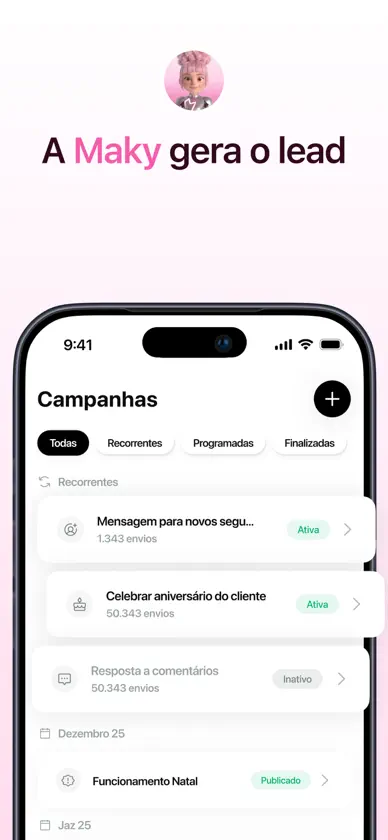


About this app
Seu Time Digital de Agentes de IA—Trabalhando 24/7 Para Você Conheça o Squad—o piloto automático para o seu negócio. Enquanto as ferramentas de IA de hoje esperam você escrever prompts, os agentes especializados do Squad trabalham proativamente em seu nome. De vendas no WhatsApp à gestão financeira e campanhas de marketing, o Squad dá a todo empreendedor acesso a um time de classe mundial que escala sem limites, sem pesar no bolso e sem exigir nenhum treinamento. SEU TIME DIGITAL, TRABALHANDO EM SINTONIA - Waz, Fin e Maky: Três agentes de IA especializados cobrindo vendas, finanças e marketing—tudo em um único aplicativo, incrivelmente simples - Trabalho em Equipe de Verdade: Maky gera o lead, Waz cuida da conversa, Fin fecha o pagamento—um time conectado, não três ferramentas separadas - Sempre Ativo: 24 horas por dia, 7 dias por semana. Sem pausas, sem inatividade, sem oportunidades perdidas WAZ — SEU ASSISTENTE DE WHATSAPP - Conversas de Verdade, Não Chatbots: Waz analisa seu site, Instagram e histórico do WhatsApp para reproduzir seu tom, suas gírias e seu estilo com perfeição - Nunca Perca Uma Venda: Responde às 2 da manhã, aos domingos e nos feriados—porque 4 em cada 5 clientes compram de quem responde primeiro - Gestão Inteligente de Agendamentos: Organiza compromissos em uma agenda e remarca clientes automaticamente quando algo acontece - Resumos Diários: Acorde com um resumo de cada conversa, agendamento e dúvida resolvidos enquanto você dormia FIN — SEU ASSISTENTE FINANCEIRO - Feche Vendas Dentro da Conversa: Gera links de pagamento na hora—para produtos, serviços, pacotes ou sinais - Controle Automático de Despesas: Tire foto de um recibo e o Fin lê, categoriza e registra para você - Projeção de Fluxo de Caixa: Projete receitas e despesas futuras com base em dados reais, não em achismos - Análise Real de Lucratividade: Descubra onde o dinheiro está vazando e defina preços com base em números concretos, não no feeling MAKY — SUA ASSISTENTE DE MARKETING - Conteúdo Pronto Para Postar: Maky conhece seus produtos e cria carrosséis, legendas e chamadas para ação—e ainda agenda tudo automaticamente no Instagram - Recupere Clientes Perdidos: Reativa compradores antes que eles se esqueçam de você, com mensagens de aniversário, campanhas sazonais e DMs personalizadas - Transforme Seguidores em Clientes: Responde automaticamente aos comentários e envia DMs de boas-vindas que convertem sua comunidade em receita - Coleta Avaliações: Convida clientes satisfeitos a deixarem avaliações no Google Maps e te avisa na hora quando alguém não ficou satisfeito COMECE EM POUCOS MINUTOS - Sem Prompts: É só baixar o app, contar seus objetivos para o Squad e seu time já começa a trabalhar - Feito pela Inner AI: Do time por trás da plataforma de IA #1 do Brasil, com mais de 1 milhão de usuários - Atendimento Presencial Disponível: Visite nossa pop-up store no Conjunto Nacional, na Avenida Paulista, em São Paulo, para um onboarding personalizado com um especialista O Squad é o seu time digital. Enquanto você trabalha, eles aceleram. Enquanto você descansa, eles continuam. Entre na lista de espera em Squad.com e tenha um time do tamanho do seu sonho. Termos de uso: https://squad.com/terms
What's new
Version 1.1.25 · Nov 10, 2026
• Reconnecting a WhatsApp number now always goes through 360dialog; the "Connect with Squad" option is gone. • After you test the copilot from the onboarding QR code, Squad opens the test conversation that just arrived. Packages that include a service with options now ask which option to include and save correctly, including services still under review in the Nexo onboarding. • After buying credits, the balance no longer briefly jumps back to the amount before the purchase. • Fixed the credit balance going back to the amount before a purchase when reopening Usage and credits, and refused credit packs showing again in Top-ups. • Fixed credit packs from one organization briefly showing in another after switching organizations. • Fixed credit balances and limits from one organization briefly showing in another after switching organizations, and the usage and credits page disappearing after a network hiccup. • Waz can now offer a tool in the chat with an Install button, so you can install and open it without leaving the conversation. • Bank accounts keep showing the bank name even after that bank stops being offered in the bank list. • Company data now shows your institutional website, and lets you connect your own subdomain to it. • Bradesco and other banks registered by our team now show up in the bank list when you set up the receiving account. • The bottom tab bar now uses Apple's newer glass look on iOS 26+, and menus and sheets get a round of upstream fixes for selection, accessibility and rendering. • Onboarding now has an "I need help" button on the Home checklist and in the Nexo chat. It opens Education on the "Nexo: first steps" mentorships. • When connecting WhatsApp, you can now choose a number with no WhatsApp app that works only through Squad, besides the number already on the WhatsApp Business app. • Fixes a layout glitch in the Home onboarding checklist when connecting Instagram. • The Home onboarding checklist now has a step to connect your business Instagram, which you can also skip. • Team members without permission to manage tools can now pin and unpin the tools they use. • The WhatsApp connection screen now explains the shorter 360dialog page: tap one button and connect the number you already use on WhatsApp Business. • When a new version of a custom tool is published while you are using it, the tool is locked during the update and reopens on the new version when it finishes, instead of failing midway. • Changing the language now closes the open menu instead of leaving it on screen in the previous language. • Tapping the organization you are already in closes the organization picker on mobile. • Opening a product edit link without its data now takes you to Products and Services instead of an empty screen, and a screen that fails to draw shows the Squad background instead of a grey box. • The onboarding guide Nexo moves more naturally, and it no longer steals taps meant for the tour buttons next to it. • Tools stay in the agent menu while they update, and adding a tool now shows where it landed and when it is ready. • You can read the outcome of an automatic ticket review and contact support if you still need help after it closes. • Conversations that started from an Instagram or Facebook ad now show, under the chat header, which ad the lead tapped. Only your team sees it.