
Stroke Rate Trainer
David Hedden
No ratings yetSportsAges 4+
Screenshots




About this app
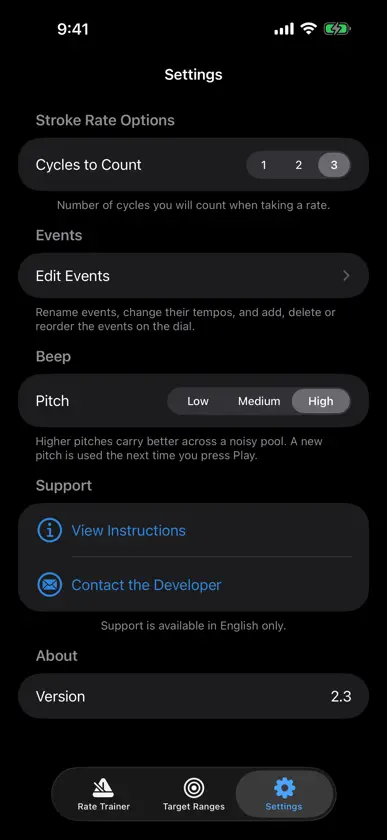
Rate Trainer is a simple metronome app that plays a beep at the selected tempo, in seconds per stroke cycle. Use it to train stroke rates in swimming or other sports. For example, play the tempo to an athlete or a group of athletes through the phone speaker, a Bluetooth speaker or headphones, before or during a practice repeat, so they learn the target tempo they are trying to achieve. On Apple Watch, feel the tempo as a tap on your wrist, or use the Pace mode to set a pace to hold with countdown ticks. SET THE TEMPO - Slider from 0.20 to 3.00 seconds per cycle, with plus and minus buttons for fine adjustments of 0.01 - ÷2 and ×2 buttons to switch between one beep per pull and one beep per full cycle - Change the tempo while the beeps are playing - Take Rate: tap along with an athlete's stroke and the app sets the tempo from your taps EVENT PRESETS AND TARGET RANGES - Pick an event on the wheel to set the tempo to a preset for that event - Presets are based on the average stroke rate of the top 8 swimmers in each event in the 2024 NCAA data (short course yards) - The Target Ranges screen shows the fastest to slowest stroke rate among those top 8 swimmers for each event - Rename events, change their tempos, and add, delete or reorder them in Settings BUILT FOR THE POOL DECK - Steady, evenly spaced beeps that stay on tempo while you adjust it - Beeps keep playing when the screen locks or the silent switch is on, or if music is playing - Choose a low, medium or high beep pitch; high carries best across a noisy pool - Large controls and a dark design that are easy to use with one hand - Works on iPhone, iPad and Apple Watch - No account, no ads, and works fully offline APPLE WATCH - Works on its own, with no iPhone needed - Set the tempo with the Digital Crown or the plus and minus buttons, then tap Start to get a tap on your wrist (and a beep, if you want one) with every stroke cycle - Pace mode: a tap every 8 to 59.9 seconds, to hold a lap pace such as 12 seconds per 25 - Optional Countdown Ticks: three light taps, one second apart, before each Pace tap - Turn the beep sound off for silent wrist taps only - Taps keep going with your wrist down and with a workout running Stroke rate data courtesy of Russell Mark of ASCA.
What's new
Version 2.4 · Nov 3, 2026
**Rate Trainer 2.4** - New Apple Watch app. Feel a tap on your wrist (and hear a beep) at your stroke tempo, with no phone needed. - Pace mode for watch app: a tap every 8 to 59.9 seconds to hold a lap pace, with optional countdown ticks. - Instructions updated to cover the watch.
More from David Hedden


You might also like
All apps like Stroke Rate Trainer → Rowing Tools for CoachesSports Stats Limited
 划船划水頻率秒錶Peth Pty Ltd
 The Rowing AppWyatt Harrell
 Swimming Coach Set BuilderSports Stats Limited
 Workouts XBig Fish Software
 SwimPulseArtem Goncharov
 LaneVisionAspiricx Inc
 FitKit ProSchumacher Physical Therapy and Performance
 Athlee CoachAthlee ApS
 Swim Time Calculatorumimplavat.cz