
Markdown Editor and Reader
Julian Lau
No ratings yetProductivityAges 4+
Screenshots




About this app
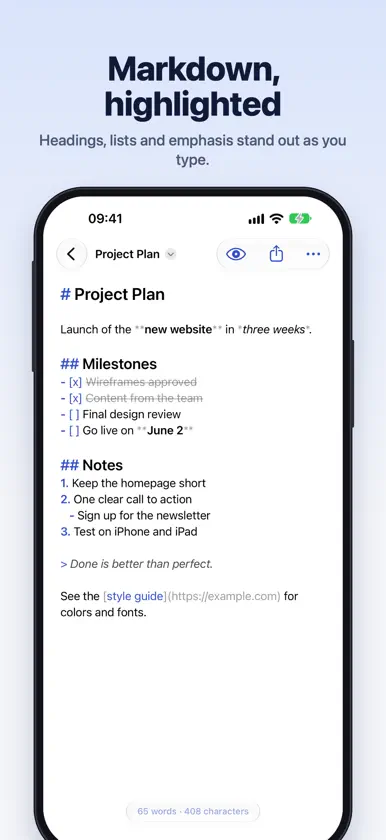
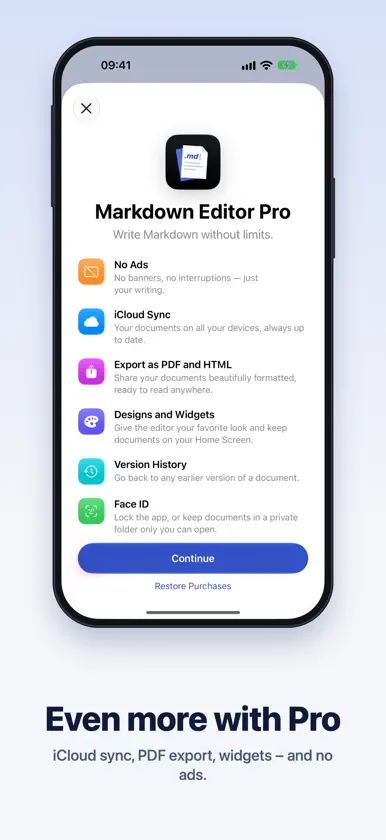
Write Markdown as easily as plain text. Markdown Editor opens in an instant – no account, no setup. For notes, READMEs, documentation, blog posts, to-do lists and anything that should look good. WRITE WITH SYNTAX HIGHLIGHTING Headings, bold, italic, code, links, lists and quotes are highlighted as you type. The Markdown characters step back so your words stay in focus – and the editor stays smooth even with long documents. FORMAT WITHOUT SEARCHING • A formatting bar above the keyboard: heading, bold, italic, lists, checklists, links, code, quotes, tables and images in one tap • Lists continue by themselves when you press Return • Keyboard shortcuts ⌘B, ⌘I and ⌘K on iPad PREVIEW AND READ One tap on the eye shows your document beautifully formatted – with tables, checklists, nested lists, code blocks and images. On iPad, see your text and the live preview side by side. Documents can also open straight in the preview, perfect for reading. REAL FILES, NOTHING LOCKED IN Your documents are plain .md files in the Files app under “On My iPhone › Markdown Editor”. Open Markdown and text files from iCloud Drive or other apps and edit them right where they are. ORGANIZED YOUR WAY • Folders with their own color and icon • Pin what matters to the top • Sort by date, name, or your own order with drag and drop • Search finds every word across all your documents • Find and replace, word count, reading time, printing MARKDOWN EDITOR PRO For when you want more – as a monthly or yearly subscription: • No ads • iCloud sync between iPhone and iPad • Export to PDF and HTML, beautifully formatted • Eight designs, from warm paper to deep black midnight • Widgets for your Home Screen and Lock Screen • Version history: bring back any earlier draft • App lock and a private folder with Face ID Payment is charged to your Apple Account. The subscription renews automatically unless canceled at least 24 hours before the end of the current period. You can manage and cancel it anytime in your App Store account settings. Terms of Use: https://www.apple.com/legal/internet-services/itunes/dev/stdeula/ Privacy Policy: https://jlau.netlify.app/markdown-editor/privacy/ Markdown Editor is built by an independent developer. If you enjoy it, a rating means a lot!
What's new
Version 2.0.3 · Oct 26, 2026
2.0.2 Added small bug-fixes and performance improvements
In-app purchases
The most popular purchases on the App Store.
- Markdown Editor Pro YearlySubscription · 7 days free trialUSD 22.99 / year
- Markdown Editor ProSubscription · 7 days free trialUSD 2.99 / month
More from Julian Lau


You might also like
 One Markdown禄海 区
 Inkdrop - Markdown NotesTakuya Matsuyama
 MWeb - Markdown Writing, Notes禄海 区
 Markdown Viewer MobileCemil Ilik
 .md ViewerTOMASZ ALEKSANDER WOJEWODA
 Minimal | NotesTimeless
 iMarkdown - Write & PreviewHIROMOTO TSUJI
 1Writer - Markdown Text EditorNgoc Luu
 uFocusNicolas Kick
 Editor - Markdown NotesConstellation Ltd