
VimKey - Code & Vim Keyboard
chuncheng su
No ratings yetUtilitiesAges 4+
Screenshots


About this app
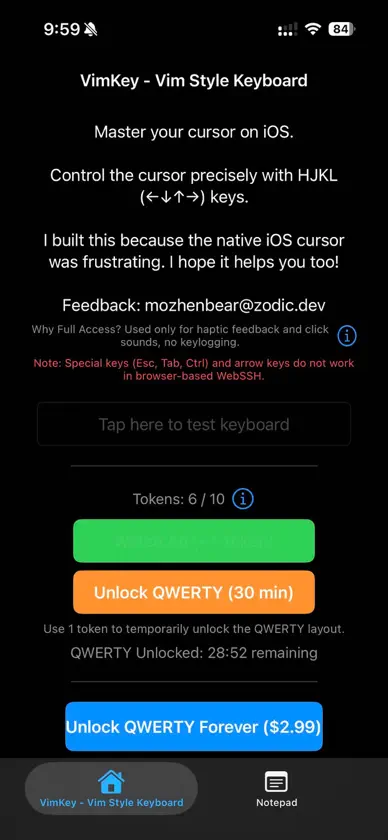
Master Your Cursor on iOS Editing code and managing SSH sessions on a mobile device can be painful. The default magnifying glass cursor is imprecise, and fingers often block the exact characters you need to select. VimKey brings desktop level cursor precision to your iPhone and iPad. Key Features Dedicated Arrow Keys and Joystick Navigation Move the cursor step by step with dedicated arrow keys or the touch joystick pad. Navigate across lines effortlessly without obscuring the screen. Vim Style Navigation Fly through documents with classic Vim navigation and essential modifier keys designed for developers and terminal users. Select Mode and Quick Copy Toggle Select Mode on and navigate with directional keys to highlight text with ease. Copy selected text straight to the clipboard with one tap. Dual Layouts Switch seamlessly between the navigation layout and a standard QWERTY keyboard. Unlock QWERTY temporarily by watching a short ad, or unlock forever with a one-time purchase. Privacy First Your input belongs to you. Full Access is requested exclusively for haptic feedback and click sounds. We never collect, store, or transmit your keystrokes. Important Note Due to iOS browser limitations, modifier keys such as Esc, Tab, Ctrl, and arrow keys do not function in browser-based WebSSH clients. For the best experience, please use a native Terminal app. Contact Feedback and suggestions are welcome. Email: mozhenbear@zodic.dev
What's new
Version 1.1.4 · Oct 20, 2026
Update Main View
In-app purchases
The most popular purchases on the App Store.
- qwert LayoutConsumableUSD 2.99
More from chuncheng su


You might also like
 Arrow Keys URL KeyboardToshihiro Nakane
 audiOS Terminal KeyboardLuis Gutierrez
 Coding KeyboardChi On Ho
 Easy URL KeyboardToshihiro Nakane
 Falconkey (developer keyboard)葆霖 李
 UtilKBAngda Song
 GL-ConfiguratorGunter Van Hauwe
 Mak Commander-Input ControllerMohammed Kazim
 ZelmuxYang Zhang
 ifconfigSkye Road Systems, Inc.