
Arrowmate
Mavish Prasad
No ratings yetUtilitiesAges 4+
Screenshots



About this app
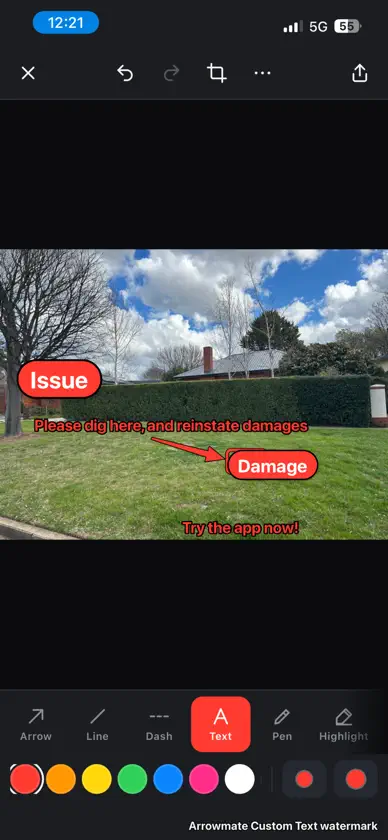
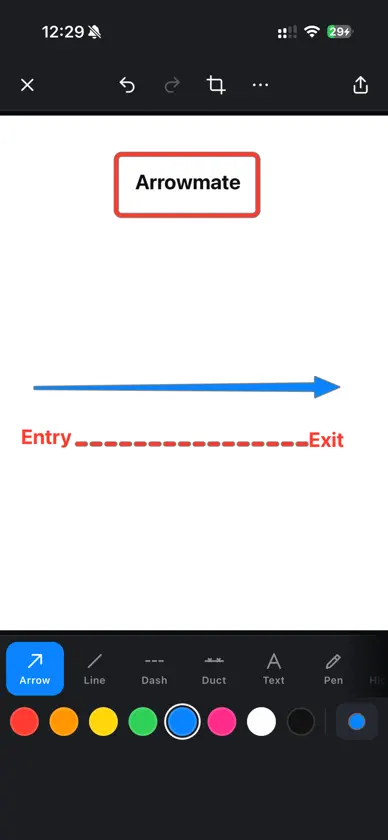
Point it out. Send it. Arrowmate is the fast way to mark up a photo or a PDF on site, sign it, and send it to the client, the project team or the crew. SITE RECORD: WHAT WAS AGREED, SIGNED ON SITE Take a photo of the job and mark it up. Tick what was discussed and agreed with the customer, from access on the day to the reinstatement. The customer signs on the screen. Send it as a picture or a PDF. Proof of the conversation, in their inbox, before you leave the driveway. Every trade gets a form, telco crews get an FTTP install record with the pit, the lead-in and the PCD on it, and you can change the name and the list to suit your business. A custom setup carries its form to the crew. PERMIT MODE FOR THE MUD MAP Open your Authority to Work permit and the mud map legend is on the toolbar: water, telco, gas, power, proposed work, building line, back of kerb, hand dig and numbered potholes. Your company, crew and locator go onto the form in one tap. Keep the blank form on your phone for next time. Telco setup, free. SIGN PDFS Draw your signature once with your finger or a pen. After that, tap the line on a permit or a form and it drops in. Move it, resize it, then send the PDF back. Your signature stays on your device. EDIT PDFS Open a quote, a plan or a report and change it. Tap a line to fix the words. The new text keeps the font, size and colour of the original wherever the PDF allows. Move it, resize it or delete it. Move, resize or delete pictures too. Add new text that matches the text beside it. Scanned and locked PDFs can still be marked up, signed and saved. SAVE WHAT YOU NEED Save the whole PDF, just one page, or the pages you choose. Snapshot part of a page and save it as a sharp picture. Rotate or crop a page. All the PDF tools are free. MARK UP IN SECONDS Arrows, boxes, circles, lines, text, pen, highlighter, labels and stamps. Callout bubbles that point at the problem and say what it is. Revision clouds for changes on a plan. Tap to drop a box, drag inside to move it. Pixelate anything private. Crop with a frame you drag, straighten with rotate. Undo everything. TIME STAMP CAMERA Open the camera and the job name, date, time and street address sit right on the viewfinder. Every shot is stamped and saved to your Photos as you take it. Take the next one straight away. Need to add an arrow or a note? Tap the thumbnail and mark it up. MEASURE Measure on the photo. Set the scale once and every measurement after that calculates itself. Snap to horizontal and vertical. YOUR LOGO ON EVERY PHOTO Add your business logo once and it goes on every photo you save or share, time stamp photos included. Pick the corner, the size and how solid it is. BUILT FOR YOUR TRADE Electrical, plumbing, telco, aircon, construction and surveying set-ups with the right colours, labels and symbols. Make your own custom set-up and share it with the crew. Everything stays on your device. No account, no sign-up, no photos or PDFs uploaded anywhere. ARROWMATE PRO The free app gives you PDF editing and signing, the site record, arrows, boxes, callouts, clouds, text, labels, measure, crop and the General and Telco set-ups, with a small Arrowmate mark on what you share. Arrowmate Pro unlocks the time stamp camera, your business logo, toolbar layout, all trade set-ups, custom set-ups and crew sharing. Arrowmate Pro is an auto-renewing subscription: A$3.99 a month or A$24.99 a year. Payment is charged to your Apple ID account at confirmation of purchase. The subscription renews automatically unless it is cancelled at least 24 hours before the end of the current period, and your account is charged for renewal within 24 hours before the end of the period. You can manage or cancel it in your App Store account settings after purchase. Terms of Use: https://www.apple.com/legal/internet-services/itunes/dev/stdeula/ Privacy Policy: https://arrowmate.com.au/arrowmate-legal.html#privacy
What's new
Version 2.7 · Nov 3, 2026
• Pick a photo and change your mind: the picker now lets you select, look again and deselect before it opens. Pick several and they open one after the other • Permit mode: open your Authority to Work permit and the mud map legend is on the toolbar. Water, telco, sewer, gas, power, proposed work, building line, back of kerb, hand dig and numbered potholes • My details: your company, crew, supervisor, locator and its calibration date go onto the permit in one tap, plus any other detail you save from the form. Page 1 and the team leader row fill in one go • Keep a blank form on your phone: it shows on the home screen and opens a fresh copy every time • A custom setup carries the permit details to the crew
In-app purchases
The most popular purchases on the App Store.
- Arrowmate ProSubscription$69.00 / month
- Arrowmate ProSubscription$299.00 / year
More from Mavish Prasad

You might also like
 Mapas Catastrales y ParcelasEUTOPIX LABS
 Ocultar Rápido - Apps ocultas金桃 董
 GlydeFLEETWOOD CORPORATION LIMITED
 Snap Markup - Annotation ToolRaghvendra Bhargava
 CarDash: Videos e IPTV en autoLaigang Wang
 Countdown timer: TimusHAPPUS LLC
 QR Maker - QR Code GeneratorSADIQUL AMIN
 Stair Calculator: ConstructionPhan Nhat Đang
 BRASS MONKEYTechbrands by Electus Distribution