
Screenshots
About this app
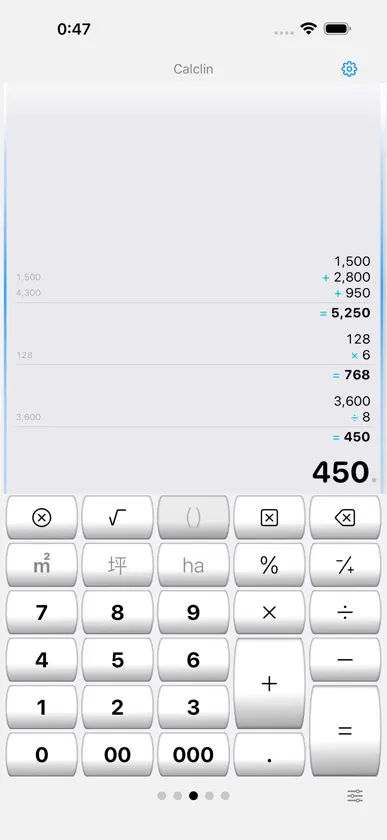
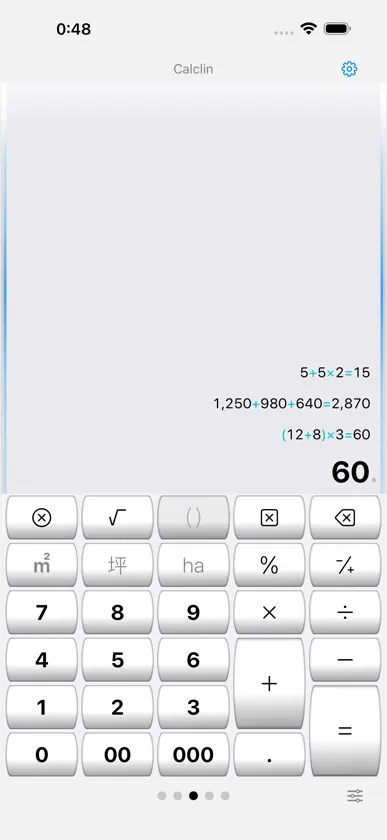
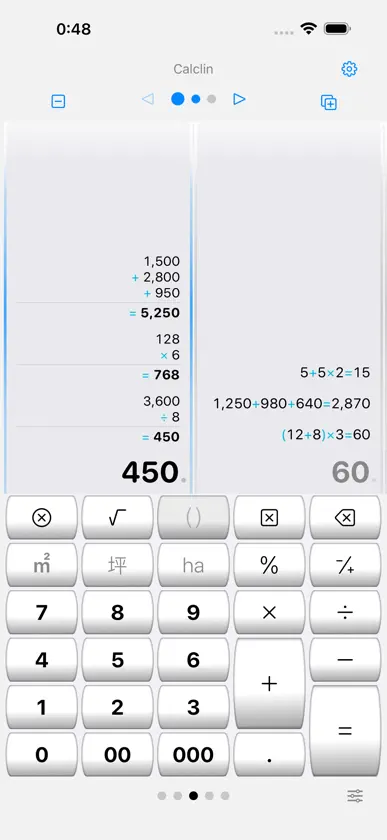
A calculator memo app with history that keeps your calculation process visible like a paper roll. Switch between calculator input and formula input to handle everything from everyday math to calculations you want to keep as records. ■ Calculator mode and Formula mode Calculator mode evaluates left to right (5+5×2=20). Formula mode respects operator precedence (5+5×2=15) and supports parentheses and roots. Switch anytime from the input row, changing the calculation style without leaving the active input area. ■ Paper-roll style history Expressions and answers stay on the roll from the top, so you can see the flow of your calculation at a glance. Subtle side lines and top shading keep each frame easy to distinguish, even with multiple rolls. In calculator mode, a running total can be shown while you type. ■ Edit rows and add notes In calculator mode, tap any roll row to edit and recalculate. Add a note to any history entry. Swipe left to delete; swipe right to add a memo, copy the expression, or copy the answer. ■ PDF export Export a calculation roll as a PDF whenever you want to keep it. ■ Use multiple calculators side by side Up to a triple deck. Add or remove panels with the [+][−] header buttons, swipe or tap to switch, and double-tap to toggle between 1-panel and 2-panel views. ■ Unit-aware calculations Calculate with units of length, area, volume, and weight. Press a different unit key to change only the unit, or press the same unit key again to convert the number. Tap an underlined unit to pick from the conversion list. ■ TAX+ and TAX− keys Add tax to, or remove tax from, the value you are entering or the answer you just calculated. Set up to three tax rates; each key shows its rate. ■ Customizable keyboard Long-press any key to define it, and merge keys vertically or horizontally to create larger keys. Switch between 5 layouts (30 keys each), and export or import your arrangement. ■ Flexible display settings Choose the decimal point and grouping symbols, the grouping style (every 3 or 4 digits, Indian style), the number of decimal digits, and the rounding mode (including round half to even). Answers are kept at full precision; rounded answers are marked with "≒", and tapping one shows every digit. Pick Auto, Light, or Dark appearance, and enlarge or reduce text size. Your settings are restored on next launch. ■ Beginner and Expert modes Beginner mode shows labels and tips for each button. Once you are comfortable, Expert mode unlocks advanced operations such as long-press key editing. The calculation engine uses C/C++ fixed-point decimal, stored internally in BCD arrays. Note: Data is not encrypted. Please do not store personal or confidential information.
What's new
Version 2.4.0 · Oct 10, 2026
■ Answers kept at full precision - Answers, not just intermediate results, are now kept at full precision - The display is rounded to your chosen number of digits. Rounded answers are marked with "≒"; tap one to see every digit ■ Clearer unit handling - Pressing a different unit key changes only the unit and keeps the number e.g. 60m², press [坪] once: 60坪 - Pressing the same unit key again converts the number e.g. 60m², press [坪] twice: 18.15坪 - Tap an underlined unit to open the conversion list and convert to the unit you choose ■ New TAX+ and TAX− keys - Set up to three tax rates in "Key settings"; each key shows its rate - Works on the value you are entering and on the answer you just calculated ■ Usability improvements - Moving between Formula and Calculator modes feels more natural - Redesigned the Formula / Calculator switch - In Expert mode, switching between the roll and the keyboard is twice as fast - Redesigned how options are chosen in Settings
In-app purchases
The most popular purchases on the App Store.
- Tips_1Consumable$19.00
- Tips_5Consumable$99.00
More from Azukid.com


You might also like
 POUCHESTOMIHIDE OTA
 Kapy Notes - Memo & CalculatorKapybara LLC
 git.md — Editor Markdownkamasu.jp Inc.
 表めも - チェックリスト・買い物メモTERUHA
 MSRX AI CalculatorMrinal Singh Raja
 テープ電卓・計算帳簿 - DenchoYuya Tanaka
 JustCount - Tap Counteratsuko imai
 TapeCalc - Fraction CalculatorLeandro Lopez
 SolverPad - Notepad CalculatorASAPP STUDIO
 Chronicle - Daily LogFishington Studios