
Screenshots




About this app
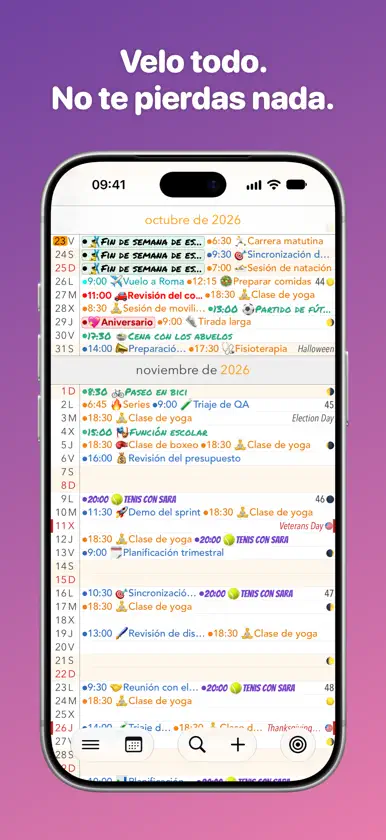
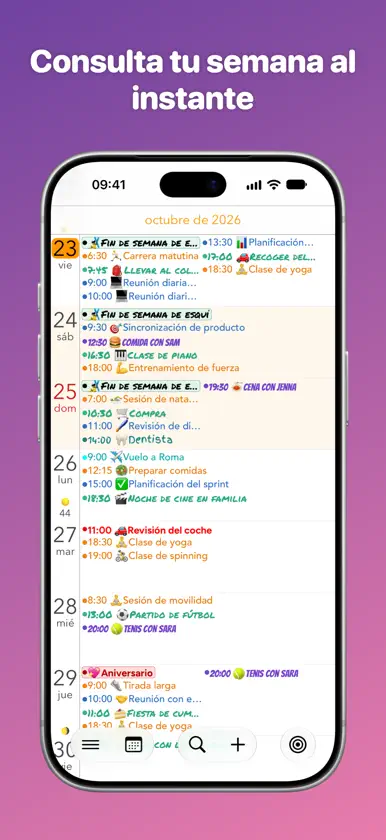
Recorre tu agenda como una línea de tiempo: rápida, fluida y siempre en contexto. Calendar+ está pensado para quienes quieren una vista clara, ediciones rápidas y calendarios más bonitos sin pelearse con la app predeterminada. ¿Por qué Calendar+? • Desplazamiento fluido por días, semanas y meses • Vistas de día, semana y mes con una gran visión de conjunto • Agrega, edita y elimina eventos rápidamente • Se sincroniza con tus calendarios (iCloud, Google, Outlook/Exchange, CalDAV, suscripciones ICS y más) • Salta a cualquier fecha al instante • Números de semana • Días festivos y días de la bandera integrados para 2021–2032: Alemania, Australia (todos los estados y territorios), Austria, Canadá, Dinamarca, Estados Unidos, Finlandia, Francia, Italia, Japón, Luxemburgo, Noruega, Nueva Zelanda, Países Bajos, Reino Unido, Rusia, Suecia y Suiza • Onomásticas integradas: Alemania, Austria, Bulgaria, Chequia, Eslovaquia, España, Estados Unidos, Estonia, Finlandia, Francia, Grecia, Hungría, Irlanda, Italia, Letonia, Lituania, Polonia, Reino Unido, Suecia y Ucrania • Selección y filtrado de calendarios: muestra solo lo que quieras • Botón dedicado “Hoy” • Compatible con vertical y horizontal Personalízalo todo (Pro) • Grupos de calendarios: agrupa tus calendarios, por ejemplo Trabajo o Familia, y cambia de enfoque con un toque • Vistas personalizadas: crea tus propias vistas con su diseño, tema y grupo de calendarios, y reordena u oculta vistas a tu gusto • Haz que tus calendarios destaquen con colores y fuentes únicos en todas las vistas • Colores de tema de la app • Todos los widgets • Fases de la luna de todo el año • Cuenta regresiva para cumpleaños y onomásticas • Apoya a un desarrollador independiente (a mí) Ajustes que de verdad usarás • Tamaño del texto (mes y semana por separado) • Activa o desactiva festivos y onomásticas • Globo en el ícono de la app (día del mes, día del año o número de semana) • Ajustes predeterminados de eventos (avisos, calendario, etc.) • Opciones detalladas de visualización de eventos (puntos, horas, títulos, sombreado del fin de semana, contraste, truncado) Gestos • Desliza a izquierda/derecha para cambiar de vista • Pellizca para pasar de mes a semana • Mantén presionado un día para crear un evento • Desliza para eliminar en la vista de día Soporte y comentarios Me encantaría saber de ti. • En Calendar+ → Ideas (propón y vota) • En Calendar+ → Soporte/Comentarios • Correo: support@alientoes.se • Web: https://www.alientoes.se/es/support Condiciones: https://www.alientoes.se/es/terms Privacidad: https://www.alientoes.se/es/privacy-policy
What's new
Version 8.3 · Oct 23, 2026
• 1900 to 2100 – Browse your calendar all the way from 1900 to 2100, up from 2021 to 2032. Events now load as you scroll instead of all at once when the app starts. • Full-screen widgets (Pro) – The Month, Date + Month and Event List widgets now fill the full-screen widget on iPhone with iOS 27 and the extra-large widget on iPad. Event List now shows events up to a month ahead instead of a week. • Classic colors – The calendar views have their classic colors back. With Pro, choose Classic under Theme to keep that look while the rest of the app uses your theme color. • Event colors – With Standard text color, all-day events in light calendar colors such as yellow now use black text so they're easier to read. The event popover, the day's event list and search now show events in the colors of the view you open them from. • Calendar groups (Pro) – Hiding a calendar now only affects All Calendars, so your groups and custom views show every calendar you add to them. Search and the day's event list start on the current group and can switch to another. Groups are now sorted by name. • Default start time – Choose what time new events start under Defaults for new events in Settings. Events added for today still start at the next full hour. • View banner switches – Turn off the view banner for switching views, switching calendar group, or both, under Customize Views in the menu. • Bug fixes – Fixed tapping an event notification not opening the event, deleting events on read-only calendars such as some Outlook calendars failing without a message, the “On date of event” alert going off at midnight instead of 9:00, several Japanese public holidays, Northern Ireland showing no holidays and some UK bank holidays missing, the current week not being highlighted with the Buddhist calendar, the calendar flashing light when opening in dark mode, and switching views sometimes getting stuck.
In-app purchases
The most popular purchases on the App Store.
- Fases lunaresConsumable$19.00
- ProSubscription$19.00 / 7 days
- ProSubscription$69.00 / month
- ProSubscription · 7 days free trial$299.00 / year
- MassiveConsumable$179.00
- MediumConsumable$39.00
- HugeConsumable$99.00
- LargeConsumable$69.00
- SmallConsumable$19.00
More from Alien Toes AB


You might also like
 Still: simple listsNikita Vlaskin
 Calvetica CalendarKodare
 SumNote - Notes with SumsGREEN JACKET LTD
 ScrollBump: Reduce Screen TimeOndrej Veres
 Sticky Tasks: Snap it, Do itDerainged LLC
 HEIC a JPG Foto Convertidor+Muhammad Mujahid Khan
 Supercal CalendarioDevart B.V.
 MoleculistBijjol Rambhia Kiran
 SwipeNote: Organize your notesMehar Nallamalli
 Lista de tareas: TaskerProGrzegorz Rakoca