
Candle – Blind Navigation
Andreas Herz
No ratings yetNavigationAges 4+
Screenshots


About this app
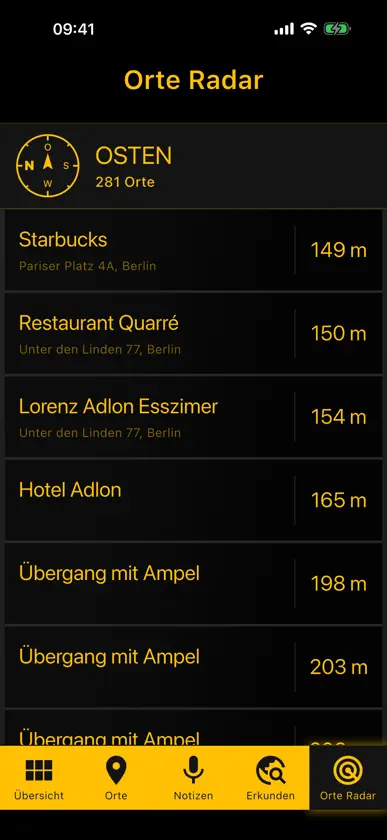
Candle helps blind and visually impaired people find their way. The app is built for VoiceOver from the ground up: large buttons, clear announcements and vibration instead of looking at a map. COMPASS • Direction by vibration: Candle vibrates when you point your iPhone north or in one of the eight compass directions, and announces it. • Compass to a destination: hold the iPhone in front of you – Candle tells you the direction and distance to your destination. PLACES NEARBY • Explore: cafés, restaurants, pharmacies, ATMs, bus stops, taxi stands, hospitals, public toilets, pedestrian crossings and traffic lights with sound signals – sorted by distance while you walk. • Radar: point your iPhone in a direction and hear which places are there. • Wikipedia: articles about sights around you. YOUR PLACES AND ROUTES • Save favourite places – from your current position or by address search, also by voice. • Walking navigation to saved places, with announcements you choose: detailed or short. • Location notes: leave a hint at a spot, e.g. "stairs after the door" – when you pass it with Candle open, your iPhone vibrates and Candle tells you the hint. Add a new one quickly with a long press on the Candle icon. • Share places as a link and receive them from family and friends. PRIVACY No sign-up, no ads, no tracking. Your places and location notes stay on your device. For maps, places and routes Candle uses open services such as OpenStreetMap. OPEN SOURCE Candle is free and open source: github.com/freegroup/candle Found a bug or have an idea? We welcome feedback – especially from blind and visually impaired users.
What's new
Version 1.5.16 · Oct 17, 2026
A clearer layout: • Tidier home screen: everything for "here and now" on top, with "Explore" and "Location Radar" as tiles below. • Tips and Settings are their own tabs in the bottom bar now; open the app info via the (i) at the top right. • Map (without VoiceOver): shows your position and follows you as you walk. "Center" brings you back to the middle, and tapping a place starts navigation. • Location Radar: share a place or save it as your own — by swiping left or as a VoiceOver action.
You might also like
 CrossGuide Blind NavigationPawel Luczak
 waveOutDreamwaves GmbH
 Seeing Assistant GoTransition Technologies S.A.
 BlindSq EventMIPsoft Oy
 WaymapWAYMAP LIMITED
 Bastón blanco - para ciegos绪海 罗
 VoiceVista: NavegaciónJianfeng Wu
 Lazarillo - Accessible GPSLazarillo LLC
 Oko - Cruces y mapasPolara Engineering, Inc.
 GoodMaps: Navegación InteriorGoodMaps Inc