
ChoreoPocket
Lovelace Productions LLC
No ratings yetMusicAges 4+
Screenshots



About this app
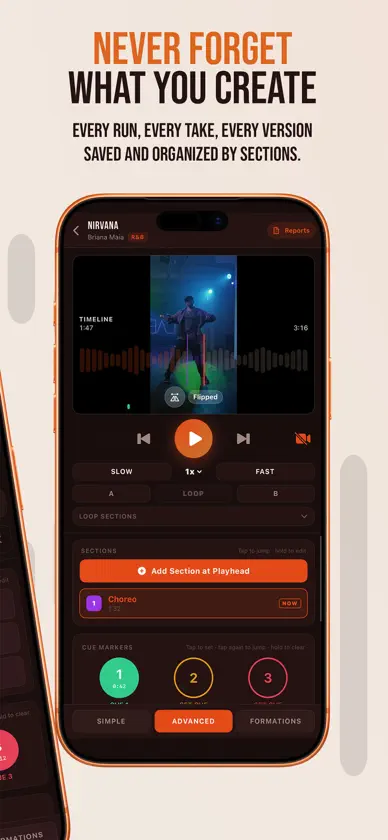
ChoreoPocket is the pocket studio built for dancers, choreographers, and dance teachers. Turn any song into a rehearsal tool: build your routine around the music, capture every take, drill the hard parts, and keep your whole class on the same count. CHOREOGRAPH TO THE MUSIC • Import your own audio files or connect Apple Music, Spotify, or Tidal. • Break a song into sections and give each one its own steps, notes, and takes. • Drop cue markers so you always know where the drop, the chorus, or the count-in lands. DRILL LIKE A PRO • Slow the music down without changing the pitch to nail tricky sections. • Loop any part of the routine on repeat until it's muscle memory. • Isolate vocals or instruments with on-device stem separation to hear the count clearly. RECORD AND REVIEW • Film video takes right in the app and keep multiple takes per section. • Sync your video to the music with precise offset alignment. • Flip the camera view so mirroring feels natural when you learn. • Jump between sections in Class Mode to teach a routine piece by piece. DESIGN YOUR FORMATIONS • Place dancers on a stage and map their positions across the routine. • Animate transitions with keyframes so everyone knows where to go and when. TEACH AND COLLABORATE • Share projects with students and collaborators. • Track student progress so you know who's ready. • Organize everything into folders and tag by dance style and skill level. BUILD YOUR PORTFOLIO • Feature your best choreography on a public profile. • Add your bio, social links, and resume so directors and studios can find you. EVERYWHERE YOU DANCE • Your projects sync securely to the cloud and stay available across your devices. • Download projects for offline rehearsal when the studio Wi-Fi won't cooperate. • A companion Apple Watch app keeps playback under control from your wrist. MADE FOR EVERY DANCER Whether you're a soloist polishing a piece, a choreographer setting a group number, or a teacher running a full class, ChoreoPocket keeps your music, video, formations, and notes in one place. SUBSCRIPTIONS ChoreoPocket is free to start. Creator Pro and Teacher Pro subscriptions unlock the full toolkit, including advanced practice and teaching features. Subscriptions are billed through your Apple ID and renew automatically unless canceled at least 24 hours before the end of the current period. Manage or cancel anytime in your App Store account settings. Have feedback or a feature request? We'd love to hear from you.
What's new
Version 1.60 · Oct 31, 2026
Introducing the Mixer: cut, arrange and mix your music right inside ChoreoPocket. No more editing a song in another app, exporting it and importing it back. Everything now happens in one place, inside your project. Open the new MIXER tab in Class Mode, pick songs from your project or import a file, and mark the parts you want. Then shape your mix on a timeline: trim, move and cut clips, layer them on tracks, crossfade clips that overlap on the same track, and set the volume of every clip and track. Select several clips to move them together, with undo and redo along the way. Save, and your mix becomes a song in the project, ready for sections, formations and class, and synced to ChoreoCloud for everyone on the project. The Mixer is included with Creator Pro and Teacher Pro. Also new in this update: Know when your project changes. Project members get a notification when a song, section, formation or report is added. Tap it to go straight there — the new item stays highlighted until you tap it. See if a project is synced. A cloud beside the project title turns green when ChoreoCloud has the latest copy. Tap it to sync. Move a section to another song. Its video re-syncs to the new song automatically, or you can line it up by hand. Stages drawn to size. Set the stage's width and depth in feet. The stage scales with zoom, and dancers are drawn to scale. Feature a video on your portfolio. Upload one or pick one from your portfolio, and it plays under your bio. Set it in Edit Profile. Review Projects. When this device and ChoreoCloud disagree, see both update times side by side and choose which copy to keep. Find it in Settings › ChoreoCloud. Speed control on Apple Watch. Slow the song down or speed it up from your wrist, and the A, B and Loop buttons stay in step with the phone. Clearer prices. Every plan price now says per month or per year. Clearer password messages. Creating an account or setting a new password now tells you when the passwords don't match or are too short.
In-app purchases
The most popular purchases on the App Store.
- Teacher Pro AnnualSubscription$1,999.00 / year
- Teacher Pro MonthlySubscription$299.00 / month
- Creator Pro - AnnualSubscription$1,799.00 / year
- Creator Pro - MonthlySubscription · 14 days free trial$179.00 / month
You might also like
 DanceTribe - For all dancersAlphaTheta Corporation
 Show|ReadyRight On Cue Services, LLC
 Audio Editor -editor de músicaBeijing Beibeitan Technology Co., Ltd.
 Offtrack: AI DJ MixerMixonset Inc.
 Audio Editor - Música clips苏娟 陈
 SoundLab - editor de audio孛 刘
 Cortador de musica & audioTMEDILAB SOFTWARE JOINT STOCK COMPANY
 Editor De Audio: Editar audiosBetterApp Tech Co., Limited
 Reverse SingingCalico Studio Inc.
 Musicnotes Mobile Music SheetMusicnotes