
Chronographer
Robert France
No ratings yetUtilitiesAges 4+
Screenshots




About this app
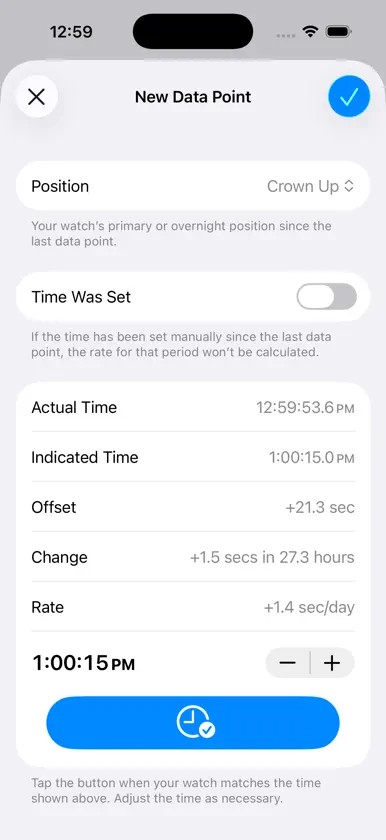
Chronographer is for people who enjoy mechanical watches. It does two things: 1. Tracks your watches’ long-term accuracy 2. Records wrist time Chronographer can work with your whole watch collection. Create a “card” for each watch, giving it a name and, optionally, a longer description. Select a picture from your Photos library and add additional notes, such as the watch’s specifications, purchase details, and service history. All information is stored in iCloud and automatically synchronized between your devices. To track a watch’s accuracy, periodically collect data points comparing its indicated time to the current correct time. Chronographer tracks offsets (the difference from the correct time) and daily rate (how many seconds it gains or loses per day). It uses this information to create graphs and histograms that help you visualize your watch’s performance over time. Chronographer also calculates the following metrics: * Average offset * Max. positive offset * Max. negative offset * Last offset * Net gain/loss * Best-fit rate * Average rate * Fastest rate * Slowest rate * Last rate * Rate variance * Best-fit rate drift You can log the watch (or watches) that you wear each day. Chronographer’s wrist time tracking feature lets you see which watches you wear the most and how long it’s been since you’ve worn each one. You can use Chronographer to identify positional variation. When you record a data point, include the position (dial up, crown up, etc.) that the watch was stored in. Then, you can restrict the charts and metrics to specific positions and compare the results. Chronographer includes a large digital clock to help when you set your watches. For more information, including a detailed user’s guide, see https://www.rmfrance.net/chronographer
What's new
Version 1.5.3 · Oct 3, 2026
• When playing a sound, don’t interrupt audio from other apps. • Minor changes for iOS 27 compatibility.
You might also like
 Tickscope — Watch AccuracyMOHANRAVITEJA CHINTAMANENI
 zakuni電卓Kunio Ozawa
 TickTracer - Precisión RelojMaxime CHEVALIER
 Watch Accuracy CheckerCogniter Technologies Pvt Ltd
 Oscillo: Precisión de relojAttila Halasz
 Wrotate: Watch TimegrapherBereket LLC
 ChronoLog • Watch Accuracytyler wood
 Tempochron: Reloj mecánicoJan Sokol
 Isochron: Watch AccuracySeth Adam Mundall
 CalctanJorge Lozada