
Coach Brain
Winning Edge Apps, Inc
No ratings yetSportsAges 4+
Screenshots


About this app
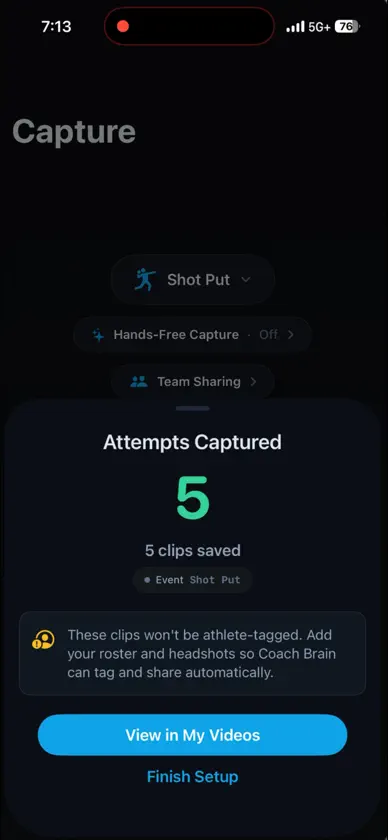
Record directly in the app at 60 or 120 frames per second to capture the details that matter. Hands-free Auto-Capture lets you place your device on a tripod and focus on coaching—not pressing the record button. Coach Brain automatically detects attempts and saves trimmed clips without the dead space before and after each performance. Auto-Capture supports track & field events including discus, shot put, hammer throw, high jump, and pole vault, as well as diving. You can also import existing videos from your camera roll. Turn Video Into 3D Transform an athlete’s video into an interactive 3D representation of their movement. Rotate the athlete with your finger, pinch to zoom, pause at key positions, and examine technique from viewpoints that aren’t available in the original video. Compare attempts using our 3D overlay, visualize joint paths through space, and identify differences that can be difficult to see in traditional video. Coach With Better Visuals Show athletes exactly what you see. Pause movement at critical positions, change the viewing angle, and use 3D visualization to make technical feedback easier to understand. Explore expert technique demonstrations in interactive 3D. Play, pause, rotate, and zoom to study important positions and movement patterns from any angle. Spend Less Time Managing Video Coach Brain helps streamline the entire video workflow—from hands-free capture and automatic trimming to analysis and distribution—so coaches can spend more time coaching and less time managing clips. Coach Brain combines AI-powered movement analysis with coaching knowledge curated from elite athletes and coaches, including Olympic-level expertise. Instant Replay Display Turn a second screen into your hands-free instant replay station. Connect Coach Brain to an Apple TV or a second iPad, then use Auto-Capture to record each attempt automatically. As soon as an attempt is captured, the trimmed video plays in a slow-motion loop on the connected display—and keeps looping until the next attempt is ready. Capture. Review. Adjust. Repeat. Terms of Use: https://winningedgeapps.com/terms.html
What's new
Version 4.9 · Oct 25, 2026
Improve efficiency of auto capture
In-app purchases
The most popular purchases on the App Store.
- Video Processing CreditsConsumable$69.00
- 5 Video 3D ProcessingSubscription$39.00 / month
- Treadmill Running ReportConsumable$99.00
- 10 Video 3D ProcessingSubscription$69.00 / month
- 20 Video 3D ProcessingSubscription$99.00 / month
- Timesaver WorkflowSubscription$299.00 / month
- Deep Insight SubscriptionSubscription$149.00 / month


