
ComicDeck: Comic Book Reader
Attila Juhas
No ratings yetBooksAges 4+
Screenshots



About this app
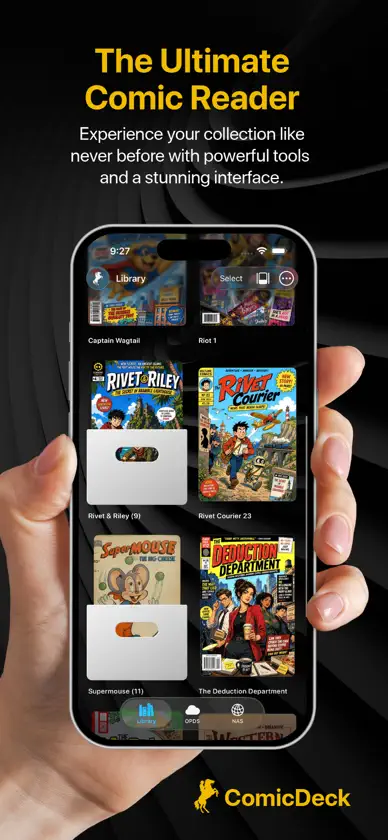
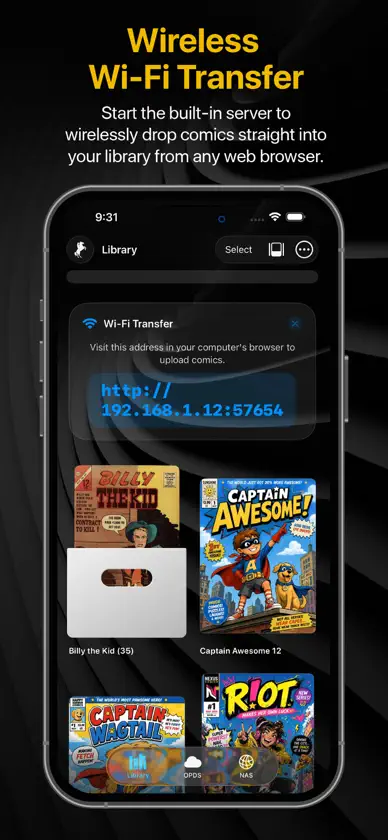
Welcome to ComicDeck, the ultimate premium comic, manga, and webtoon reader. Designed for comic lovers who want both cutting-edge technology and nostalgic aesthetics, ComicDeck transforms your digital library into a stunning, interactive experience. THE 3D NEWSSTAND Step into a beautifully rendered, interactive 3D virtual kiosk. Swipe to spin your collection, tap to pull a book from the shelf, and dive right into the action. Customize your space with built-in environments (Eclipse, Vortex, Walnut) or your own photos. SMART PANEL ZOOM Reading on an iPhone? Double-tap any page and let our CoreML-powered AI automatically detect the comic panels. Tap the edges of your screen to effortlessly glide through the action, frame by frame. NAS & OPDS STREAMING Don't waste storage space. Connect directly to your home server via WebDAV (Local IP or DDNS) or OPDS catalogs like Komga and Kavita. Stream your comics instantly without downloading the full file, or download them for offline reading. VINTAGE PAPER & VISUAL ENHANCEMENTS Make digital feel physical. Apply authentic vintage textures like Newsprint or Old Paper directly to your pages. Got low-res scans? Instantly crisp them up using our built-in CoreImage contrast, noise-reduction, and sharpness filters. READ YOUR WAY • Seamlessly read CBZ, CBR, ZIP, RAR, and PDF files. • Read Left-to-Right, Right-to-Left (Manga Mode), or vertically (Webtoons). • Turn pages with gorgeous 3D Page Curls, Cross Fades, or Slides. • Organize your collection into Box or Stacked folders with custom cover art. EFFORTLESS TRANSFERS Start the built-in Wi-Fi server to drag and drop comics directly from your computer's web browser straight to your device. Upgrade to ComicDeck Pro to unlock the full 3D Newsstand, premium page transitions, advanced background customizations, and unlimited OPDS/NAS cloud streaming!
What's new
Version 1.0.2 · Aug 11, 2026
This update fixes one of the most annoying issues with downloading comics online: wrong file extensions. Have you ever downloaded a .cbr file only to find out it won't open because someone actually just renamed a .zip file? It happens all the time. In this version, we changed how ComicDeck opens files. Instead of trusting the file extension, the app now checks the actual file itself. If a comic won't open as a CBR, the app will instantly try opening it as a CBZ or PDF behind the scenes. It just works. We also made .cb7 and .7z files visible in your library. Even if you have misnamed files in your collection, ComicDeck is now much better at figuring them out and getting you straight to reading. This update also improves stability during reading: • Fixed a crash that could occur when swiping between pages • Fixed a crash related to automatic panel detection on certain comic pages Thanks for reading with ComicDeck!
In-app purchases
The most popular purchases on the App Store.
- Buy Me a CoffeeConsumable$99.00
- Buy Me a CoffeeConsumable$39.00
- Buy Me a CoffeeConsumable$199.00
- ComicDeck ProConsumable$149.00
More from Attila Juhas


You might also like
 Lenticule: Comic Book ReaderZdravko Nikolovski
 Chek: Books & ComicsAryakumar Jha
 Halftone: Comic & Manga ReaderBony Yousuf
 ComicShelf ReaderThomas Eggenberger
 Comixor: Lector Manga y CómicRatan Lal Prasad
 ComicVerse: Lector de MangaOye Collective
 bloopworm - comic book readerPrabhkirat Singh
 Sutra - eBook & Comic ReaderKoustav Dasgupta
 KMReader川 彭
 Yomu: Lector Manga & WebtoonMOBILE ALCHEMY LTD