
Converty
VINCENZO GALLINA
No ratings yetUtilitiesAges 4+
Screenshots



About this app
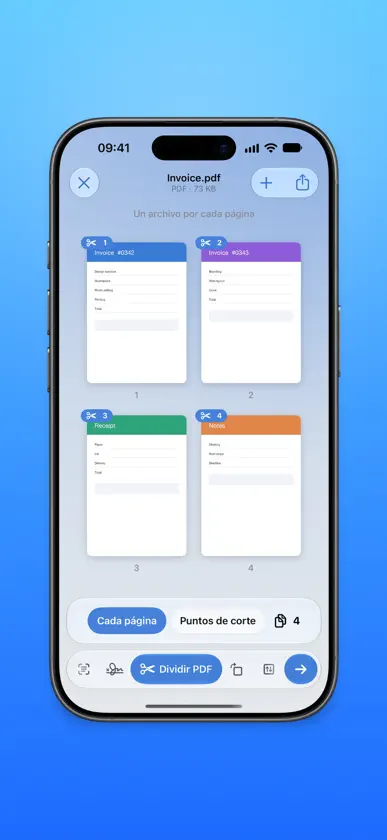
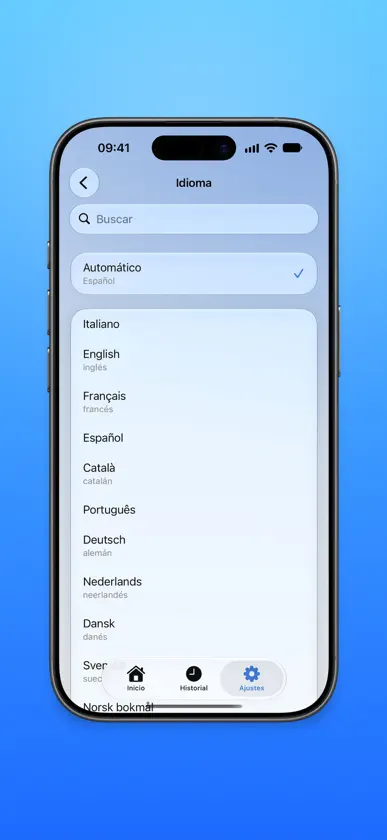
Converty convierte, comprime y arregla tus archivos en unos pocos toques — y todo ocurre directamente en tu iPhone. Sin subir nada a servidores, sin cuenta y sin anuncios: tus documentos nunca salen de tu dispositivo. CONVIERTE LO QUE SEA • Imágenes entre HEIC, JPG, PNG y otros formatos • Abre fotos RAW e imágenes AVIF y conviértelas a JPG, PNG o HEIC • Documentos y fotos a PDF, con un toque • Convierte un video en un GIF animado • Extrae la pista de audio de un video en M4A, WAV, AIFF, CAF o Apple Lossless — y abre archivos FLAC • Convierte desde cualquier app, directamente desde el menú Compartir REDUCE EL TAMAÑO • Comprime con un toque: elige Baja, Media o Alta, con una estimación del tamaño final • O ajusta tú mismo la calidad, el tamaño exacto o los píxeles • Redimensiona tus imágenes justo al tamaño que necesitas HERRAMIENTAS PDF VISUALES • Llena formularios PDF con el editor nativo de iOS: campos, texto y firma • Divide, gira, reordena y extrae páginas de forma visual • Combina varios archivos en un único PDF ESCANEA Y RECONOCE • “Escanear documento” abre la cámara al instante y pone nombre a los archivos según su contenido • Extrae el texto de un documento o de una foto y después corrígelo, cópialo o guárdalo como .txt RECORTA Y PULE • Recorta video y audio • Cambia la velocidad de reproducción de los videos TU PRIVACIDAD, LO PRIMERO Converty funciona completamente sin conexión. Ningún archivo se envía nunca a un servidor, no necesitas cuenta y no recopilamos ningún dato. Los metadatos sensibles (ubicación, fecha, dispositivo) se eliminan con un solo toque. Diseñada para iOS, con diseño de vidrio, modo claro y oscuro, el color de acento que prefieras y 48 idiomas — sigue automáticamente el idioma de tu iPhone.
What's new
Version 6.0 · Oct 15, 2026
What's New in 6.0 • Everything on one screen — Open a file and pick what to do from the bar at the bottom: the options appear right above it and the result arrives on the same screen, ready to save. • Work right on the file — Tap a PDF's pages to split, rotate or extract them, and hold one to reorder; trim video and audio on the timeline; straighten documents by dragging their corners. • High-quality audio — Converted sound keeps its original quality, and you choose the bit rate and sample rate. • New icon — Two pieces turning into each other: Converty has a new face, in the Home too. • Save in one tap — Photos and videos go to your photo library, everything else to Files. And History now remembers every action. • Smoother and easier to read — Animations up to 120 Hz and text that follows the size you chose in Settings.
More from VINCENZO GALLINA

You might also like
 unrollROHYO RO
 Inventory Scanner: OrganizerMaaDoTaa
 Ambient TimeLanguageCraft
 LongShot: Screenshot StitchBeijing Yangming Jiuha Technology Co., Ltd
 Flick: AI Remote for ClaudeSEIZEMODE
 ghleopeawrThomas Richardson
 Aura: Video to MP3 ConverterKrishnaiah Indyala
 0.05 Player逢 刘
 Palvia: AI Agents in Your Palm进年 贺
 Aura Notes AIVan Hai Nguyen