
Screenshots



About this app
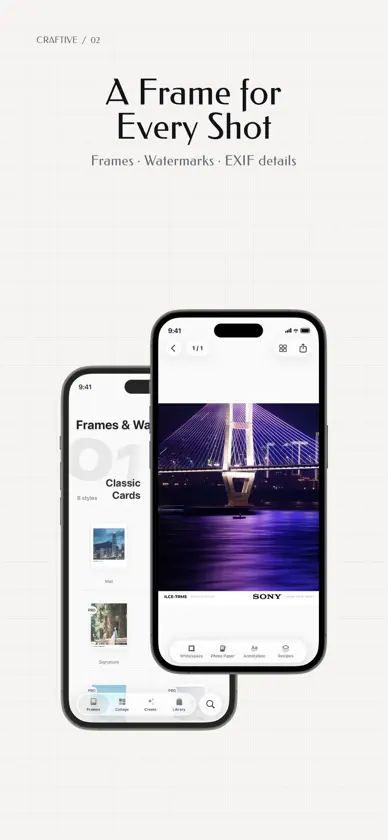
Some photos bring you right back to the moment you took them. Craftive gives your photos a considered finish with frames, watermarks, collages, photo splitting, subject cutout, and reference-based color matching. Explore creative wallpapers and tools for video and Live Photos. Frames and watermarks Choose white cards, photo paper, 35mm and 120 film, ticket stubs, gallery mounts, movie posters, halftone layouts, or translucent glass bars. Craftive reads EXIF camera, lens, exposure, and date details and matches camera brand marks. Import transparent signatures or logos, save border, material, and text styles as recipes, or batch-export framed photos. Collages and photo splitting Arrange photos in grids, across-frames subject collages, jigsaw pieces, proportional strips, 35mm contact sheets, or subtitle layouts. Adjust grid cell angles. Split a photo into a grid or panoramic slices, refine each crop, and export the pieces together. Subject cutout Separate subjects with smart selection, brush strokes, and edge feathering. Export a transparent PNG, or save to My Assets for frame watermarks, across-frames collages, and sticker wallpapers. Reference-based color matching Match your photo to a reference image's tones and colors, and hold the canvas to compare the original. Save reusable looks, export .cube 3D LUTs, or apply built-in looks. Video and Live Photos Frame videos and Live Photos or combine them in collages using compatible templates. Convert between video, Live Photos, and GIFs, or extract an exact still frame from the timeline. Live Photo works save natively to Photos and export as compatible video when shared to other apps. Creative wallpapers Explore frosted or ribbed glass, silver-halide grain, paper and fabric textures, subject-freeze streaks, motion blur, oil paint, pixel art, fuse beads, brick mosaics, multiple exposures, selective color, and halftone or CMYK print effects. Arrange emoji, text, and personal assets over solid, gradient, textured, or photo backgrounds. Create photo-sampled soft mist and color flow wallpapers, or mesh and flowing gradients with custom color stops. Fonts and export Import static or variable .ttf and .otf fonts for free in supported text slots. Configure file format, maximum dimensions, color space, and EXIF metadata preservation before saving or sharing. Works saved to Photos are indexed in Library for browsing by date or category. On-device privacy No account required, no ads, and no mandatory Craftive watermark. All photo and video processing runs locally on your iPhone or iPad, and your media is never uploaded to our servers. Basic templates, photo splitting, and font import are free. You can edit and preview reference-based color matches for free; saving and sharing the results requires Craftive Pro. Craftive Pro • Access all released templates and styles • Save and share reference-based color matches • Save and apply your own color looks, and export LUTs • Save framed photos and color-matched photos in batches • Import and use your own signatures, logos, and stickers Purchase options • Monthly: auto-renews each month, with a 7-day free trial for eligible users • Yearly: auto-renews each year, with a 7-day free trial for eligible users • Lifetime: pay once for permanent access to current and future Pro features Subscription details Purchases are charged to your Apple ID account. Subscriptions renew automatically unless canceled at least 24 hours before the end of the current period. Renewal charges apply within 24 hours before the current period ends. You can manage or cancel subscriptions in your App Store account settings. Deleting the app does not cancel a subscription. A Lifetime purchase does not cancel any existing subscription or provide a credit or refund for subscription payments. Privacy Policy: https://ember-air-1fe.notion.site/Craftive-3df0d1931b258123b835cc151ff5d231 Terms of Use: https://www.apple.com/legal/internet-services/itunes/dev/stdeula/
What's new
Version 1.1.0 · Nov 6, 2026
This update introduces subject cutout and across-frames collages, a major expansion to creative wallpapers, reusable frame recipes, and GIF conversion. Subject Cutout & Across Frames • Subject Cutout: Separate subjects from the background with smart selection, brush strokes, and edge feathering. Export a transparent PNG or save to My Assets for reuse. • Across Frames Collage: Layer cut-out subjects across photo cells and set foreground or background occlusion per cell. New Creative Wallpapers • Sticker Wallpapers: Combine emoji, text, and personal assets across 6 layouts over solid, gradient, textured, or custom photo backgrounds. • Gradient Wallpapers: Create photo-sampled soft mist and color flow wallpapers, or customize up to 6 color stops for mesh and flowing gradients with one-tap shuffle. • Pixel Styles: Turn photos into pixel art, fuse beads, or single- and double-brick mosaics. • More Photo Styles: Added halftone and CMYK print effects, geometric selective color, subject-freeze streaks, motion blur trails with editable curved paths, and embossed dot, waffle weave, fine twill, and fiber paper textures. • Preview & Aspect Ratios: Added full-screen interactive preview, current-device screen aspect ratio, and 4K export. Frames, Collages & Motion • Glass Bar in Overprint: Display your camera model and shooting settings inside a translucent glass capsule without cropping the photo. • Frame Recipes: Save borders, materials, colors, and typography as reusable recipes for any frame template, plus template favorites and home search. • Grid Shapes & Jigsaw Upgrades: Drag grid vertices and edges to create angled panels, try the new Left + Eight layout, and arrange jigsaw pieces in 2, 3, 4, 6, 8, or 9 cells. Switch non-square layouts between portrait and landscape. • GIF & Frame Extraction: Convert between video, Live Photos, and GIFs, or extract any exact frame from the timeline as a still photo.
In-app purchases
The most popular purchases on the App Store.
- Craftive Pro LifetimeConsumable$299.00
- Craftive Pro YearlySubscription · 7 days free trial$179.00 / year
- Craftive Pro MonthlySubscription · 7 days free trial$39.00 / month


