
Dates - Reminders
Decoreyon Green
No ratings yetLifestyleAges 4+
Screenshots




About this app
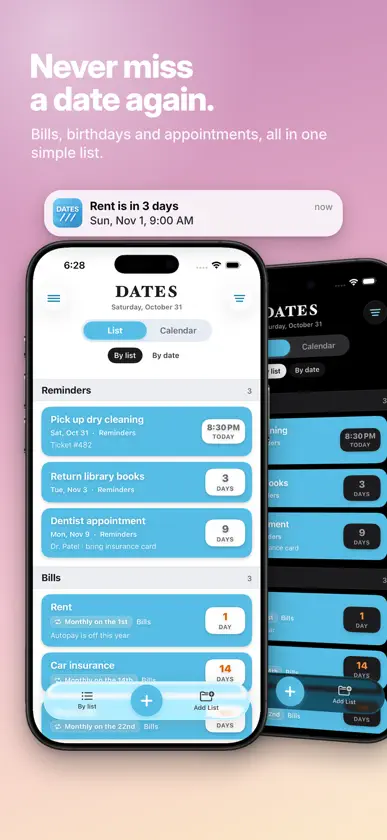
Key Features: • Custom Recurrences: Set reminders to repeat on your terms—whether it’s daily, weekly, monthly, or even custom intervals like ‘Every X Days.’ • List & Calendar Views: Switch between a list format or a calendar view to visualize your upcoming tasks and deadlines. • Notifications: Receive timely alerts with the reminder title and additional notes to ensure nothing falls through the cracks. • Core Data Integration: Your reminders are stored securely on your device using Core Data, ensuring fast performance and offline access. Custom Repeat Options: Set reminders to repeat on flexible terms, from everyday tasks to more unique intervals like tri-weekly, bi-monthly, or quarterly schedules. Effortless Navigation: • View reminders for the current day or any upcoming date in a user-friendly interface. • Edit, delete, or reschedule reminders easily with intuitive swipe and tap actions. • Use the search function to find specific tasks quickly. Notifications with Precision: Get notified exactly when you need, with alerts that include your reminder’s title and any added notes for context. Sync Your Schedule: Whether you prefer organizing your tasks in a list format or visualizing them in a calendar, this app provides both views to help you stay on track. Stay productive and never miss a beat. Our reminder app is designed to simplify your daily routine and ensure that you focus on what’s important. Download today and experience seamless task management!
What's new
Version 2.1 · Nov 4, 2026
• UI update • Way more ways to repeat: pick the days of the week, every few days, weeks or months, the 2nd Tuesday, the last day of the month, and when it stops. • iPhone Duo Compatible • Ask siri to add reminders • Go ad-free with a one-time purchase • Notifications are more reliable, and old leftover notifications from past versions are cleared out • A calendar shows exactly when each one lands • Get reminded a week, 3 days, a day or an hour ahead, plus at the time. Pick as many as you like • A new Calendar tab. Scroll the days or open the whole month • See your iCloud, Google and Outlook events, including ones shared with you, next to your reminders • Filter which lists and calendars you see • Press and hold a list’s title to rename or delete it • Sort by list or by date
In-app purchases
The most popular purchases on the App Store.
- Ad FreeConsumable$69.00
More from Decoreyon Green


You might also like
 Anniversaries Birthday TrackerQuentin KLEIN
 Rhythm5 GlobalNECE LABS LTD
 DigiDiaryDigipark
 Less things炜腾 张
 Remember All ThingsJOEL RIKARD OSKAR FRANSSON
 LastHit: Quit Vaping NowAmol Mendonca
 My Days - JournalsSIU LO
 Inscribe the message, ekhoHANUM OH
 Gateway CF WAGateway Christian Fellowship WA
 Planner: Smart CalendarAviationMP4 Media LLC