
DriveWizard
YASKAWA ELECTRIC CORPORATION
1.0(2)BusinessAges 4+
Screenshots


About this app
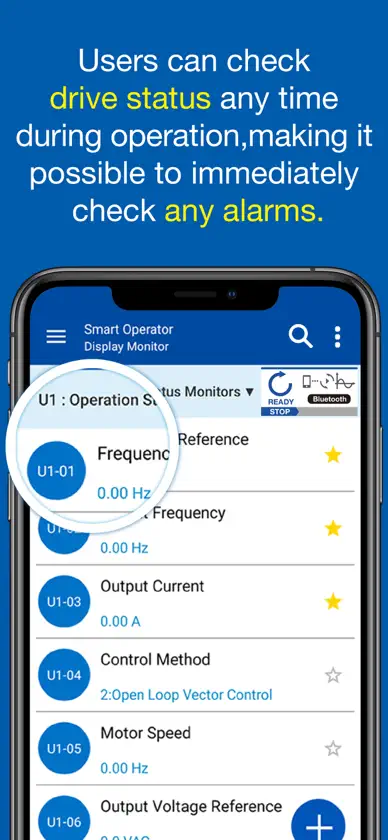
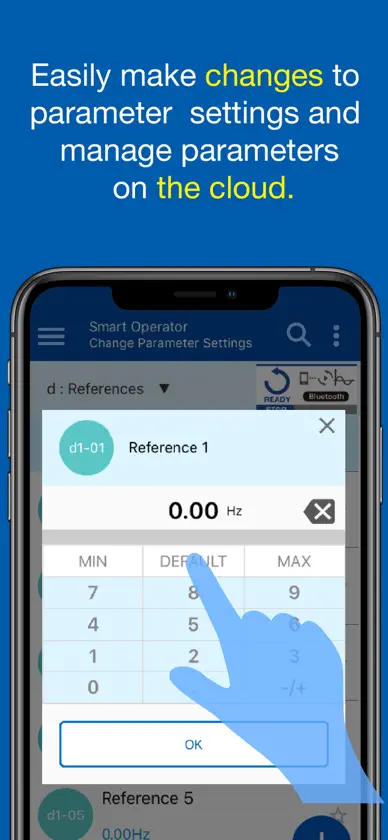
● Scan the QR code on the drive‘s faceplate or nameplate and get easy access to full product information, technical data, catalogs, and troubleshooting. ● Edit parameters, operate the drive and monitor the drive condition in real-time by connecting the drive via Bluetooth.(See notes 1 ) ● Backup your inverter parameters in the YASKAWA Drive Cloud to have them ready when you need them, anywhere and anytime. Notes: 1: To establish a Bluetooth connection, the optional “Bluetooth LCD Keypad” is required. ● Supported drive: GA700、GA500、CR700、CH700、FSDrive-LIPV、FSDrive-LIPA_LIPC、GA800、GA501、HV600、HV600 Bypass、HV305、FP605、FP605 Bypass、FP60B、LA700、ES700、iQpump605 *The inverters that can be connected vary depending on the area where you are using. ”Bluetooth” is a registered trademark of Bluetooth SIG. Maximum communication distance of the Bluetooth connection is about 10 m. Communication distance may be shorter depending on the used smartphone and other conditions.
What's new
Version 4.2.2 · Oct 25, 2026
Minor improvements.
You might also like
 DrivetuneABB Information Systems AG
 EB-LinkEbtron Inc.
 LG HVAC ServiceLG Electronics, Inc.
 Carrier® SMART ServiceCarrier Corporation
 Dry ToolsClimate by Design Intl
 Symbio® Service & InstallationTRANE U.S. INC
 KE2 Service ToolKE2 Therm Solutions
 BluVacmeasureQuick
 YORK Chiller Access ManagerJohnson Controls, Inc.
 XOi VisionXOEye