
Screenshots




About this app
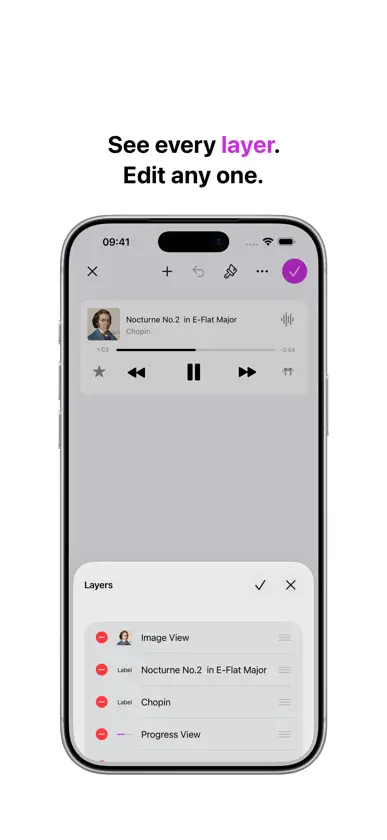
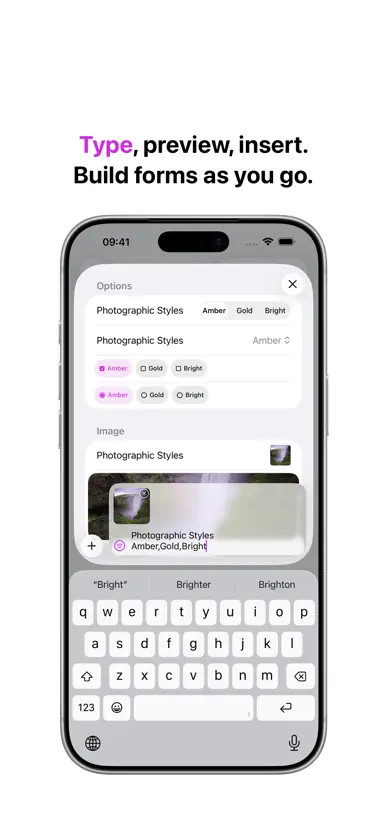
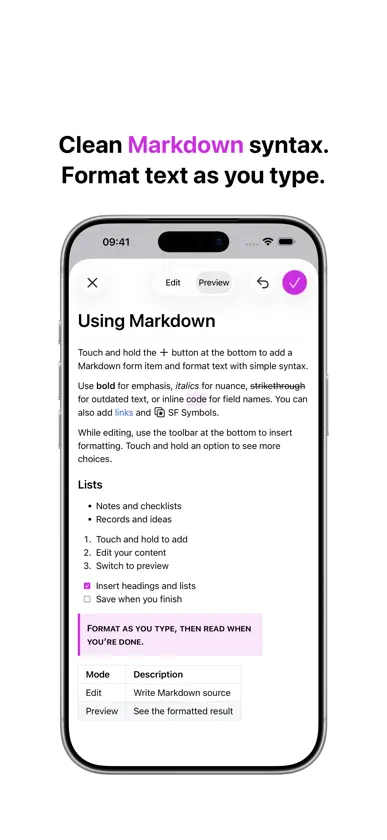
Organize notes, lists, records, and ideas with the clarity of forms. Form Memos is an app for creating memos as forms. Unlike traditional free-form notes, you can use form items—such as text fields, labels, and images—to build flexible, well-organized memo templates. You can also use Canvas to freely place, resize, and rotate controls in a fixed area, making it easy to create freer layouts like layered text and images. Create Memo Templates • Freely switch between Editing View, Memo View, and Reading View on iPhone • Easily add form items like labels, text fields, images, switches, dates, and more • Group related form items into sections to make content easier to browse and fill in • Use Markdown, ratings, radio buttons, checkboxes, buttons, message bubbles, and other components • Add a horizontal multi-image layout to insert several photos at once • Use the input bar at the bottom of Editing View to type text or add photos, then preview and quickly insert matching form items • Save frequently used form items as templates to reuse them faster • On supported systems, use the document browser to create a new document or find a recent one (requires iOS 18) Canvas • Use the Canvas form item to freely place, resize, and rotate controls in a fixed area • Easily create freer layouts such as layered text and images • Support layers, grouping, and locking, plus gradients, materials, QR codes, barcodes, and more • Save canvas layouts as templates to reuse across documents Powerful Editor • Replace default text and images with your own content • Apply built-in system colors to labels, text fields, images, and more • Enhance documents with more than 4,000 icons from SF Symbols • Apply rich fonts to text • Set button actions such as calling, emailing, or opening a link iCloud • Automatically sync across your other devices with iCloud • Form Memos automatically saves your documents as you make changes Share Your Work • Use AirDrop to send your document to anyone nearby • Quickly and easily share a link via Mail or Messages • Export your document as an image Forms Pro • Password-protect a document • Undo and redo changes freely • Copy and paste items effortlessly • View canvases and advanced items without watermarks Without a subscription, you can still create and preview every form item type; some premium components show a watermark. Some features may require internet access; additional fees and terms may apply. Terms of Use (EULA): https://www.apple.com/legal/internet-services/itunes/dev/stdeula/
What's new
Version 2.2 · Oct 18, 2026
• Get ready for iPhone Duo • Start from a template to build forms faster—or save any document as a reusable template of your own. • Add a staff notation form item to write and display music with notes, clefs, and time signatures. • Insert an equation form item to compose and render mathematical formulas with ease. • Use the drawing form item to sketch freehand and capture handwritten notes or signatures. • Add a location form item to pin and present a place right inside your form. • Copy an entire section, along with its items and layout, and reuse it across your documents.
In-app purchases
The most popular purchases on the App Store.
- Yearly PlanSubscription · month free trial$199.00 / year
- Monthly PlanSubscription · month free trial$19.00 / month
More from 育良 邱

You might also like
 Comparar Textos y ArchivosMuhammad Awais Younas
 Asistente de tareas勇 牛
 Journal Mate: Gestor de mediosVitalii Bahmet
 Humanize AI: Humanizador IAHAMZA HARDOULI
 Reminders: To Do List & WidgetZipoApps
 Temporizador Múltiple: EnfoqueRoman Sevastyanov
 Stay Focused with GobbleAstrochimp SRL
 KeyPass: Gestor de ContraseñasNAVYNEXA TECHNOLOGIES LLP
 Generador de Podcast AI TTSOmer Erdem Aydemir
 cAI, Private AI (f.k.a AnonAI)Autonomous Inc.