
GETVision
Jebi staging
No ratings yetBusinessAges 4+
Screenshots

About this app
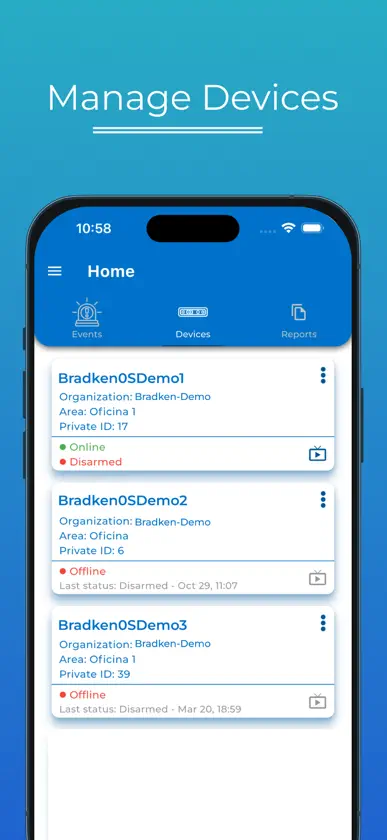
GET Vision is a powerful cloud and mobile application that enhances the management and monitoring of Bradken GET Vision systems. Designed for secure, remote access, GET Vision allows users to monitor system performance, adjust configurations, and receive real-time alerts from anywhere. GET Vision includes advanced role-based access control, ensuring data privacy and streamlined user management for organizations with varied operational needs. Users can generate ad-hoc reports to gain insights into system performance, track operational trends, and support data-driven decisions. GET Vision is a powerful app designed to help you easily manage Bradken’s advanced GET Vision systems, which use the latest computer vision technology to operate reliably in the toughest mining conditions. These systems are built to keep working smoothly, even in the harsh, demanding environments of mining operations. With GET Vision, you can securely access your systems from anywhere in the world, allowing you to check on system performance, adjust settings as needed, and receive real-time alerts if any issues arise. This means you’ll always know if something needs attention, and you can respond quickly, keeping operations efficient and safe. The app also includes advanced role-based access control, meaning that you can decide who has access to specific parts of the system. This feature helps protect your data and makes it easy to manage different users within your team. Additionally, GET Vision allows you to create reports on demand, so you can track system performance trends and make smart decisions based on accurate, up-to-date information. GET Vision is straightforward to use, giving you all the tools you need to keep an eye on your systems, ensure everything is running smoothly, and stay in control, whether you’re on-site or managing multiple operations remotely.
What's new
Version 1.5.0 · Oct 28, 2026
What's new in 1.5.0 Device protection Arm and disarm a device's modules individually. Each device card now shows a per-module breakdown, so you can see at a glance what is protected. Find things faster The user directory is searchable by name, email, client, site and role, with filters and sorting that stay put as you move around the app. Built for bigger screens On tablets and the web, Reports, Devices, Organizations, Areas and Users are now sortable tables instead of cards. Phones keep the card layout with a new Sort by menu. Reports Delete a report from its menu, and sort reports by device, area, date or status. Images Wear snapshots, segmented images, boulders and event photos all open in the same full-screen viewer. Swipe through a set, pinch to zoom, and close with a swipe down or a tap outside the image. Live video When a browser blocks playback, the screen now offers a Play button instead of an error. Faster, steadier images Thumbnails show their progress while loading and use far less memory on long event lists. Images that stall now time out and retry instead of staying blank, with a Retry button in the full-screen viewer. Smoother tabs on the web A two-finger trackpad swipe changes exactly one tab, and only when you mean it. Also in this release Register screens alongside their processor, MAC addresses are accepted in any format, and crash reporting is now active so problems reach us automatically.
You might also like
 Grain SA4SIGHT SYSTEMS (PTY) LTD
 ConSite +SHitachi Construction Machinery Co., Ltd.
 ConSite Mine ShotHitachi Construction Machinery Co., Ltd.
 Irricheck PulseAlbert Vd Westhuizen
 GRAINVESTDANKOSPARK (PTY) LTD
 PANNAR SproutPANNAR SEED (Pty) Ltd
 Obzervr CaptureObzervr Pty Ltd
 Onsite Mobile by AvettaPegasus Management Pty Ltd
 GLB File ViewerSmart Cube Labs Co., Ltd.
 MINExpo INTERNATIONALMap Your Show