
InstaPunch Mapper
小年 蒲
No ratings yetUtilitiesAges 4+
Screenshots






About this app
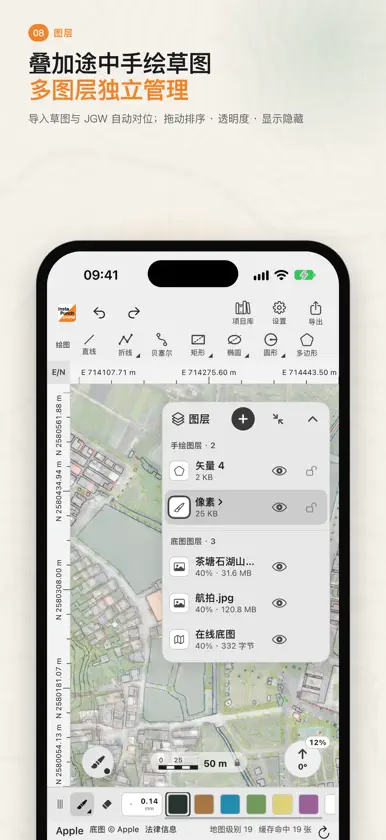
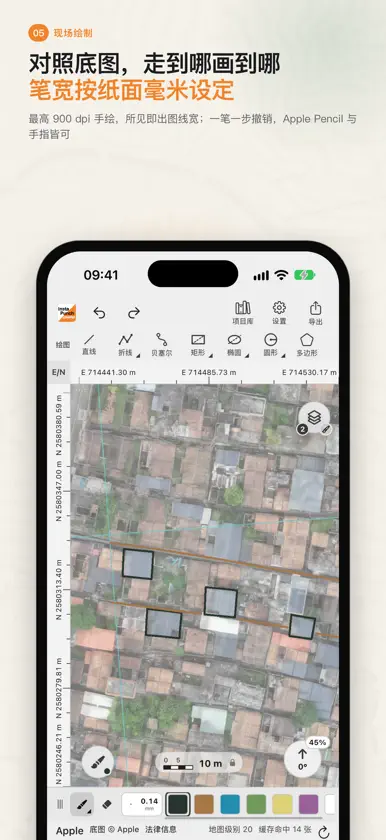
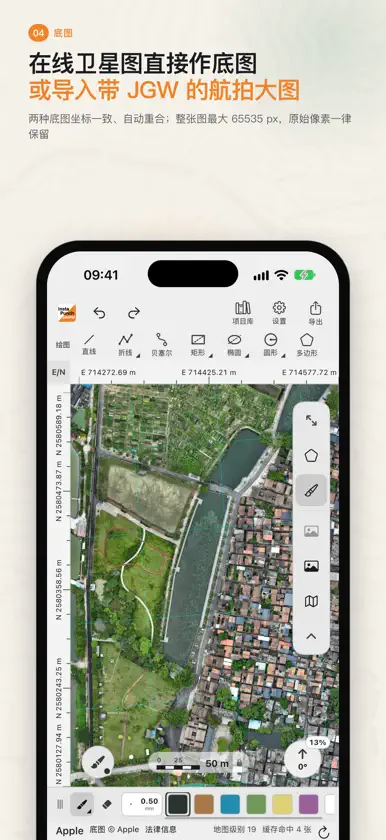
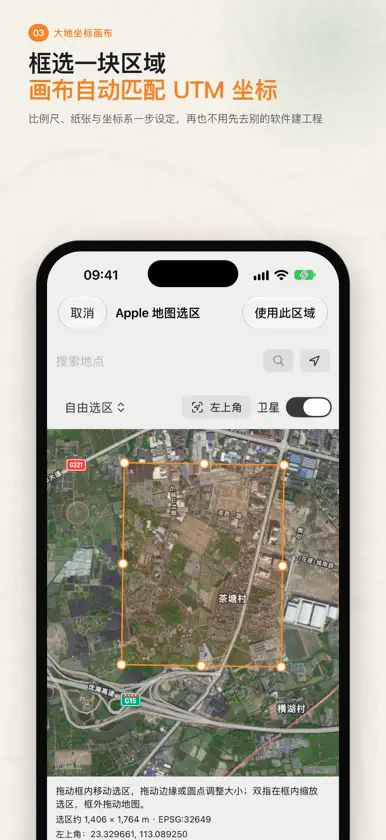
InstaPunch Mapper 是为定向越野制图员打造的 iPad / iPhone 外业制图工具。从建立大地坐标画布、叠加航拍或在线地图,到现场手绘、定位、测量,再到导出带坐标的高清手稿,全部在一块画板上完成,不必再在多个软件之间来回导入导出。 【大地坐标画布】 · 在 Apple 地图上框选一块区域,自动匹配 UTM 分带并建立画布 · 或用带 JGW 的航拍图直接生成画布,比例尺、纸张与坐标系一步设定 · 纸面最大 A1,画布像素始终与实地米、纸面毫米保持换算关系 · 支持 WGS84 / CGCS2000 / UTM;画布固定坐标北朝上,磁偏角单独处理 【底图】 · Apple 地图卫星图与街道图可直接作为在线底图,离线缓存方便野外使用 · 也可接入自己的 XYZ 瓦片服务(API Key 只存在设备钥匙串) · 导入航拍大图最大 65535 × 65535 px,原始像素完整保留,缩放不糊 · 自动读取 JGW / PGW / TFW / WLD 与 GeoTIFF 坐标;没有坐标文件的图片用两点或多点控制点配准 · 多张底图坐标一致,自动重合 【现场绘制】 · 手绘分辨率按比例尺自动确定,最高 900 dpi,所见即出图线宽 · 笔宽按纸面毫米设定(随缩放)或按屏幕像素固定,实地宽度同步显示 · 技术笔、墨水笔、铅笔、马克笔、软笔,支持 Apple Pencil 压感与悬停 · 一笔一步撤销;双指缩放、旋转画布不影响像素与历史 · 画板底部动态比例尺,可选刻度样式与单位,解锁后可拖动 · 手绘停住不动即变直线;悬浮球快速切换手绘、图形、橡皮与现场工具,可放在画板任意位置 【像素图层与矢量图层】 · 像素图层按块存储,大幅地图依然流畅 · 矢量图层上的折线、贝塞尔曲线、矩形、椭圆、圆形与多边形始终可编辑:拖手柄修改、续画、擦断、闭合 · 点选、矩形或套索多选,整体移动、复制、旋转与缩放 · 需要时把矢量图形栅格化到像素层 · 图层可调透明度、锁定、隐藏、拖动排序;导入途中草图与 JGW 自动对位 【外业定位、罗盘与轨迹】 · 十字定位标记按实地大小显示精度环,罗盘朝向与定位来源一目了然 · 罗盘瞄准:按住拉出方位线,松手固定,两线相交处直接放点并可备注;连接测距仪可生成定长线 · 录制 GPS 轨迹,一个轨迹图层可存多条;导入 GPX 先预览,可按坐标落位或放在视图中心;导出 GPX 【外接 RTK 与差分】 · 通过 InstaPunch Bridge 中转盒连接经典蓝牙 RTK 接收机,或用蓝牙(BLE)直连 · 定位来源可选本机或 RTK 接收机,画板定位与轨迹录制都使用接收机坐标,实时显示解状态、卫星数与精度 · 支持 NTRIP 1.0 / 2.0(CORS)差分改正,账号密码只存在设备钥匙串 · 多段测距逐段标注长度与方位角,纸面毫米与实地米同时给出 【输出与备份】 · 导出 PNG / JPG / TIFF / BMP,300 / 600 / 900 dpi 或自定义更高分辨率,附带 JGW 坐标文件 · 导出后可直接在 OCAD、OpenOrienteering Mapper 等桌面制图软件中配准使用 · 按纸张或自由框选取景,AirPrint 打印 PDF,轨迹导出 GPX · 自动保存、历史快照与自动备份;项目以 .ipmproj 文件分享、导入 · 项目浏览器支持分类、颜色标签与搜索 所有项目、轨迹与位置数据只保存在你的设备上。无需账号,无广告,无跟踪。界面支持简体中文与英文,可在项目库中切换。
What's new
Version 2026.2.1 · Oct 27, 2026
COMPASS SIGHT LINES AND FIELD NOTES • With the compass on, North and Aim buttons sit next to the view controls: tap North to keep the canvas north-up; hold Aim to cast a bearing line, release in place to fix it, drag off the button to cancel • While north-up or aiming, a large heading line crosses the screen with a big readout at the top, easy to read outdoors • New Field Notes layers keep sight lines and field points: drag a line's origin, bearing and length, and place a point where two lines cross; add notes to points, move them, or copy them to the current layer • A connected rangefinder adds fixed-length lines; it all works in projects without a coordinate system too POSITION MARKER • New crosshair marker: a true-to-scale accuracy ring, heading from the compass, and a label for the source (this device / single / float / fixed / corrections lost); it greys out after 10 seconds without an update • The marker is semi-transparent and fades away when Apple Pencil comes near; set its style, size and opacity in Settings ▸ Location & Ranging • Tap the marker to follow your position, place a point there or copy the coordinates VECTOR EDITING • Select now starts as a pointer: tap any vector shape on any layer to select it and switch to its layer; on a vector layer you can also select with a rectangle or lasso, everything else dims, and you can move, copy, rotate and scale the selection together • Box selection on pixel layers has been removed • Hold two fingers still on the selection for 0.6 s to rotate and scale it; otherwise two fingers move the view as usual • Rotation no longer snaps to fixed angles and follows your fingers exactly DRAWING AND INTERFACE • Quick straight lines: hold still mid-stroke and a freehand line turns straight; turn it off or change the hold time in Settings ▸ Input & Interface • The palette is now a device setting shared by all projects, and can be exported to a file and restored; an existing custom palette is carried over • The quick-action ball, layer panel and view controls can be picked up with a long press and placed anywhere; they open towards the canvas • iPhone hides the bottom status line for more drawing room (it still appears while measuring) TRACKS • Preview a GPX file before importing it, then place it by its coordinates or at the centre of the view; it works in projects without a coordinate system too • A more compact track recording card on iPhone OTHER • Projects with a Field Notes layer or a track placed at the view centre need this version or later; all other projects keep their format


