
Screenshots




About this app
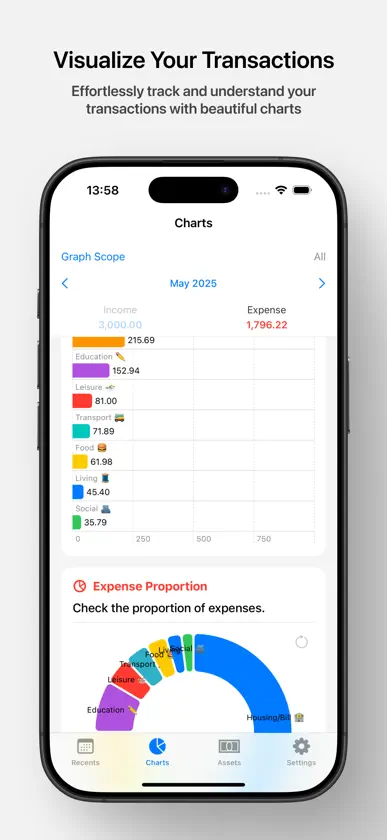
iobook keeps personal finance simple — only the essentials, with a clean and minimal experience. Track every transaction, see where your money goes, and sync seamlessly across all your Apple devices. KEY FEATURES - Easy Transaction Entry – Add income, expenses, and transfers with a clean, intuitive interface - AI-Powered Bulk Upload – Paste text or pick a screenshot, and the app parses multiple transactions for you at once - Apple Intelligence Support – On-device receipt parsing on supported devices for private, offline entry - Smart Auto-Category – Recognizes similar past transactions to auto-fill categories - Duplicate Detection – Same-date, same-amount transactions are flagged automatically during bulk upload and skipped on save - Credit & Debit Cards – Track liabilities and debit card spending separately, with a real-time Assets/Liabilities/Total header - Customizable Categories – Organize income, expenses, and assets your way with category groups and subcategories - Visual Analysis – Monthly bar charts with tab navigation, a current-month area chart that includes today, and side-by-side current vs previous month rank charts - Calendar View – See your spending patterns across the whole month at a glance - iCloud Sync – Access your data on every Apple device, anytime - Personalized Look – Choose between multiple app icons to match your home screen PERFECT FOR THOSE WHO - Want to simplify personal finance without losing detail - Feel overwhelmed by complex finance apps - Need a quick way to track income, expenses, and credit card use - Prefer visual, chart-based analysis of finances - Use multiple Apple devices and want seamless data sync SUBSCRIPTION INFORMATION - iobook offers an auto-renewing monthly subscription for $1.99(USD)/month and an auto-renewing yearly subscription for $19.99(USD)/year, unlocking unlimited assets and category groups. - Payment will be charged to your iTunes Account at confirmation of purchase. - You can manage your subscription and turn off auto-renewal at any time in your Account Settings after purchase. Terms of Use: https://www.apple.com/legal/internet-services/itunes/dev/stdeula/ Privacy Policy: https://sites.google.com/view/iobook/privacy-policy-en
What's new
Version 1.11.2 · Oct 25, 2026
- Fixed the Charts tab joining this month and last month into a single line on iOS 27. This month is red (blue for income) and last month is gray again. - Fixed gray section bars and backgrounds spilling under the tab bar on wide screens where the tab bar sits at the side.
In-app purchases
The most popular purchases on the App Store.
- Basic (Yearly)Subscription$399.00 / year
- Basic (Monthly)Subscription$39.00 / month
More from Joonhee Cho


You might also like
 Feed MoneyBook ProMINIE BAI
 Money: Registro SimpleVlad Zhila
 SimplyBudget AINooruddin Pirani
 차곡 - 더 자세한 공유 가계부Yura Kang
 위스키캣 가계부Unlimiting Studio
 Suscripciones y PresupuestoMustafa Kenan Atmaca
 WOORI: Gastos compartidosSEUNGHYUN LEE
 오늘쓸돈: 오늘 예산 알려주는 가계부MOTEY STUDIO
 Cada MenudoMoneta Fintech LLC
 비트 프리미엄 - 김치 프리미엄Isu Kim