
Logbird
Tuomo Ojala
No ratings yetProductivityAges 4+
Screenshots




About this app
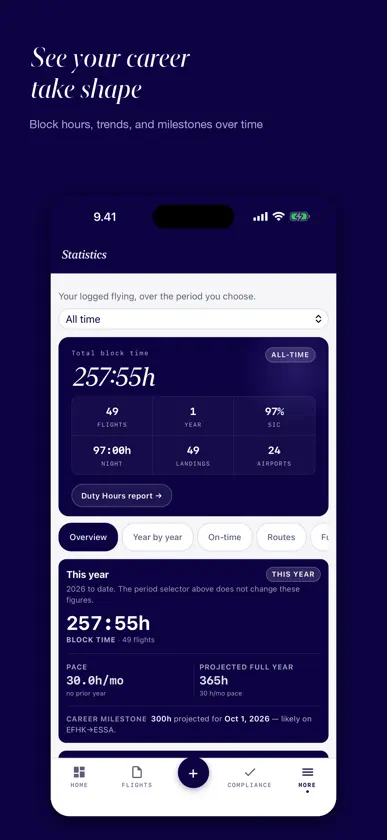
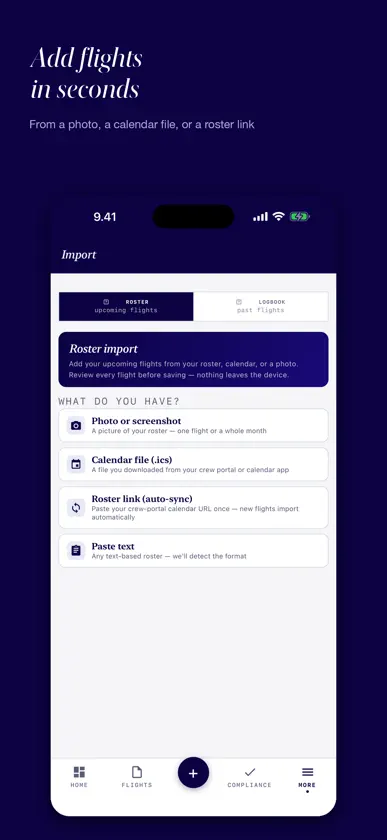
Soy piloto de línea y he creado Logbird para otros pilotos. La app se adapta a cómo trabajamos: jornadas con varios tramos, cuadrantes que cambian, horas de servicio y años de historial de vuelo. Importa tu cuadrante, registra los tiempos reales y consulta toda tu actividad de vuelo en un solo lugar. La interfaz de la app está actualmente en inglés. IMPORTA TU CUADRANTE FÁCILMENTE Importa cuadrantes compatibles desde un archivo de calendario ICS, CSV, texto pegado, PDF o foto. También puedes seleccionar un calendario de tu iPhone. Revisa los vuelos antes de guardarlos y añade después tus tiempos reales de OFF-block, despegue, aterrizaje y ON-block. Así no tienes que introducir desde cero cada tramo de una jornada con varios vuelos. MÁS QUE UNA LISTA DE VUELOS Consulta horas de bloque, de servicio y de vuelo nocturno, aterrizajes, experiencia reciente, rutas, aeronaves y totales acumulados. Explora las tendencias de tus propios vuelos y consulta tu jornada en el Apple Watch. El simulador FDP te ayuda a estimar cómo puede afectar un retraso a tus planes. CONSERVA TU HISTORIAL Importa exportaciones compatibles en CSV, XLS y XLSX de otros libros de vuelo, incluidos LogTen Pro y CrewLounge PILOTLOG. Logbird reconoce muchas columnas y te permite relacionar las demás antes de guardar. Revisa la vista previa y los totales. También puedes introducir tus horas anteriores sin registrar cada vuelo por separado. ¿Tu archivo no se importa correctamente? Envía una copia a support@logbird.fi. La convertiremos gratis a un formato que Logbird pueda importar y te la devolveremos. El envío es voluntario: conserva el original y comprueba después los vuelos y las horas importadas. DE LA ESCUELA A LA AEROLÍNEA La hora de piloto único (SE, ME) y la de varios pilotos (MP) se conservan al importar y en la impresión EASA, y «Check against my old logbook» compara tus totales con los de tu libro antiguo, columna por columna. El modo alumno ofrece Lesson, Solo, SPIC y Simulator. Más de 500 tipos de aeronave están incluidos y agrupados por habilitación de tipo y de clase; la exportación FAA incluye SEL, MEL, complex, high performance y tailwheel. TE ESCUCHAMOS Si un cuadrante da problemas, algo no funciona como esperabas o tienes una idea para mejorar Logbird, escríbenos a support@logbird.fi. Haremos lo posible por ayudarte y tendremos en cuenta los comentarios de los pilotos para seguir mejorando la app. TUS DATOS, BAJO TU CONTROL Tus vuelos permanecen en tu iPhone o iPad; si quieres, se sincronizan mediante tu propia cuenta de iCloud. Exporta el libro en PDF con formato EASA o FAA, Excel o CSV, o guarda una copia JSON que puedes restaurar. Sin cuenta de Logbird, anuncios ni seguimiento. La importación normal se procesa en tu dispositivo; nuestro equipo solo recibe un archivo si decides enviarlo por correo. Prueba todas las funciones durante 14 días desde el primer vuelo registrado o importado. Después, puedes seguir usando el libro básico con hasta 50 vuelos gratis. Premium ofrece vuelos ilimitados y funciones avanzadas mediante una suscripción anual con renovación automática o un pago único para acceso de por vida. Los 14 días no activan ninguna suscripción ni generan cargos automáticos. La suscripción anual solo se cobra si decides comprarla y se renueva hasta que la canceles. El precio se muestra en App Store antes de confirmar la compra. Logbird no es un registro oficial certificado ni sustituye los registros exigidos. Los cálculos FDP y FTL son orientativos; prevalecen las normas de tu operador y de la autoridad competente.
What's new
Version 1.6.3 · Oct 22, 2026
A career logbook that adds up: class time kept through import and print, a student mode, aircraft grouped by type and class rating, the FAA columns, and more accurate night time. CLASS TIME • Imports keep SE, ME and multi-pilot time. Safelog, LogTen Pro, CrewLounge, ForeFlight, FlyLog.io and EASA paper-layout spreadsheets are read for it, and the import review shows your SE / ME / MP split before you save. • The EASA print and PDF show single-pilot SE, single-pilot ME and multi-pilot time in their own columns, on every page and in the totals. • Flights imported earlier can get their class afterwards: import the old file again and choose “Fill time class only”, or set it per aircraft type under Import → Fix existing flights. • “Check against my old logbook” in Statistics compares your totals with the last page of your old logbook, column by column. It writes nothing. STUDENT MODE • Choose Student under Settings → Profile. New flights start as Dual, and the flight form offers Lesson, Solo, SPIC and Simulator, a Local flight button and a + Circuit counter. • Your dashboard shows your training totals instead of duty and flight-time limits, and no airline currency rules apply. NIGHT TIME • Night follows the EASA definition, the sun more than 6° below the horizon, and is worked out along the great-circle route at the real time of day. Summer flights in the far north and flights across midnight UTC come out right. The Night Calculator in Settings uses the same method and only runs when you tell it to. IMPORT • LogTen Pro: relief crew names, scheduled times and CAT II / CAT III approaches now come through. Approach categories in other files are read as the form’s own Approach type. • “Replace entire logbook” asks first, with the numbers, refuses a file that is mostly unreadable and keeps a copy: Settings → Data → Restore logbook from before last import. AIRCRAFT • Types are grouped as variant, model and rating: A321-211 and A321-271N are the A321, the A319–A321 are one type rating, C152 and C172 are SEP time. Group your own types under Statistics → Group aircraft. • Over 500 aircraft types are built in, and you can add your own on the Aircraft page. • The SEP class rating’s 12-month revalidation requirements can be added to Currency, with the date they lapse. FAA • The FAA export has SEL, MEL, SES, MES, helicopter, dual received, instructor, simulated instrument, simulator, complex, high performance and tailwheel columns. Instrument approaches count only instrument approaches, not visual ones. CURRENCY AND DUTY • Roster legs you did not fly no longer count toward currency, and fleet and type rules match by aircraft model. A duty that ends after midnight UTC is measured correctly on the dashboard. ELSEWHERE • Editing a flight keeps the class and the solo / student-PIC mark it was imported with. • A setting cleared on one device clears on your others, and an older iCloud copy no longer brings it back. • Airport and runway data restored from a backup or iCloud is checked before it is used.
In-app purchases
The most popular purchases on the App Store.
- Lifetime PremiumConsumable$399.00
- Yearly PremiumSubscription · 14 days free trial$89.00 / year


