
Nimbalyst
Nimbalyst, Inc.
No ratings yetProductivityAges 12+
Screenshots


About this app
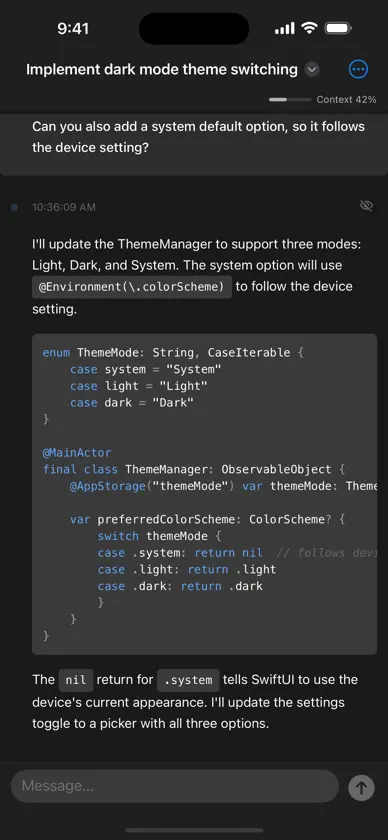
Nimbalyst brings your AI coding sessions to your pocket. Monitor, interact with, and respond to your desktop AI agent from anywhere -- no laptop required. STAY IN THE LOOP Your desktop AI sessions sync to your phone in real time. Control Claude Agent from your phone and track progress on the go from wherever you are. When your AI agent needs input -- a permission approval, a question answered, a plan reviewed -- respond right from your phone. INSTANT PUSH NOTIFICATIONS Get notified the moment your AI agent needs your attention. Tap the notification to jump straight to the session that needs you. SECURE BY DEFAULT All session data is end-to-end encrypted with AES-256-GCM. Your code, prompts, and AI responses are encrypted before they ever leave your desktop. Not even the sync server can read your data. NATIVE iOS EXPERIENCE Built with SwiftUI from the ground up. Native navigation, pull-to-refresh, iPad split view, and instant offline access to previously viewed sessions. No web wrapper -- this is a real iOS app. KEY FEATURES Real-time sync of all AI sessions across your projects Send prompts and follow-up messages to active sessions Approve tool permissions, answer questions, review plans Review code changes and git commit proposals Push notifications with deep-linking to specific sessions Offline viewing of cached session transcripts iPad split view with sidebar navigation QR code pairing with your desktop in seconds Unread indicators so you never miss a message Nimbalyst for iOS is a companion to the Nimbalyst desktop app. A desktop installation is required. Pair your devices by scanning a QR code from Nimbalyst desktop, and your sessions sync automatically. Learn more at https://nimbalyst.com
What's new
Version 1.3.0 · Oct 20, 2026
- Fixed sync issues and errors regarding sync keys - Fixed images in agent transcripts - Browse and edit your project's agent-maintained wiki from the new Wiki tab. - Layout improvements for markdown on different screen sizes. - Improved error handling - Long replies and question forms no longer disappear from the transcript
You might also like
 OpenClient: Chat privado de IAArturo Carretero Calvo
 Paseo - Remote Coding AgentsMohamed Boudra Ziani
 AIMailMindSingularity Games Co., Ltd.
 Local AI Assistant: ThinkLocalDigital Hole Pvt. Ltd.
 Capio: Work Log & PlannerChang Joo Park
 Hermes ReddeGoosehouse LLC
 Cumbersome: AI LLM API ClientFolding Sky Co
 Lumiere: OpenClaw & AI AgentsReceiptIn
 Kilo Code: Code with AI AgentsKilo Code Inc.
 MausBot: Private AI AgentsSupamaus Software Private Limited