
pairPics
hidenobu akiyoshi
No ratings yetPhoto & VideoAges 4+
Screenshots



About this app
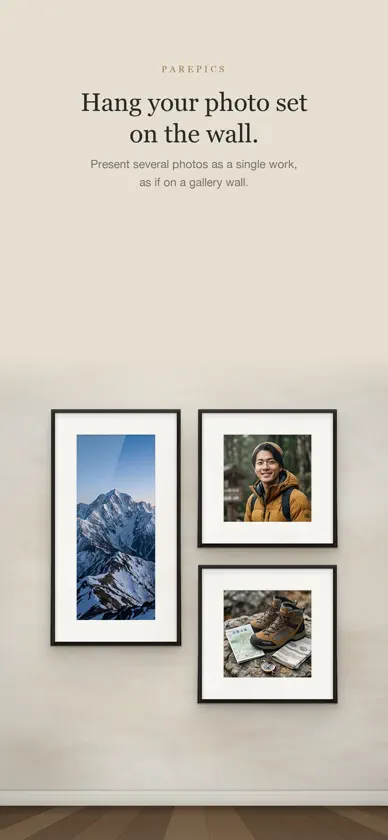
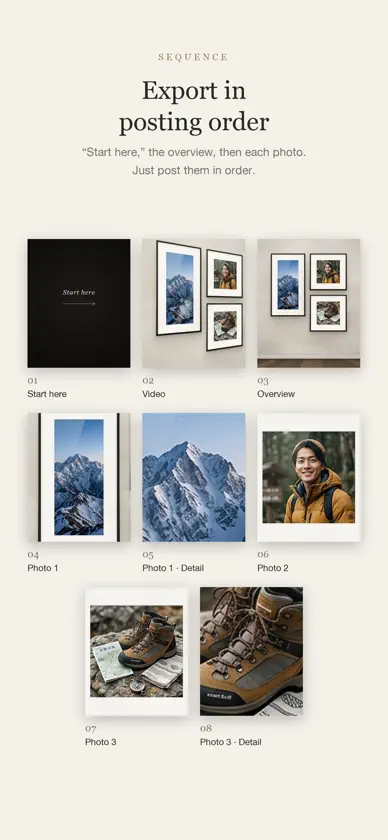
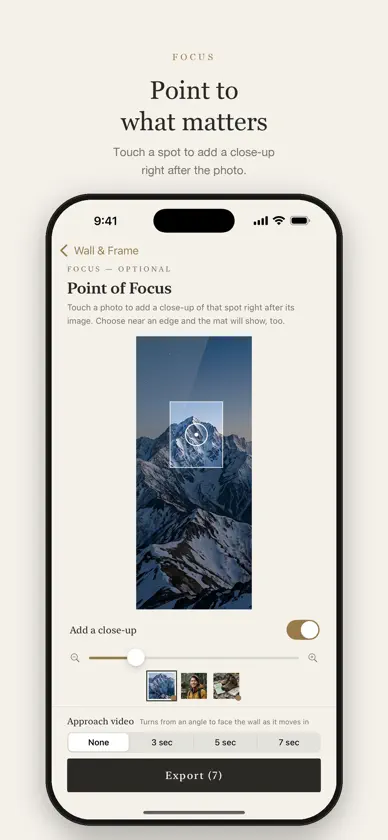
parePics presents several photos as a single work. Like hanging them on a gallery wall, it frames your photo set with quiet care. ■ Your photo set, on the wall • Choose a style for one to five photos • Rearrange and resize the frames as often as you like, with a single tap. A square photo doesn’t always get a square frame ■ Framing for each photo • Choose a ratio (original, 1:1, 4:5, 3:2 and more) and set the crop with your fingers • Black or gray screenshot borders are removed automatically ■ Fine walls, frames and mats • 8 walls: Limewash Ivory, Roman Travertine, Carrara Marble, Walnut Boiserie, Charcoal Plaster, Sage Wainscot, Belgian Linen, Bordeaux Silk • 9 frames: Gilded Louis, Gallery Black, Walnut, White Oak, Brushed Brass, Antique Silver, Ebony & Gold, Float White, and a frameless Acrylic Panel • Choose a thin, standard or thick frame width • The mat adapts to the tones of each photo — or choose from 8 mats, including double and linen • Add an elegant spotlight, as if lit from the ceiling ■ Film look • Compare the original and the film look side by side, choose the strength, then decide ■ Point to what matters • Touch a spot on a photo to add a close-up of it as the next image. Choose near an edge and the mat will show, too ■ Approach video • Create 3, 5 or 7-second videos that turn from an angle to face the wall as they move in, with light gliding across the glass ■ Export in posting order • “Start here,” the approach video, the overview, each photo, then the close-ups • Saved to Photos in the same order, so you simply post them by number ■ Privacy All photos are processed on your device. There’s no account, and parePics never uploads your photos to any server.
What's new
Version 2.0 · Oct 21, 2026
Welcome to pairPics. - Choose a wall and frame to turn photo sets into art - Walk-through videos of a museum, a forest and a glass gallery by the sea - Put your photos on the giant screens at the Shibuya crossing - Export images and videos in posting order Works on iPhone and iPad.
More from hidenobu akiyoshi


You might also like
 emo. - 新体験フィルムカメラEmotional Bloom
 Film35: Experiencia analógicaMasami Yamate
 Gps Cámara - Marca de TiempoArslan Amin
 LCC ScanXGRIDS LIMITED
 Color Control LitehandyCloset Inc.
 Inset – Marcos de foto y vídeoAritaka Kanazawa
 Collage - photo layout appGIGABUBBLE INC.
 GifMov - Gif MakerREAFO CO., LTD.
 Colorear Fotos en Blanco NegroAlpine Technologies LLC
 Accent - Selective ColorAKIRA SANO