
PocketMonitor
Jake Phillips
No ratings yetMusicAges 4+
Screenshots


About this app
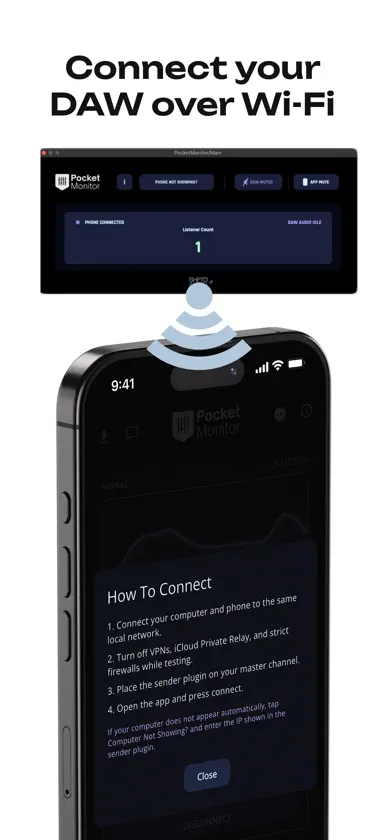
PocketMonitor lets you stream your DAW audio to your phone over local Wi-Fi, so you can quickly check your mix on a real mobile device while you work. Use PocketMonitor to: • Listen to your mix on your phone in real time • Connect to your desktop sender plugin over the same Wi-Fi network • Monitor signal activity and adjust output volume • Switch between available desktop sources with a simple tap To use PocketMonitor, you’ll also need the PocketMonitor sender plugin on your computer. Download the PocketMonitor sender plugin from SHFTDAudio.com Available for: • macOS: VST3, AU • Windows: VST3 How it works: 1. Install the PocketMonitor sender plugin on your Mac or Windows computer 2. Put your computer and phone on the same Wi-Fi network 3. Load the plugin on your DAW master/output channel 4. Open the PocketMonitor app and connect PocketMonitor is built for fast, practical mix checking on the device your audience uses every day. Website: SHFTDAudio.com Terms of Use: https://www.apple.com/legal/internet-services/itunes/dev/stdeula/
What's new
Version 3.0.0 · Jun 23, 2026
PocketMonitor 3.0.0 brings a refreshed experience and a more reliable connection workflow. • New black-and-accent visual design • Improved sender plugin connection and audio metering • Manual IP connection when automatic discovery fails • Updated setup help and support tools • New Pro monthly plan with a 3-day free trial • Improved stability and crash reporting
In-app purchases
The most popular purchases on the App Store.
- PocketMonitor ProConsumable$599.00
- PocketMonitor Pro Subscription · 3 days free trial$99.00 / month
You might also like
 Omni: Pocket SynthRuben Terron Rodriguez
 SB AUDIO FXCourtney Lake
 Trackstack MobileTrackstack Music Ltd
 DnB Allstars MallorcaCurate It Travel
 InflytePaul Mcconnon
 Qu4YouAllen & Heath Limited
 Pianoteq 9Modartt
 Music Mastering - SoundBoostDIKTATORIAL Inc.
 hearthis.atBenedikt Gross
 Open Beatz FestivalOpen Beatz Festival