
Q++
Case For Vision LLC
No ratings yetHealth & FitnessAges 4+
Screenshots




About this app
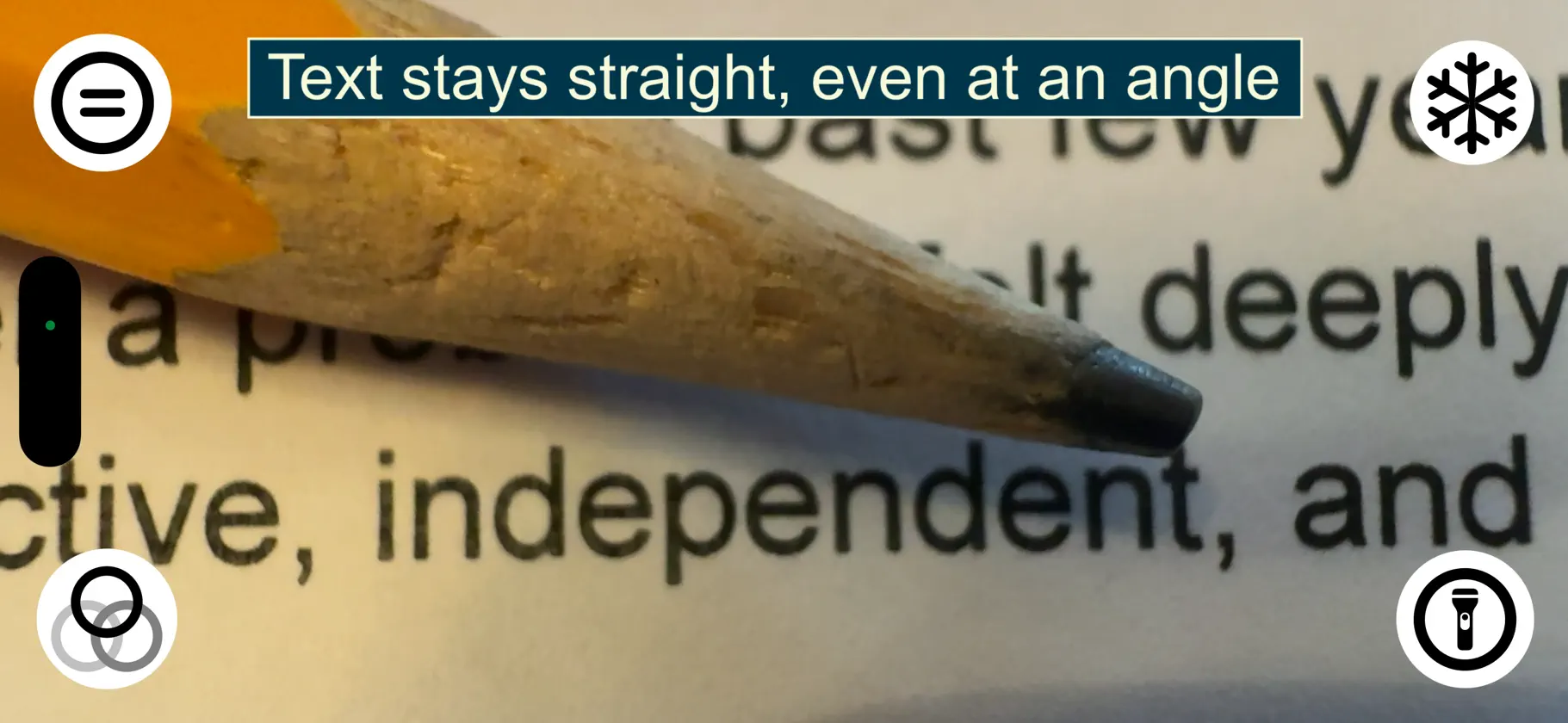
A simpler, more stable way to magnify Q++ transforms your iPhone into a hands-free, handheld magnifier, similar to dedicated electronic magnification devices—but without the cost, complexity, or learning curve. Unlike traditional magnifier apps, Q++ is designed to reduce common challenges like shaky hands, tremors, constant refocusing, and awkward phone positioning. Whether you’re holding your phone or using the app with Case for Vision Ergo or a compatible kickstand, Q++ helps you maintain a clear, steady view. What makes Q++ different? - Stable magnification with true hands-free operation Q++ works beautifully on its own and pairs especially well with compatible MagSafe kickstands or the Case for Vision Ergo. When supported, you can glide the phone smoothly over text or objects—much like a professional handheld video magnifier—without needing to hold it perfectly still. - Automatic perspective correction When your phone is angled above printed material, Q++ automatically straightens and corrects the image, keeping text readable and undistorted even when the device isn’t parallel to the page. - Intuitive zoom and navigation Use familiar pinch gestures to adjust magnification, and pan around the image to explore different areas with ease. - Ultra-simple interface Essential controls are placed intuitively in the four corners of the screen, keeping the view clear and uncluttered. - Reading guidelines and high-contrast filters Optional reading guidelines help you focus on a single line of text. Switch between black on white, white on black (inverted), and yellow on black filters to improve readability in different lighting conditions. - Freeze the image for steady inspection Freeze the view to examine fine details without motion or shaking, ideal for extended reading or close inspection. - Built-in flashlight control Turn on your iPhone’s flashlight directly within the app to brighten printed material in dim environments, like restaurants or low-light workspaces. - No setup, no training. Q++ uses standard iPhone gestures and works seamlessly with Apple accessibility features, including the VoiceOver screen reader. Includes a 14-day evaluation. Q++ is free when you purchase a Case For Vision Ergo, which also enables hands-free distance magnification. Purchase Ergo and receive an unlock code for unlimited use of Q++ beyond the trial period
What's new
Version 1.0.6 · Aug 6, 2026
Bug fixes and performance improvements.
In-app purchases
The most popular purchases on the App Store.
- Full LicenseConsumable$899.00
More from Case For Vision LLC

You might also like
 IowaColorVisionThe University of Iowa (ITS)
 Hello Practice ScribeHelloPractice, Inc.
 Control LITEShemesh Health Solutions PTY Ltd
 Color Vision TestsMy Call Bag LLC
 MagniLink ViewerLVI Low Vision International AB
 MindfulPacerHuman Aspects of Software Engineering Lab, University of Zurich
 Chart2020 LiteShemesh Health Solutions PTY Ltd
 Eye Disease SimulatorMy Call Bag LLC
 Eye Chart Pro Remote ControlDok LLC
 HEALIC FootScannerReTiSense