
Shell Keyboard
Nguyen Nguyen
No ratings yetDeveloper ToolsAges 4+
Screenshots



About this app
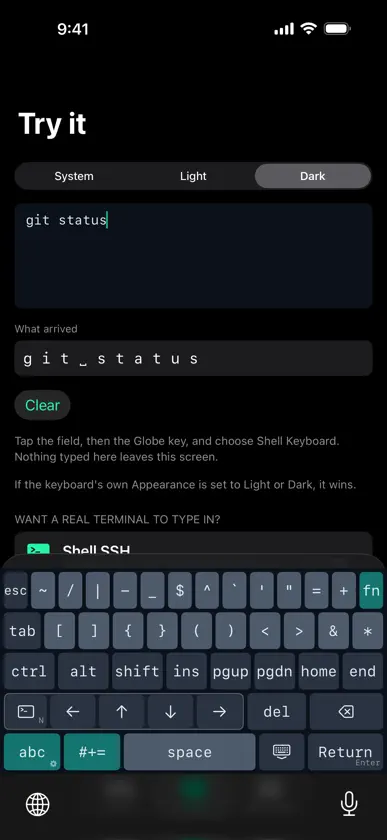
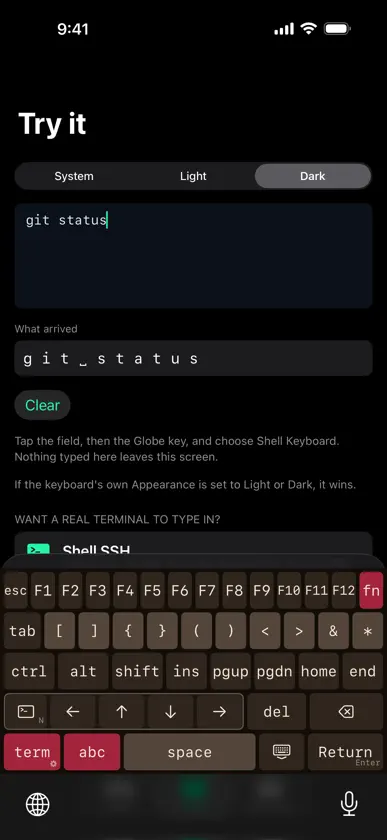
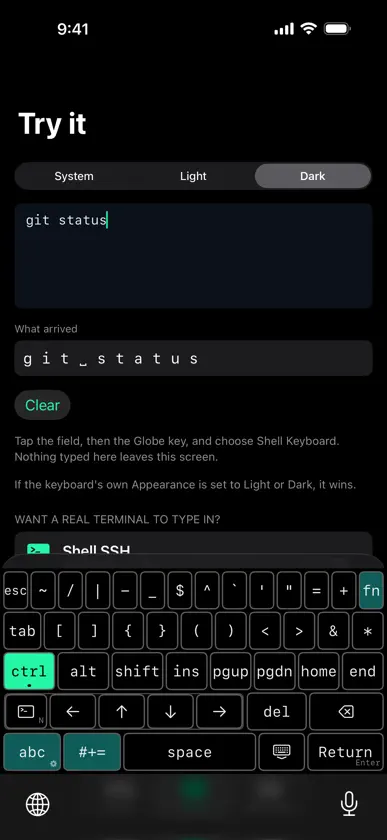
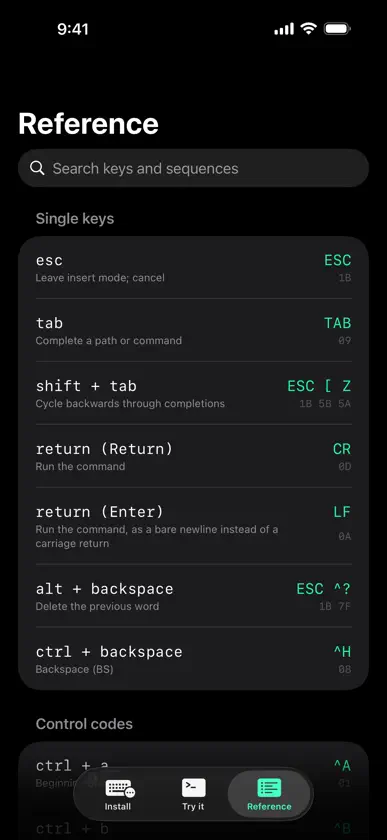
Shell Keyboard adds the keys a terminal actually needs — the ones iOS's default keyboard leaves out. Working over SSH or in a local shell needs Ctrl, Esc, Tab, arrow keys, and function keys, none of which exist on the standard iOS keyboard. Shell Keyboard is a custom keyboard built specifically for terminal apps like Blink, Termius, Prompt, a-Shell and iSH — it sends the exact ASCII control codes and ANSI/VT escape sequences your terminal expects, the same bytes a physical keyboard would send. NEW: IPHONE DUO Shell Keyboard supports iPhone Duo. Open it, and the keyboard spreads out into the same 60% and 75% layouts as iPad, 75% by default. Close it, and it's the iPhone keyboard again. It switches as you fold and unfold. A REAL KEYBOARD ON IPAD AND IPHONE DUO Choose a 60% or 75% layout, the compact keyboards terminal users already type on. The 75% layout puts Esc, F1–F12, a number row, Caps Lock, Home, End, Page Up, Page Down and inverted-T arrow keys on one screen, and Shift types the symbol printed on each key, just like a physical keyboard. The 60% layout keeps the function keys, navigation and arrows one fn press away. iPad opens in the 75% layout; the original ShellKey layout is one tap away in Settings. WHAT'S INCLUDED • A dedicated terminal layer: Ctrl, Alt, Esc, Tab, arrow keys, Home/End/PgUp/PgDn, and the punctuation a shell prompt uses constantly • Ctrl and Alt as proper modifiers — latch one for a single keypress, or double-tap to lock it on, like a hardware keyboard • A full function-key layer: tap fn and the top row becomes F1 through F12, while every other row stays exactly where it was • Arrow keys that match the app you're in — Normal for shells, Application for vim, tmux, less and htop, or Move the Cursor for ordinary text fields • Return or Enter: long-press the Return key to switch between a carriage return and a line feed • A plain QWERTY layer and a complete symbols layer, for ordinary text — hostnames, paths, commit messages — without leaving the keyboard • Seven themes — Shell, Ember, Glacier, Dusk, Moss, Void (pure black) and High Contrast — each in light and dark, and an Appearance option to keep the keyboard light or dark everywhere • On iPad and an open iPhone Duo, 60% and 75% layouts (75% by default), described above • A searchable reference inside the app, listing every key alongside the exact escape sequence and hex bytes it sends • Every key emits the exact byte sequence a real terminal expects SETTINGS LIVE IN THE KEYBOARD Touch and hold the key with the small gear (or tap the gear key on the 60% and 75% layouts) for Haptic feedback, Theme, Appearance and, on iPad and an open iPhone Duo, Layout. They live in the keyboard itself because, without Full Access, iOS keeps a keyboard and its app apart, and Shell Keyboard never asks for Full Access. BUILT FOR PRIVACY Shell Keyboard never asks for Full Access. It cannot reach the network. It never reads, stores, or transmits anything you type — every key it sends is decided from the key you tapped, and nothing else. No analytics, no crash reporting, no account. GOOD TO KNOW In a terminal or editor running inside a web browser — code-server, Jupyter and the like — the keys that send a multi-character escape sequence don't get through: the arrow keys, F1 through F12, Home, End, Page Up, Page Down, Shift+Tab and Alt combinations. Everything that sends a single byte works there normally, including every Ctrl combination, Esc, Tab, Return and ordinary typing. Web pages listen for key press events and iOS only lets a keyboard extension insert text, so this is an iOS limitation that applies to every third-party keyboard, not something an app can work around. WHO IT'S FOR Anyone who SSHes from an iPhone or iPad — sysadmins, developers, and anyone tired of missing Ctrl+C.
What's new
Version 1.3.0 · Nov 4, 2026
• iPhone Duo: Shell Keyboard now supports Apple's foldable. Open it, and the keyboard gets the iPad's 60% and 75% layouts, 75% by default, with a number row, F1–F12 and inverted-T arrows. Close it, and it's the iPhone keyboard. It switches as you fold and unfold. • On the 75% layout, the arrow keys now sit inside one clean inverted-T outline. Still no Full Access, no network, and nothing you type is ever read, stored or sent.
More from Nguyen Nguyen


You might also like
 iDevTools奕 徐
 Fetch Me !Basel AbuTaleb
 YAML ToolsMohammed Aadhil
 systemsoundtestSHUNJI KUSAKA
 Binarrator - binary translatorLudvig Valdemar Soerensen
 Device Information ToolKudit LLC
 Device Insight Dashboard ProEyeOS Store Inc.
 Tanuki for GitLabFelix Schindler
 eBook Studio: Create & Publish株式会社キイロ乃カモ
 Python ManualHua Yang