
SortGlass
Cyrus Press
No ratings yetPhoto & VideoAges 4+
Screenshots


About this app
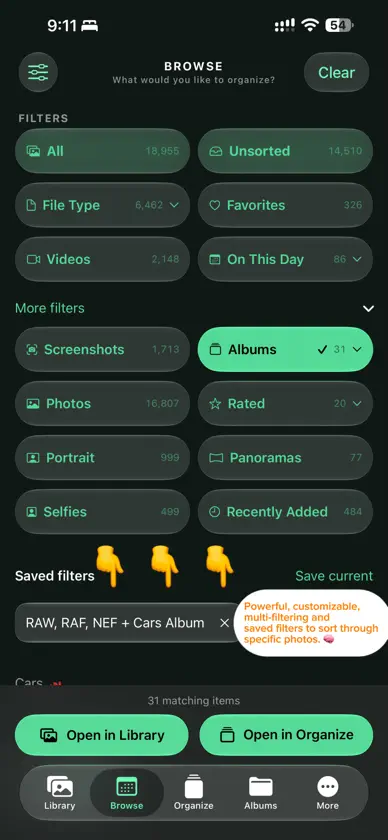
SortGlass is a powerful and simple way to organize your Apple Photos library, designed with customizable Liquid Glass. Move quickly through photos and videos, decide what deserves to stay, and keep your library organized without interrupting your flow. With SortGlass, you can: • Review photos and videos one at a time in the Organize tab • Swipe UP to send items to Trash • Swipe DOWN to favorite the images that matter • Rate photos 1–5 stars for a simple culling workflow (iOS 27 or later) • Add photos and videos to albums with one tap • Browse your whole library in flexible grids, sorted by date taken or recently added • Filter by Unsorted, ratings, media type, albums, and much more • Select multiple items to trash, favorite, organize, or rate together • Review and undo recent organizing actions • Explore and organize directly from your albums All changes you make in SortGlass apply to your Apple Photos library. Nothing is deleted until you confirm in Trash. Confirmed deletions move to Recently Deleted in Photos, where Apple generally keeps them for up to 30 days. SORTGLASS PRO Pro unlocks unlimited organizing, advanced and saved filters, ratings, and full customization: themes, app icons, accent colors, heart colors, and launch effects. The free version includes up to 100 Trash and album actions each week. Pro is available as a weekly, monthly, or yearly auto-renewing subscription, or as a one-time lifetime purchase. Monthly and yearly plans include a 7-day free trial for eligible new subscribers. Payment is charged to your Apple Account. Subscriptions renew automatically unless canceled at least 24 hours before the end of the current period. Manage or cancel anytime in your Apple Account settings. Terms of Use: https://www.apple.com/legal/internet-services/itunes/dev/stdeula/ Privacy Policy: https://sortglass.com/privacy.html Make room for what matters.
What's new
Version 1.1 · Oct 7, 2026
We’re keeping it GLASSY. SORTGLASS IS NOW ON iPAD AND MAC Sort your library on a bigger screen, with the purchases you already have. • Support for Split View, Stage Manager and usable in every orientation (landscape/portrait) • Support for keyboard shortcuts, with shortcuts you can fully customize • Support for trackpad and mouse: click and drag to select, Shift-click to select a range of items • More photos across the screen, sized for larger displays iCloud SYNC Set SortGlass up once and keep it seamlessly consistent on your iPhone, iPad and Mac. You choose exactly what syncs to adapt to per-device workflows: themes and appearance, pinned albums and album order, goals, achievements and history, keyboard shortcuts, and photo search details. BETTER ALBUMS AND FOLDERS • Pin folders to Organize and open them right in the album row • Select and organize photos within any album (to clean-up your individual albums) • Search and filter for albums and folders by just their name • Sort albums A to Z or sort in your customized order (you can choose whether this syncs with iCloud) • Delete albums and folders SEARCH YOUR LIBRARY Find photos and videos by camera, lens, focal length, file type or date. Combine searches with filters and save the ones you use most. A NEW INFO PANEL Swipe up on any photo to see the Camera, Lens, Focal Length, Megapixels, Video Frame Rate and the Album(s) it lives in. Tap the interactive map to open it full screen, switch to Satellite, and see other photos you took nearby. UNDO AND REDO Changed your mind? Undo favorites, ratings, Trash and album changes with a three-finger swipe, a shake, or ⌘Z (when paired with a keyboard). Even a deleted album or folder comes back. MAKE IT YOURS New preset themes, your own saved themes, and custom colors for the accent, theme and favorite heart (you can choose whether this syncs with iCloud) ALSO NEW • Favorites show a heart in your grid and are protected from Trash • Drag photos straight into Messages, Mail and other apps • Optional reminders, including On This Day • Give Back: donate directly to causes for animals, nature and children • Optional tips to support development, and Redeem Code for offer codes PLUS MANY FIXES AND REFINEMENTS
In-app purchases
The most popular purchases on the App Store.
- Tip - You’re a Lifesaver!Consumable$399.00
- Tip - Huge Thanks!Consumable$299.00
- Tip - Treats for my pup.Consumable$199.00
- Tip - Coffee Break.Consumable$99.00
- Tip - Small Thanks!Consumable$39.00
- SortGlass Pro LifetimeConsumable$999.00
- SortGlass Pro YearlySubscription · 7 days free trial$999.00 / year
- SortGlass Pro MonthlySubscription · 7 days free trial$89.00 / month
You might also like
 BridgeLiteTsuyoshi Ito
 cullstudioNILS NEUHAUS
 NitpicWilliam Yelvington
 Culpix - Borra Fotos RepetidasHAEDUN KIM
 Photo Triager: RAW CullingJunle Li
 NeoCam - cámara de pixel artCharles Etzel
 GyroCam | Always Upright VideoFayaz Shaikh
 Curator - Organizar FotosOscar Lampe
 SDCullOne Rad Studio LLC
 Nitro PhotoGentlemen Coders