
Synchrona
Kai Kunze
No ratings yetUtilitiesAges 4+
Screenshots



About this app
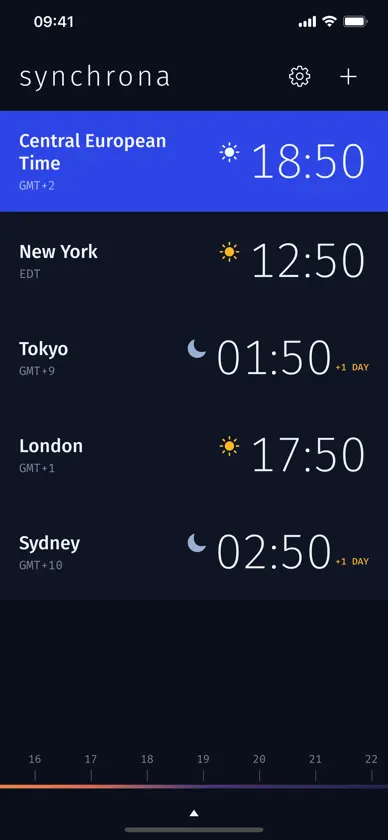
Synchrona shows the current time in every city you care about, on one screen you can read from across the room. It follows your light or dark appearance. The slider along the bottom is the main idea. Drag it and every city shifts together, so you can see what 4 PM your time looks like in Tokyo, London, and Sydney before you send the invite. A colored strip under the slider runs from midnight blue through sunrise orange to noon amber and back to night, so you always know which part of the day you are pointing at. Let go and the slider settles on the nearest five minutes. Tap Now to go back to the current time. Each city card shows the time in large, light digits, the zone abbreviation, and a sun or moon for day and night. When a city is already on tomorrow or still on yesterday, a +1 DAY or -1 DAY marker appears next to the time. Your own time zone is the blue row, and it follows you when you travel. Times use your region's 12- or 24-hour clock unless you pick one in Settings. Widgets put your time and your cities on the Home Screen, and one city on the Lock Screen. The share button sends the moment you picked as text, such as "16:00 CET (Berlin) = 10:00 EST (New York) = 00:00 JST (Tokyo, Sat)", ready to paste into an invite. Add a city by searching for it. The list starts with twenty common cities, and search finds any time zone by name. Hold a card and drag to reorder, or swipe left to remove one. Text sizes and VoiceOver work throughout. Your list is saved on the device and nowhere else. Synchrona has no accounts and makes no network requests. Synchrona runs on iPhone, iPad, and Mac.
What's new
Version 1.2 · Nov 5, 2026
Version 1.2 - Fixed: the clocks now show the current minute and keep up. Before, they stopped at the full hour. - Widgets for your Home Screen and Lock Screen. - Share the time you picked in all your cities as text. Tap Now to go back to the current time. - Larger text sizes and VoiceOver work across the app, and your own row shows your city's name. - Zone names like JST and CET match the time you pick.


