
Tonbridge App
Tonbridge School
No ratings yetEducationAges 4+
Screenshots




About this app
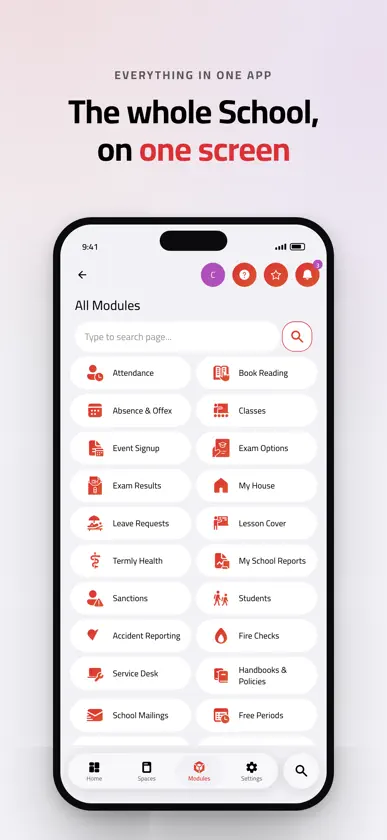
The Tonbridge App puts the School day in one place. Sign in with your Tonbridge account to see your timetable, your reports, the notices that matter, and the forms and bookings that used to mean an email chain. It is for pupils, parents and staff at Tonbridge School, and it needs a School account to show anything at all. What you see depends on who you are, so there is nothing to set up and no wrong version to download. PUPILS • Your timetable, with the week letter and the room, so you know where to be next • School reports and exam results as they are published • Rewards and sanctions, so nothing arrives as a surprise • Absence and Offex requests, sent from your phone instead of chased in person • The School calendar, trips, event sign-ups and club lists • Handbooks, policies and your reading list • Report an IT or facilities problem, and follow it through to a fix PARENTS • All of your children in one app, a tap apart • School reports, exam results and a summary of how each term has gone • Book parents' evening appointments yourself, at a time that works • Absence and Offex requests, and the School's answers to them • Trip information and forms • Termly health forms and Check Your Details, so the School holds the right information • Billing extras, itemised, so a term's charges are never a mystery STAFF • Registers taken in seconds, on a phone in a corridor or a laptop in a classroom • Class lists, set lists and pupil profiles, with the pastoral context in front of you • Lesson cover, free periods and who is where • Rewards, sanctions and private notes, recorded where pupils are actually discussed • Leave requests, allowances and approvals, with your team's cover visible before you book • Professional development submissions and approvals • House and site compliance: fire checks, accident reports, critical incidents • Advanced search and saved queries across the data your role allows MADE AT TONBRIDGE The app is built and run in-house by the School's IT and Digital team. If something is wrong or missing, the people who can fix it are down the corridor. Log a ticket from Service Desk in the app. DETAILS • Light and dark, plus a set of colour themes • Respects your system text size • The same app on iPhone, iPad and Mac • Notifications open the screen you need, not the home page SIGNING IN Sign in with your School account. Parents new to the School receive their sign-in details from the School. Without a Tonbridge account, the app has nothing to show you. PRIVACY You only ever see the information your role entitles you to. The app is covered by the School's privacy policy: https://tonbridge.school/privacy
What's new
Version 2026.11.2 · Nov 12, 2026
This update makes reports and assessments more predictable. Delegate on Assessment Entry works again, report admins can edit assessment marks, and a new Assessment only tick box keeps reports you don't need to write out of the way while leaving them on Assessment Entry. Copying between reports now tells you which marks and grades couldn't be matched, and report setup keeps each step's ticked groups. Parents' Evening has been tidied for phones. The admin page scrolls properly, every upcoming evening is a card you can tap, and finished evenings sit behind a Show button. Teachers' availability is grouped by day within each session, and changes to evening details are saved reliably. You can now check whether a sent campaign was delivered. Push notification text is written separately from the email and kept within its length limit. When IT edits a communication, the owner's name stays on it. Staff onboarding checks for an existing staff record with the same personal email address and uses that record rather than creating a duplicate. Double lessons split into two halves now mark the correct pupil in both halves, and Book Reading lists academic subjects only, as Rewards does. On iPhone, bottom sheets now float in from the edges, following the corners of the screen. Pride mode has a flag-coloured band around the whole screen on iOS 26 and rounded displays, and the thin flag line under the title bar has been removed. Fixes include a crash when choosing an evening on the family screens, a crash in the copy toolbar when the selected text had gone, and filter sheets that could act on a page that had already closed.
More from Tonbridge School


You might also like
All apps like Tonbridge App → The New BeaconWeduc UK Ltd
 Sutton Valence SchoolSchool Window
 UppinghamSchool Window
 MyDulwichDulwich College(Singapore) Pte. Ltd.
 The Athlete PlaceThe Athlete Place LTD
 Chinese International SchoolChinese International School
 SchoolBase ParentFurlong Solutions
 LodgicalDaymarker Ltd
 Shrewsbury House SchoolSchool Window
 Cottesmore SchoolWeduc UK Ltd