
Shell SSH
Nguyen Nguyen
No ratings yetDeveloper ToolsAges 4+
Screenshots




About this app
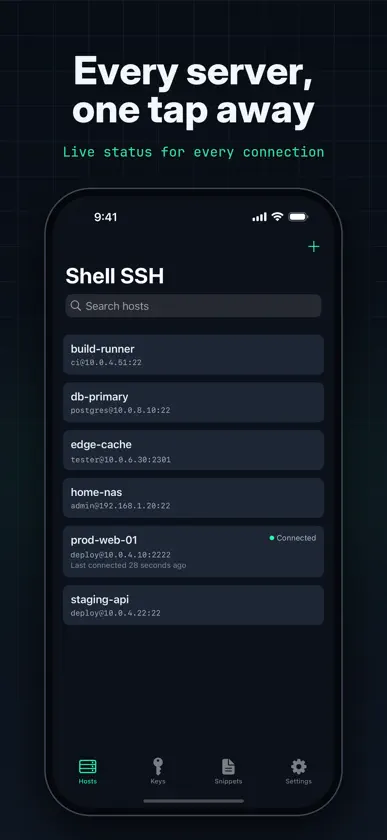
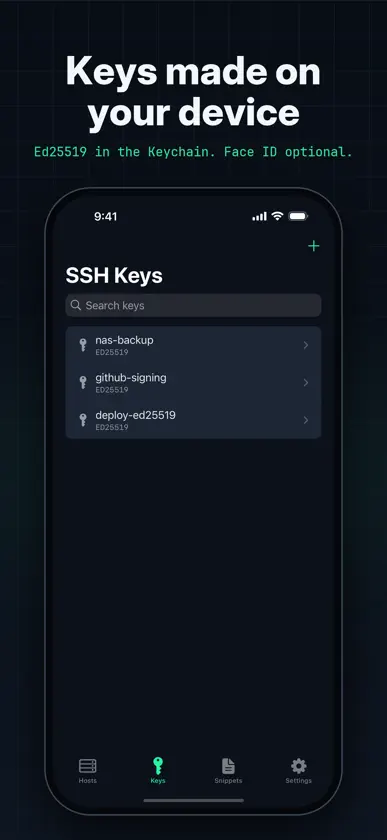
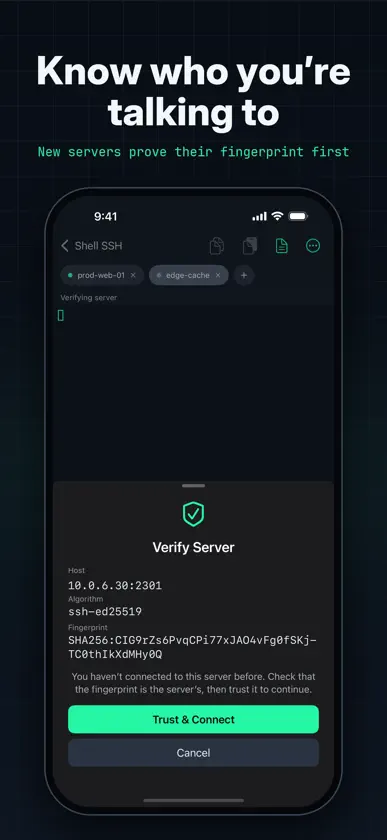
Shell SSH is a focused SSH client for iPhone, iPhone Duo, iPad and Mac. It opens a real interactive terminal to the servers you administer — not a box that runs one command at a time. COPY WHAT YOU NEED, WHERE YOU NEED IT • Select Text: copy output to your device even while tmux, vim or htop has the mouse. Drag to select, two fingers to scroll, then Copy • Let a server copy to your clipboard: a yank in tmux or vim lands on your device, for the hosts you allow. Every copy is shown, and a server can never read your clipboard • Copy the whole scrollback in one go, and paste from the toolbar or with Command-V A KEYBOARD THAT WORKS LIKE A TERMINAL • With a hardware keyboard, Ctrl and Option shortcuts reach the shell — Ctrl-C, Ctrl-R, Option-B — on a Mac too • Shift+Enter starts a new line in chat-style command-line tools instead of sending • On screen, a key row adds Esc, Ctrl, Tab, arrows and common symbols — the keys iOS doesn't give you CONNECT • Save hosts with a name, address, port, username and notes • Authenticate with an SSH key or a password • Search across names, addresses, usernames and notes • Servers that only offer keyboard-interactive login, as some two-factor setups do, aren't supported yet • Open several sessions as tabs, and switch without disconnecting • On iPad and an open iPhone Duo, run two terminals side by side • Your tabs and your split come back the way you left them SESSIONS THAT SURVIVE A LOCKED SCREEN • iOS suspends apps, which drops SSH connections when your device locks • Shell SSH can run your shell inside tmux, so it keeps running on the server and picks up exactly where you left off • It asks once, per host or as a default, and closing a tab closes its tmux session too A REAL TERMINAL • xterm-256color emulation with full 256-colour support and an alternate screen, so full-screen programs behave as on a desktop • Themes: Shell, Solarized Dark and Light, Dracula, Nord, Gruvbox, One Dark and Monokai • Adjustable font size, cursor style and scrollback • Resizes correctly on rotation, in Split View and in Stage Manager SNIPPETS • Keep the commands you run often and insert or run them in a tap • Placeholders: write {{service}} once and be asked for it when you use it • Insert leaves the command at the prompt so you can read it before you send it • 100 common commands included, from systemctl and journalctl to docker and git SSH KEYS • Generate Ed25519 keys on device • Import OpenSSH keys, including passphrase-protected ones • Copy a public key out for authorized_keys • Fingerprints in the same SHA-256 form as ssh-keygen SECURITY FIRST • Server identity is verified on first connection, with a clear, blocking warning if a host key ever changes • Passwords and private keys live in the iOS Keychain. A private key leaves your device only if you export it • Optionally require Face ID or Touch ID before a saved credential is used • When a login is refused, Shell SSH tells you what the server would have accepted • Warns before pasting multiple lines, which could run several commands at once • Review and remove trusted server fingerprints whenever you want IPHONE, IPHONE DUO AND IPAD • On iPhone Duo, closed it's the iPhone app; open it for the iPad layout, with your hosts beside the terminal, split view and Focus mode. It switches as you fold and unfold • On iPad, your hosts sit alongside the terminal, and Focus mode gives one session the whole screen (Command-Shift-F with a keyboard) • Light and dark appearance, following the system or set explicitly Shell SSH keeps its key row deliberately small. For a fuller terminal keyboard in every app, Shell Keyboard is a separate companion app.
What's new
Version 1.3.0 · Nov 7, 2026
• Select Text: copy from the terminal to your device even while tmux, vim or htop has the mouse. Tap Select Text, drag to select, two fingers to scroll, then Copy. • Copy from your server: turn on Allow Copy to Clipboard for a host, and copying in tmux or vim lands on your device's clipboard. Shell SSH shows each copy as it happens, and a host can never read your clipboard. • On a Mac, Ctrl and Option shortcuts now reach the shell: Ctrl-C, Ctrl-A, Option-B, Option-Backspace and the rest. • Shift+Enter starts a new line in chat-style command-line tools instead of sending. You can turn this off in Settings → Terminal. • iPhone Duo: Shell SSH supports Apple's foldable. Closed, it's the iPhone app you know. Open it, and you get the iPad layout: your hosts beside the terminal, two shells side by side, and Focus mode. It switches as you fold and unfold, and your open sessions carry over. • Split view on the Duo's inner display works upright too: two terminals stacked, each the full width.
More from Nguyen Nguyen


You might also like
 Fetch Me !Basel AbuTaleb
 iDevTools奕 徐
 Device Insight Dashboard ProEyeOS Store Inc.
 App Icon ExtractorFlorian Schimanke
 Binarrator - binary translatorLudvig Valdemar Soerensen
 eBook Studio: Create & Publish株式会社キイロ乃カモ
 systemsoundtestSHUNJI KUSAKA
 Device Information ToolKudit LLC
 Link Check ProAbraham Vera
 XML Tools: Editor & ValidatorMohammed Aadhil