
Crest Browser
Paul Davis
No ratings yetUtilitiesAges 17+
Screenshots


About this app
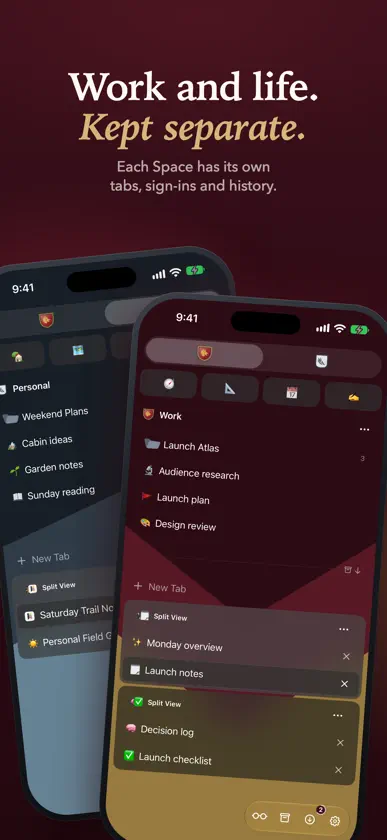
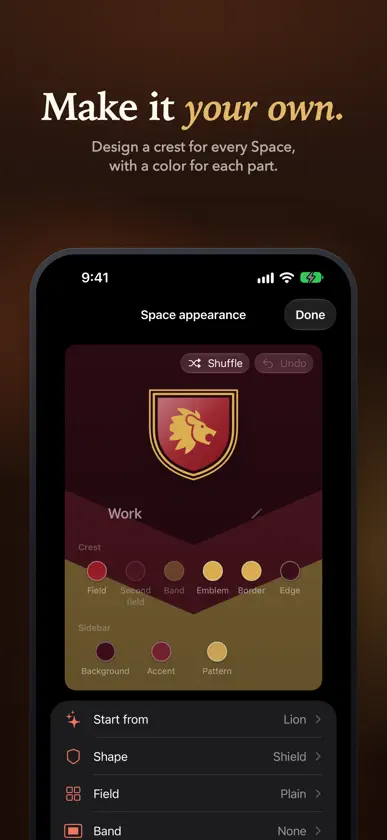
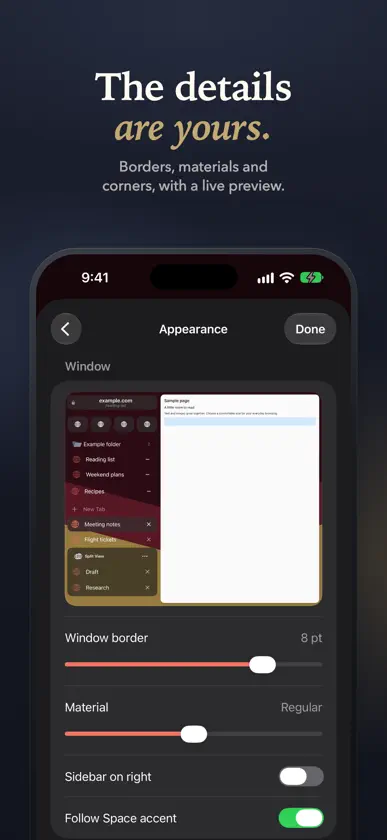
Work, personal life, and everything between deserve their own Space. Crest is a native browser for iPhone and iPad that keeps your accounts separate, your tabs organized, and your browsing distinctly yours. KEEP YOUR ACCOUNTS SEPARATE Each Space has its own tabs, cookies, website data, history, passwords, and site permissions. Stay signed in to different accounts on the same website. Switch from work to personal browsing without carrying the wrong session with you. GIVE EVERY TAB A PLACE Pin the sites you use every day. Save pages in folders. Keep today's tabs close and completed work in the archive. Select and move tabs, folders, and Split View groups together. On iPhone, bring in the sidebar with a gesture; on iPad, keep it beside your page. MAKE IT YOUR OWN Start from Winter, Lion, or another template in Crest Studio, then choose a color for each part of the crest and the sidebar. Choose a crest, emoji, monogram, or symbol. Appearance settings adjust the window border, sidebar material, tab corners, borders, and default page zoom. KEEP RELATED PAGES TOGETHER Group two to four pages in Split View. On iPad, browse them side by side and resize the columns. On iPhone, swipe across the compact toolbar to move between pages in the group. Peek lets you check supported links without losing your place, then keep the page as a tab when you need it. TOOLS FOR EVERYDAY BROWSING Choose one default search for every Space and another for Private Browsing, or pick one for a single Space. Search from a new tab to find the pages and tabs you use most. Translate webpages on device with Apple's Translation framework. Read supported articles in Reader, find text on a page, adjust zoom, share links, and export pages. Content blocking and site permissions give you control over each Space. Language availability varies, and translation may require a language download. PRIVATE WHEN YOU NEED IT Private Browsing uses temporary website storage. Private tabs stay out of saved history, restoration, archive, and sync. Crest does not run an advertising SDK, collect browsing analytics, or require a Crest account. PICK UP ON ANOTHER DEVICE Optional iCloud sync keeps supported Space and tab organization available across your Apple devices through your private iCloud database. Crest is also available for Mac. Crest is free and open source, built with Apple's WebKit. Requires iOS 26.1 or iPadOS 26.1 or later. Some website features and integrations vary by device.
What's new
Version 0.9 · Nov 10, 2026
Sub-Spaces • Spaces can share one set of sign-ins, history and passwords while each keeps its own tabs and look. In Settings › Spaces, touch and hold a Space and choose New Sub-Space, or add an existing Space to a group. • The Spaces of a group show its pinned tabs, or each keeps its own with Separate Pinned Tabs. • Devices on an earlier version of Crest keep syncing and show each Sub-Space on its own until they update. Ad blocking • Crest blocks ads and trackers on every page with EasyList, EasyPrivacy, uBlock Origin's lists and a list for your language. • Choose Off, Balanced or Strict in Settings › Ad Blocking, subscribe to more lists, or write your own filters. • Block Element hides anything the lists miss, and you can turn blocking off for a site from the page's actions. iPhone and iPad • Add to Home Screen is in a page's actions. • A New Tab button floats at the bottom of the sidebar, and a floating sidebar has an arrow that slides it away. • Holding a link opens it in Peek, which grows from the link. • On iPhone, the command palette opens from the address bar, and the address bar slides away while you type into a page. • Clear one site's cookies or cache from the page menu, and see and remove the sites that keep data in each Space's Privacy settings. • Spaces can start from a plain Neutral look. • Notices such as a copied link show at the top of the window. Fixes • Running low on memory unloads one background tab instead of several. • On iPad with a keyboard, pressing Tab in a form no longer switches Spaces. • Zooming a page out fits it to the window. • Tapping the Start Page outside its field puts the keyboard away. • Dropping a tab on a Space icon moves it to that Space. • Sign-in popups offer to save the password you enter and fill saved ones. • Saved passwords are no longer lost if Crest quits partway through an import or delete. • Turning off a Space's lock sticks, and lock changes reach your other devices.
More from Paul Davis


You might also like
 Lens: Simple, Private BrowserMaximos Angelakis
 Emerald BrowserDario Ortiz
 Vanilla - Private BrowserNo Type Studio B.V.
 Quiche BrowserGregory de Jonckheere
 Beam Browser: Fast & PrivateShenzhen Yibo Technology Co., Ltd.
 OutSpan - Fullscreen BrowsingYaw Boamah
 EFKey – Swipe & AI KeyboardPeter Feranc
 Vee BrowserChris Crawley
 VanBrowser: Private BrowserVertolini
 Akari: Browser with Ad BlockerJoseph Rodriguez