
Libstack: Reading Tracker
Sounho Chung
No ratings yetBooksAges 4+
Screenshots



About this app
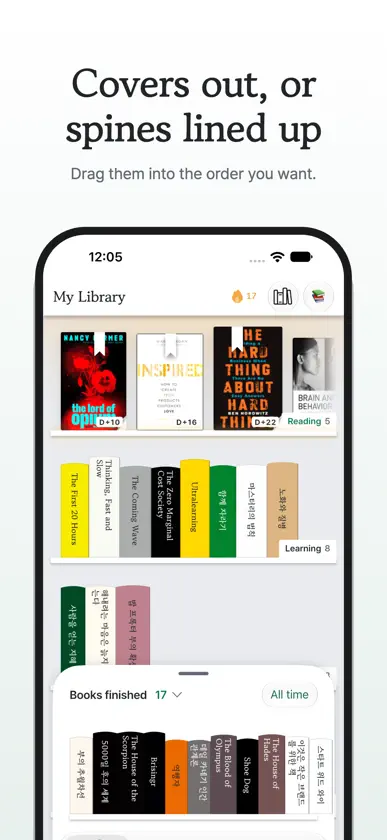
A bookshelf you actually keep. - Shelves you arrange yourself Name your own shelves and drag books into the order you want. See them covers out, or spines lined up. Whatever you're reading sits at the front of its shelf. - Add a book in seconds Search by title, author or ISBN, or point your camera at the barcode on the back. No barcode? Photograph the cover and it finds the book. - Days that add up Read today? Mark it — the calendar fills in and your streak grows. Log where you are by page or by percent. - Notes along the way A sentence worth keeping, or your thoughts when you finish — every book holds your notes, and they're yours alone. - Your reading becomes a card Books finished, days reading, your pace, your most-read author — one library card. Share it to Stories, Photos, or anywhere else. - Read alongside friends Invite a friend by link and see what they have open right now. Browse their shelves, leave a compliment on a book they've read, and poke the ones who've gone quiet. Friendships are mutual, and only friends can see your library. - Pick up where you left off Jump straight to the book in the app you read it in, or borrow it free from your local library through Libby. Korean and English throughout. Light and dark. iPhone and iPad.
What's new
Version 1.1.1 · Oct 10, 2026
• Friends — invite by link, see what they're reading, visit their shelves, poke the quiet ones. • A reading streak — mark the days you read and watch them add up. • Progress by page or percent. • A shareable Library Card — books finished, days reading, pace, most-read author. • Two shelf views — covers or spines. • Notes on any book. • Open a book in the app you read it in, or borrow it through Libby. • Sign in with email, Apple, or Google. • Redesigned for iPad. Used the app before? Sign in with the same Apple or Google account and in most cases your shelves are waiting. If they come up empty, reach out — nothing was deleted.


