
Screenshots



About this app
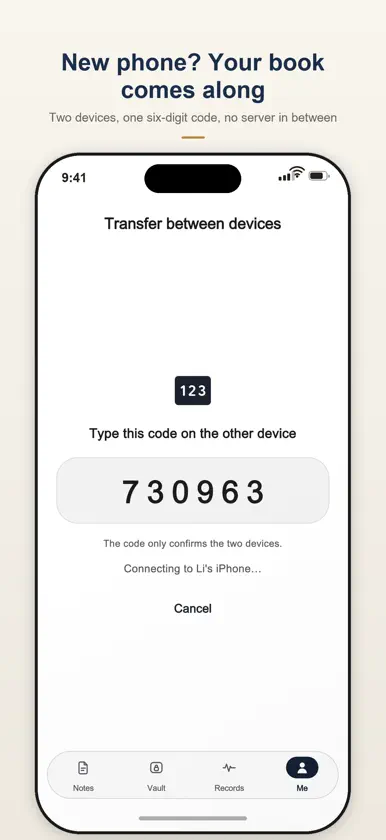
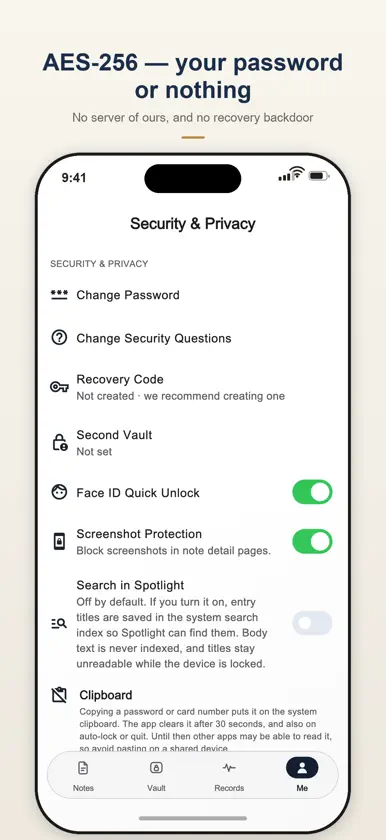
OffMemory is a fully encrypted private record book: your diary, passwords, bank cards, ID documents, cycle, intimacy log and spending all live in the same locked book and open with the same password. No cloud, no server, no ads. One book, five doors On iPhone the app is now four tabs: Notes, Vault, Records, Me. On iPad in landscape the sidebar stays, with the same four doors on the left. The vault and the records are not separate apps: they share one lock, one encryption layer and one recycle bin with the diary, so there is no second password to remember. Vault: passwords, cards, documents Passwords show as dots, appear on tap and re-mask after five seconds; copying goes through a clipboard guard that clears after thirty seconds; a generator and strength meter are built in. Bank cards are drawn as cards, the number masked except the last group, with a reminder seven days before expiry — storage only: the app cannot pay, transfer or reach any payment network. Documents keep front and back photos, with the number visible only at both ends. While the app is locked, no item and no count is shown at all. Records: cycle, intimacy, spending The cycle view colours a monthly calendar, one entry a day, eighteen symptoms to tick, and works out the average length and next estimate from your own dates; it logs your cycle only, gives no diagnosis and cannot be used as contraception. The intimacy log keeps what happened, with no ranking and no comparison. Spending is split into income and expense with categories, and the calendar shows each day's total. All three sit on the same timeline as the diary: Recent lists everything newest first. It opens and you write Layered materials, a restrained type scale, hairline borders instead of shadows, light or dark following the system, serif page titles. Every touch target was audited for size and contrast. Three things worth calling out 1. Second Vault: a second, decoy password opens a separate space where your real content is not visible: separate database, keys and media folders. 2. Apple Watch: capture from your wrist; entries wait in a sync queue, so nothing is lost offline, and you can lock the phone from your wrist. 3. On-device summaries on Apple Intelligence devices: summarise, suggest a title or reflect. Nothing leaves the device. Key features 1. Password protection with Face ID; the app locks itself when it leaves the foreground 2. Recovery code: write it down once and everything stays readable even if you forget the password 3. Records share the diary's password and its AES-256 layer, derived with Argon2id 4. Vault in four sections: passwords, bank cards, ID documents, other; sensitive values masked until tapped, then re-masked after five seconds 5. Bank cards: six colours, number masked in groups, reminder seven days before expiry 6. ID documents: front and back photos with the number visible only at both ends 7. Cycle: coloured calendar, eighteen symptoms, average length and next estimate — a log, not medical advice 8. Intimacy log: date, place, type, note — facts only, no evaluation 9. Spending: income and expense, categories, accounts, calendar and monthly totals 10. Record insights: this month's spending, average cycle, the last six months of trends 11. Recent: diary entries and every record type on one timeline 12. Markdown toolbar, folders, tags, favourites, moods, writing calendar, per-note lock, event date, Time Capsule, Year in Review 13. An encrypted backup restores on a new phone with the vault and records inside; device-to-device transfer carries them too 14. Optional Spotlight index — titles only, off by default; home-screen widget and Lock Screen control (iOS 18+) Download free: three items in total are free, shared by the diary and every record type; one purchase then unlocks unlimited recording, forever. iPhone, iPad, Apple Watch, Mac, 15 languages.
What's new
Version 3.0.0 · Nov 6, 2026
FIVE TABS, ONE BOOK — On iPhone the bottom bar is now four tabs: Notes, Vault, Records, Me. Nothing was removed from the old drawer, it just moved; iPad in landscape still uses the sidebar, and the diary is still the first thing you see. THE VAULT HOLDS PASSWORDS, CARDS AND DOCUMENTS — Passwords appear as dots, show on tap and hide again after five seconds; copying goes through a clipboard guard that clears after thirty seconds; a generator can create a new one. Bank cards are drawn as cards with only the last group of the number visible, and a reminder arrives seven days before expiry. ID documents keep front and back photos. All of it uses the same password as the diary, so there is no second lock to remember. Storage only: there is no payment feature in the app. RECORDS: CYCLE, INTIMACY, SPENDING — The cycle view colours a month calendar, one entry per day, eighteen symptoms to tick, and works out the average length and the next estimate from your own dates; it records, it does not diagnose, and it cannot be used as contraception. The intimacy log keeps the facts, with no ranking and no comparison. Spending is separate income and expense with categories, and the calendar shows each day's total. All three live on the same timeline as the diary — Recent sorts everything newest first. BACKUPS AND TRANSFER CARRY THEM TOO — Restore a backup on a new phone and the vault and the records come back with it; device-to-device transfer can include them as well. The archive version went up, so an older build now refuses a newer file explicitly instead of importing half of it. THE FREE ALLOWANCE, SAID PLAINLY — Three items in total are free, shared by the diary and every record type. One purchase removes the limit.
In-app purchases
The most popular purchases on the App Store.
- Unlock Unlimited NotesConsumable29,99 zł
You might also like
 Passo Password Manager & 2FA星 何
 U2 Secured Password VaultDOLLAR MATES PROPRIETARY LIMITED
 Ciphera Password ManagerOrkhan Gojayev
 Password Bunnypasswordbunny, Inc.
 1Cryptor : Protect PrivacyYusuf Ariturk
 ForPassword - Password ManagerElyware S.R.L
 Asterex: Password ManagerYaw Boamah
 Leaf Note: Markdown Notes守恒 王
 PrivacyNotes: Encrypted NotesLifetime Labs LLC
 Unform - Your AI Career AgentMONETA STAR LABS