
Coffee DTR Timer
Mike Whaley
No ratings yetFood & DrinkAges 4+
Screenshots



About this app
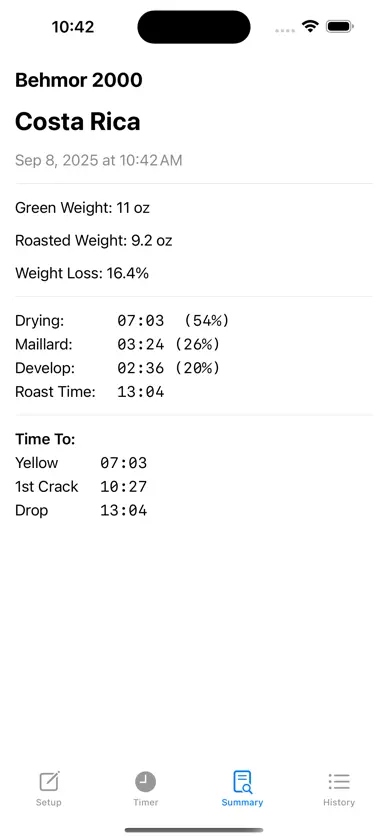
This simple coffee roast timer is used with your roaster of choice. Add your roaster name, bean name and green weight with units on the setup screen. On the timer screen hit start when you start your roast. Tap the Yellowing button when the beans start to turn yellow and the drying phase time is saved. Tap First Crack at the sound of first crack and the Maillard phase time is saved and live DTR is enabled allowing to dial in development time! Tap Drop/End and the development time along with DTR, maillard time, time to first crack and total roast time are shown to allow you to log your roast information. Add roasted weight and weight loss is calculated. Save roast will add to roast history and display the roast summary screen. On the history screen the user can favorite or delete roasts from the history.
What's new
Version 2.0 · Sep 9, 2025
Separated Roast Setup, Timer, and Summary into separate tabs for cleaner user interface and added roast history with the ability to mark favorites.
More from Mike Whaley

You might also like
 Roast ManagerGuido Scheffler
 Roastit - Coffee RoastingARPINE AZATYAN
 RoastmasterRainfrog, Inc.
 RoastNoteMao Nabeta
 CoffeeRoastMateArda Balkan
 BeanBon Home Coffee RoasterAvigo Technology Co., Ltd.
 Kaava: Coffee RoasterTony Gaitatzis
 Roast Master: Coffee JournalSeokmin Bang
 RoastSignalAnkur Agarwal
 CrackLog: bitácora de tostadoKYUNGHWAN KIM