
S3Deck
Tuan Anh Pham
No ratings yetDeveloper ToolsAges 4+
Screenshots



About this app
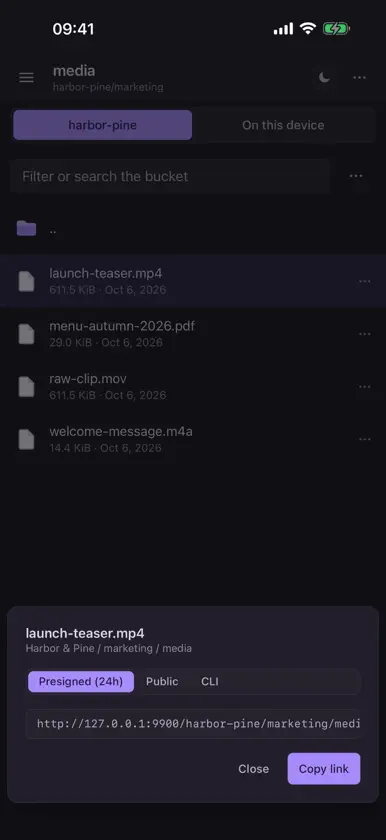
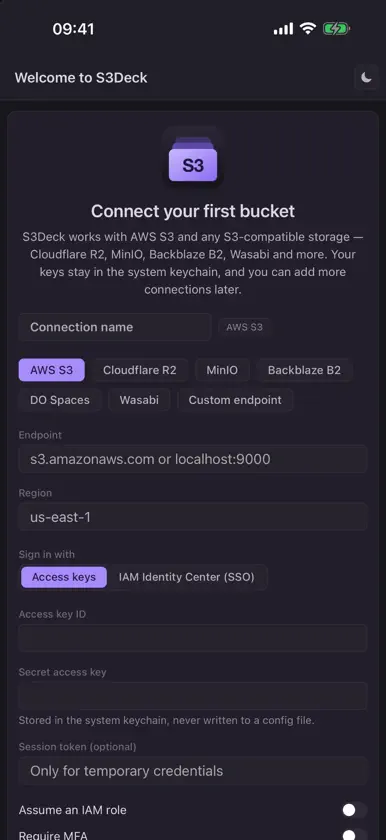
S3Deck puts AWS S3 and every S3-compatible storage on your iPhone — Cloudflare R2, MinIO, Backblaze B2, DigitalOcean Spaces, Wasabi, Ceph and any custom endpoint. Check a bucket, grab a file, share a link or fix a bucket setting without opening a web console. BROWSE AND PREVIEW • Folders and files laid out for the phone: tap to open, long-press to select several, ⋯ for every action. • Preview photos, PDFs, video, audio and text right in the app. • Filter a folder instantly, or search a whole bucket. UPLOAD AND DOWNLOAD • Upload from the Files app, iCloud Drive or any file provider. • Downloads land in S3Deck's own folder, which you also find in the Files app under On My iPhone. • A live transfer queue with retry and cancel; large files go up in parts. MANAGE OBJECTS • Create folders, rename, copy, move and delete. • Edit metadata and headers, tags, storage class and permissions; browse and restore versions. SHARE IN A TAP • Presigned links with an expiry, public/private toggles and copy-ready object URLs. • Open downloaded files in other apps through the share sheet. BUCKET SETTINGS • Bucket policy editor with validation and ready-made snippets. • CORS rules, lifecycle rules, versioning, ACLs and access logging. PRIVATE BY DESIGN • S3Deck connects directly from your iPhone to your storage endpoint. Your files and credentials never pass through any server of ours — there isn't one. • Secret keys are kept in the iOS Keychain. • Mark production connections read-only to block every delete and overwrite. • No analytics, no tracking, no account. Works with the same connections as S3Deck for Mac, Windows and Linux. Available in English and Vietnamese.
More from Tuan Anh Pham

You might also like
 R2Explorer - Bucket ManagerMagenta Creations
 pmoshRobert Gruber
 Cadence for HealthchecksAnton Krall
 ByokyMichael Lodzik
 XV: Release RadarJeffrey Jackson
 UUID Generator & ValidatorMarvin Krueger
 barra de estado - Bar941TAKAAKI KAWABATA
 DraftCode for PHP IDESolesignal Limited
 Conduit: SSH, Mosh & SFTPGrzegorz Witkowski
 Uptime MateChristoph Scherbeck