
Beamer Notes
Wei Chen
No ratings yetProductivityAges 4+
Screenshots


About this app
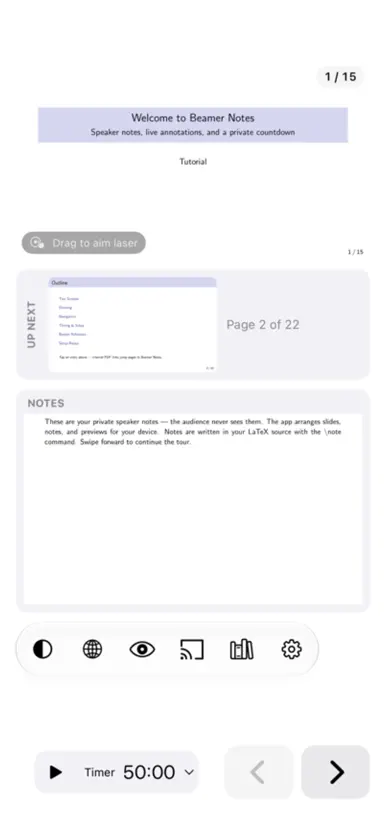
Beamer Notes brings your slides, speaker notes, and teaching tools together. Present Beamer PDFs, sketch on a whiteboard, or explore an interactive HTML chart while keeping your notes and controls private. SLIDES AND SPEAKER NOTES • Open Beamer PDFs with separate slide and notes areas, or use standard PDFs and manual page splitting. • See the current slide, next-slide preview, notes, page thumbnails, and a private countdown. • Choose notes beside or below the slide, Notes Only, or Slide Only. • Use a slide overview and tabs to move between decks, whiteboards, and HTML. DRAW AND EXPLAIN • On iPad, write with Apple Pencil using pens, highlighters, erasers, the lasso, and ruler, with undo and redo. • Restore cleared ink with Undo, including Clear All Ink in PDFs and whiteboards. • Tidy hand-drawn lines, circles, ellipses, and rectangles with adjustable shape correction. • Add photos and text, or guide attention with a laser dot or trail. • Create independent multipage whiteboards with white or black backgrounds. Save, reopen, rename, export, and share them without changing the original PDF. INTERACTIVE HTML • Open compatible HTML files from Library or enter a website link to load a live page or try downloading its HTML. • Move sliders and operate controls with your fingers, then annotate with Apple Pencil on iPad. • Compatible HTML lessons can include page navigation, separate ink on each page, private speaker notes, a next-page preview, and page thumbnails. • HTML previews are fixed snapshots for each opening. They do not change with the live controls. • Use standard HTML, CSS, JavaScript, SVG, and Canvas in a 1280 × 720 presentation stage. The bilingual two-page example covers supply and demand, production possibilities, and opportunity cost, with speaker notes. • Switch tabs and return to the open HTML session with its current controls and annotations. • Live links need internet. For offline use, prepare a self-contained HTML file with embedded resources. PROJECT AND RECORD • Show a separate audience view over a cable or AirPlay. Cast PDF slides and whiteboards to compatible Chromecast or Google Cast receivers. • Keep speaker notes, next-slide previews, and controls on your device. Temporarily blank the audience view when needed. • Record the audience view with optional microphone narration and save the video to Photos. Notes and presenter controls stay out of the recording. IPHONE AND IPHONE DUO • Use a standard iPhone as a remote for a nearby presenting iPad, with slide previews, notes, page controls, a timer, and laser controls. • Fully open iPhone Duo for its adapted presenter workspace. Close it for the compact remote experience. YOUR TEACHING LIBRARY • Organize PDF and HTML files together with cover previews and folders. Import files from other apps and sync Library through iCloud Drive. • Choose English or Traditional Chinese and light or dark appearance. • Follow the bundled 16:9 and 4:3 visual tutorials. Older tutorials and annotations are preserved in a backup folder when tutorials are updated. Ink, inserted photos and text, and independent whiteboards stay on the device where they were created. Export a whiteboard as a PDF to sync it through Library. Live website sessions are opened directly and are not saved as Library items. The free version allows 3 distinct non-tutorial PDFs and 3 whiteboard creations. Each free whiteboard has up to 2 pages. Reopening a counted PDF does not use another credit. Deleting does not restore an allowance. Tutorials and the HTML example are free. A one-time Full Version purchase removes PDF and whiteboard limits and unlocks your own HTML files and live HTML links in the presenter.
What's new
Version 2.2.1 · Nov 14, 2026
Version 2.2.1 adds lecture notes and page navigation to compatible HTML lessons. • Add private speaker notes to HTML and choose notes beside or below the slide, Notes Only, or Slide Only. • Turn HTML pages with the presenter buttons or page thumbnails. Ink stays with its page when you return. • See a real next-page preview and a bottom thumbnail strip with notes beside the slide. Previews stay fixed while you adjust live parameters, so sliders no longer trigger preview flicker. • Try the updated bilingual example. Page one demonstrates supply and demand; page two explores production possibilities and opportunity cost. Both pages include speaker notes. • Restore cleared ink with Undo. Clear All Ink in PDFs and whiteboards is also undoable. • Updated tutorials explain HTML pages, speaker notes, static previews, and the example models.
In-app purchases
The most popular purchases on the App Store.
- Add 30 DecksConsumableSAR 19.99
- Add 10 DecksConsumableSAR 9.99
- Full VersionConsumableSAR 39.99
More from Wei Chen

You might also like
All apps like Beamer Notes → Priyo NotesMd Sayed Abul Kasem
 Notes at HandTamar Ben-David
 CustosNotesJuan Martin
 QuikNotes: Notes & NotebookDenis Molka
 Routine Path: Habit TrackerDarpan Neve
 TalkBeamerManuel Alabor
 magicPresenterMarkus Nebel
 Quick Note: Sticky Notes MenuKauntey Suryawanshi
 MathWrite NotesAndres Osorio Leyenda
 Rise Vision ShareRise Vision Inc