
CubeNook
Seiichirou Tanaka
No ratings yetEntertainmentAges 4+
Screenshots



About this app
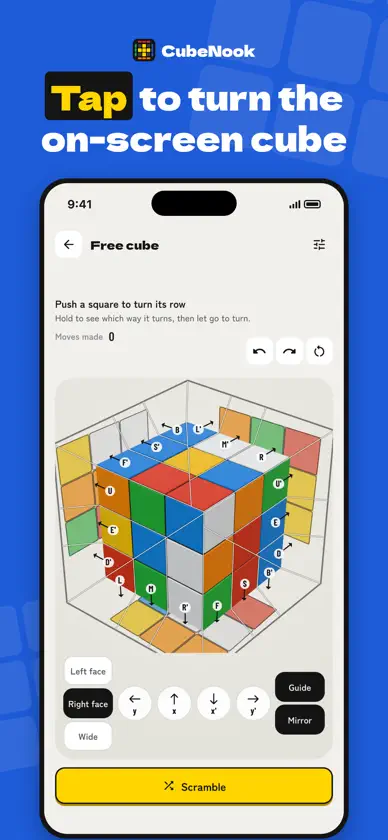
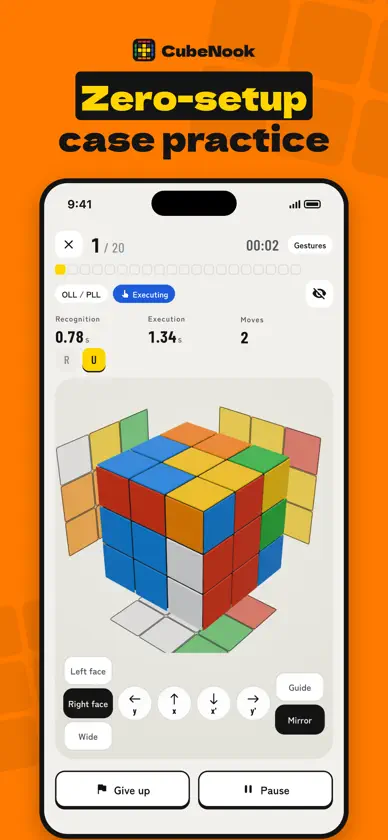
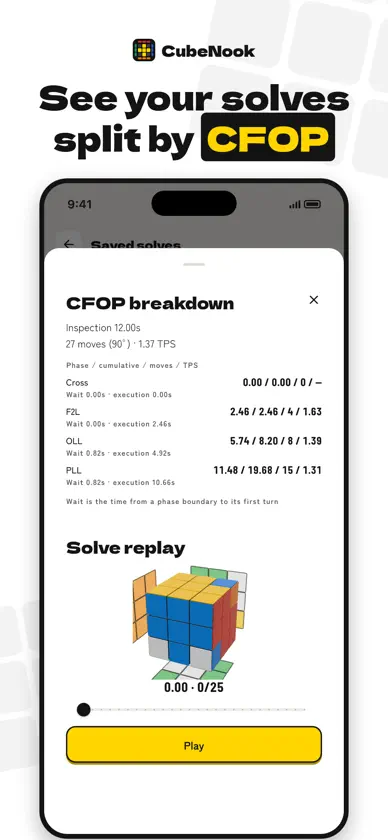
CubeNook is a speedcubing app for learning, drilling and tracking CFOP algorithms. Check all 119 F2L, OLL and PLL cases in 3D, then practice on the on-screen cube or a smart cube. LEARN • All 119 cases (F2L 41, OLL 57, PLL 21) with 239 algorithms • Replay any algorithm on a 3D cube (0.5x, 1x, 2x), with mirrors that show the hidden faces • Mark each case as not started, learning or learned, and choose the algorithm you use • Today's review: practice the learning and learned cases that are due PRACTICE • Virtual cube: tap the on-screen cube to turn it. The guide shows where to tap and which move it makes • Zero-setup practice: solve Cross, F2L, OLL and PLL cases one after another without rescrambling your cube, with recognition time, execution time and move count • Solve practice: full solves from scrambles • Notation drill: turn the moves you are shown to learn notation and common triggers TRACK • Timer with 15-second inspection, +2 and DNF, sessions, best, Ao5 and Ao12 • Time with the virtual cube or a smart cube to see the time and moves of each CFOP step and replay the solve SMART CUBE • Connects directly over Bluetooth to the GAN i4 (Gen4 protocol) and detects every move ALSO • Choose how you hold the cube (top and front colors) • Light and dark appearance • 8 languages: English, Japanese, Chinese (Simplified), Korean, Spanish, Portuguese, French, Arabic About CFOP: CFOP is the most popular speedcubing method. It has four steps: • Cross: solve the cross on the bottom • F2L (First Two Layers): finish the first two layers (41 cases) • OLL (Orientation of the Last Layer): orient the top layer (57 cases) • PLL (Permutation of the Last Layer): permute the top layer to finish (21 cases)
What's new
Version 3.1.0 · Nov 8, 2026
CubeNook 3.1.0 • You can now create an account. Sign in with Apple or Google from My page to save your practice, times, reviews and lesson progress online and pick up where you left off on other devices. • Records made before signing in move to a new account automatically. • Records made offline stay on your device and are sent once you are back online. My page shows the save status. • You can delete your account and saved records from My page at any time.
More from Seiichirou Tanaka


You might also like
 Rubiks Cube Speed Timer AppSinnig Media, LLC
 acubemyTan Grumser
 Rubix Timer: Cube Times ProSinnig Media, LLC
 SkillAddicts - Play & LearnSKillAddicts s.r.o
 Magic Cube Solver & Timer铸前 高
 Cubesolver by Yariv GdidiYariv Gdidi
 Speedcube Timer Tracker - CubeKarol Jaworski
 ChessBot: AI Chess Assistant冬阳 隋
 Rubik's Cube Master东发 黄
 RubikTimeDawid Wrzesinski