
Basic Calendar
dotori king
No ratings yetProductivityAges 4+
Screenshots


About this app
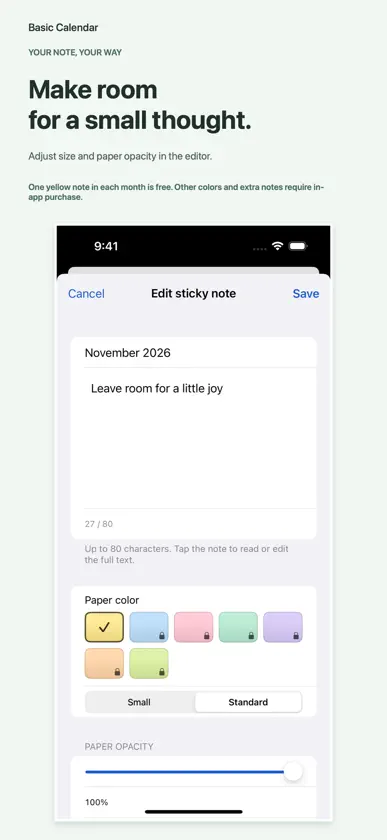
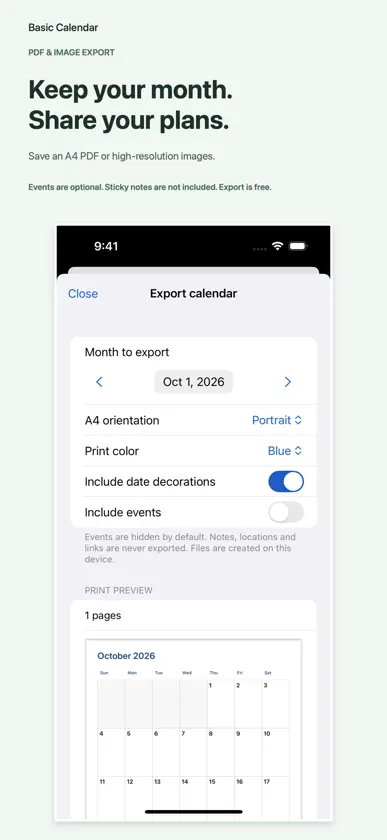
Your plans, with a personal touch. Bring your month, week, notes and calendar records together with Basic Calendar. • A little note on your month Move, resize and tilt sticky notes, adjust paper opacity, and display them in monthly widgets. One yellow note per month is free. Sticky Notes Plus is an optional one-time, non-consumable purchase for up to three notes per month and seven paper colors. It is not a subscription. All Access Pass and verified eligible previous supporters include this access. Existing notes merged through iCloud are preserved even when they exceed the creation limit or your current purchase access. • Find and understand your schedule Search event titles, locations and notes with date and calendar filters. See calendar names and time overlaps in daily and weekly lists. Create a new draft from an eligible event; invited, recurring and read-only events cannot be duplicated. • Turn a sentence into an event draft On supported devices, on-device AI interprets English, Korean, Japanese and Simplified Chinese sentences. Requires iOS 26 or later, an Apple Intelligence-compatible device, and available settings, model and language. AI can make mistakes: review the title, date, time and location, then save in the system event editor. Standard event creation remains available on unsupported devices. • Look back and export Explore monthly and yearly charts by scheduled duration, event count and sticker share, and compare with the previous month or year. Charts summarize calendar records, not actual activity, productivity or goal completion. All-day events are excluded from duration totals; overlapping durations are added separately. Export an A4 calendar as PDF or high-resolution PNG. Events are off by default; event notes, locations, links and sticky notes are excluded from exports. Lookback and export are free. • Personalize your app and Home Screen Choose five new color themes with separate system, light and dark modes. Use small, medium and large widgets and Korean or Chinese lunar dates. Korean lunar dates support Gregorian dates from January 1, 1900 through December 31, 2050. Emoji, the basic circle and red highlighter are free. Illustrated packs and additional hand-drawn styles and highlighter colors require optional one-time purchases. All Access Pass includes current and future decoration sets; verified eligible previous supporters receive the same access. Availability and local prices appear in the app. Events require calendar access; event syncing depends on device settings and your calendar service. Sticky notes, date decorations and saved calendar display sets have separate optional iCloud sync switches for the same Apple Account. The currently applied calendar selection and custom lookback titles stay on each device. Sticky-note sync is off by default; turning it off keeps downloaded notes on the device. Sticky note content and appearance sync; position and size stay on each device.
What's new
Version 1.1.6 · Nov 11, 2026
• Search event titles, locations and notes, with matching fields shown in results. • See calendar names and time overlaps in daily and weekly event lists. • Tilt and resize sticky notes more freely, and show them in monthly widgets. • Optionally sync sticky note content, colors, opacity, tilt, creation and deletion through iCloud. Position and size stay on each device. • Choose from five new color themes and separate system, light and dark appearance modes. • Create an event draft from a sentence with on-device AI on supported devices. Requires iOS 26 or later, an Apple Intelligence-compatible device, and available settings, model and language. Review the draft before saving. • Moving between weeks now selects the first day of the next week or the last day of the previous week. • Improved date interpretation and reopening the editor after cancelling an event draft. • Improved widget refresh performance when changing color themes and appearance modes.
In-app purchases
The most popular purchases on the App Store.
- Sticky notes plusConsumable$30.00
- WorkdayConsumable$30.00
- School DaysConsumable$30.00
- Vegetable GardenConsumable$30.00
- Animal FriendsConsumable$30.00
- Pastel DaysConsumable$30.00
- All Access PassConsumable$190.00
- Highlighter SetConsumable$30.00
- Simple DailyConsumable$30.00
- Warm EverydayConsumable$30.00
More from dotori king


You might also like
 Calendar ۬Draunt LLC
 Calendar App- Schedule PlannerKetan Padsala
 CalCal|簡潔日曆Teruto Yamasaki
 Plander: 日程規劃與日曆CHOI HYEONG SEOK
 Simple Calendar - CalendarLiam Sammy
 Glance: Calendar & Day PlannerYoseph Bagighni
 Agendo Week CalendarRemy Bubic
 Calendario Pro - 行事曆GSSI.es
 Linear Calendar - ChronosLeap Tech LLC
 Cubby CalendarYulei Duan