
Forge Database Manager
Marco Tini
No ratings yetDeveloper ToolsAges 4+
Screenshots



About this app
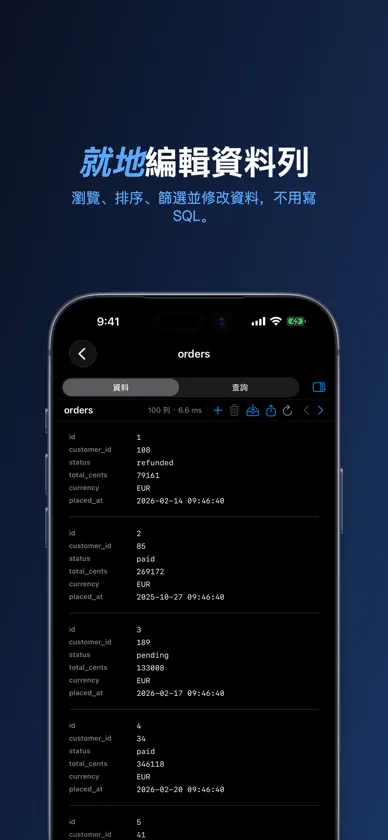
別再為四套工具付費。Forge 把 SQL 伺服器、雲端資料倉儲、NoSQL 叢集、聯邦查詢引擎、傾印檔與鍵值資料庫,全部收進一個原生 App —— 不用 Electron,不必訂閱。 以 SwiftUI 為 iPhone、iPad 與 Mac 打造。買一次,所有 Apple 裝置都能用。 十九種資料庫引擎 • PostgreSQL 家族 —— Postgres、CockroachDB、TimescaleDB、Amazon Redshift • MySQL 家族 —— MySQL、MariaDB • SQLite、libSQL、Turso(透過 Hrana HTTPS 遠端連線) • Microsoft SQL Server、Azure SQL —— 純 Swift TDS,免安裝驅動程式 • Oracle —— 純 Swift,免 Instant Client • Snowflake —— SQL API v2,金鑰對 JWT 驗證 • Google BigQuery —— 服務帳戶 JWT • Trino / Presto —— 聯邦查詢 • Apache Cassandra、ScyllaDB • DuckDB —— 直接分析 Parquet、CSV、JSON 的嵌入式引擎 • Redis —— 依鍵值型別,以資料表的方式瀏覽 • ClickHouse —— 透過原生 HTTP 進行分析 • Elasticsearch —— 索引就是 SQL 資料表 三種檔案格式當成資料庫 • CSV —— 自動偵測分隔符號,處理引號欄位與重複的標題列 • JSON、NDJSON、JSON Lines —— 陣列與串流 • SQL 傾印檔 —— 開啟 mysqldump 或 pg_dump 檔案,一行都不執行也能瀏覽 DRY RESTORE —— FORGE 獨有 把任何 SQL 傾印檔當成上線中的資料庫來檢視。400 MB 的備份幾秒內就能瀏覽。零風險、免伺服器、不用還原。 AI BRIDGE —— FORGE 獨有 在本機啟動 MCP 伺服器,把你的資料庫變成 Claude Desktop、Cursor 以及任何 MCP 助理可用的工具。列出資料表、檢視結構、執行查詢 —— 用自然語言,在每一種支援的引擎上。預設唯讀。憑證永遠不會離開你的 Mac。 即時資料,變更一目了然 在任何資料表開啟自動重新整理,看著資料即時變動。新增的列亮起綠色,改動的儲存格亮起黃色。你在編輯時會自動暫停。 就地編輯 按兩下儲存格就能修改。跨多列的多個儲存格,一次交易寫入。INSERT 與 DELETE 都遵循結構定義。CSV/JSON 可直接匯入 SQL 資料表。每一種 SQL 引擎都支援,Oracle 也不例外。 查詢編輯器 語法上色與情境感知的自動完成 —— 關鍵字、資料表名稱、欄位名稱。內建 SQL 格式化與尋找取代。用 {{var}} 變數寫出可重複使用的查詢。程式碼片段庫:輸入 `:name`,範本就插進來。 聰明的資料格線 排序、篩選,並把結果匯出成 CSV、JSON 或 SQL INSERT —— 每一種引擎都可以。 結構比對 比對兩個連線之間的資料表與欄位。在正式環境出問題前先抓到差異。 通用備份 為每一種引擎排程備份:SQL 引擎產生 SQL 傾印檔,Redis 產生 JSON。支援 cron 運算式、保留期限與 gzip。在背景執行。 SSH 通道 連上堡壘主機後方的資料庫。支援密碼或私密金鑰驗證(ed25519、RSA,可搭配密碼詞組)。純 Swift,不依賴 openssh。 可攜且安全 把連線匯出成單一加密封存檔(ChaCha20-Poly1305 + PBKDF2-SHA256),換一台機器用密碼詞組匯入。把 .sqlite/.csv/.json/.sql.gz 檔案拖到側邊欄就能開啟。密碼存放在 Apple 鑰匙圈。遠端連線支援 SSL/TLS。沒有遙測,不依賴雲端。 輕巧又快速 在 iPhone 上安裝後約 50 MB,Mac 上更小。原生 Swift 程式碼,沒有 Electron runtime,冷啟動瞬間完成。 道地的 APPLE 原生體驗 Spotlight 會索引你儲存的查詢與連線 —— 在 macOS 或 iOS 的任何地方都搜尋得到。用 Siri 或「捷徑」App 執行已儲存的查詢。鍵盤快速鍵無所不在。Mac 上支援多視窗,並共用引擎快取。 二十二種資料來源。一個 App。零 Electron。
What's new
Version 1.3.4 · Sep 17, 2026
Forge 1.3.4 opens your files where they are, gives every statement its own result, and puts the results grid on the keyboard. FILES OPENED IN PLACE A DuckDB, SQLite, CSV, JSON, or SQL dump file you choose is no longer copied into Forge: it opens in place, and a file you move or rename is found again. When a dlt pipeline or a script writes to the same DuckDB or SQLite file, Refresh shows the new data; CSV, JSON, and SQL dump files are read when the connection opens. To write to a SQLite or DuckDB file outside Forge's own folder, allow access to its folder once (the button explains why). Connections created earlier keep their copy until you choose the file again. QUERY EDITOR Several statements separated by semicolons give one result per statement, with a selector above the grid. psql-style parameters :name, :'name', and :"name" work alongside {{name}} (on Oracle, :name stays a server bind variable). The autocomplete popup on Mac no longer replaces the schema you typed before the dot, and a semicolon typed while the popup is open leaves your text intact. Outside ClickHouse, a table or column named settings or format no longer breaks the default LIMIT. RESULTS GRID The selected row keeps keyboard focus: Up/Down, Home/End, and Page Up/Down move the selection, Left/Right pick a cell, Return edits that cell in an editable table, and Escape cancels. Command-C copies the selected row as tab-separated text, or the picked cell. The inspector has a Values pane showing every column of the selected row, in the data browser and in query results. On iPhone, Row Details in the long-press menu shows the same list.
More from Marco Tini


You might also like
 D1V - AI Coding WorkspaceHASH CLOUD LIMITED
 Python Code CardsSMART BIT K.K
 HTTP Debugger+凯祺 王
 Regex PlaygroundNirav Parmar
 Ad Blocker - For SafariShubham Sharma
 AppIcon Maker - Developer ToolRemi Herbiet
 App Exhibit: Your App ShowcaseJan Armbrust
 DraftCode for PHP IDESolesignal Limited
 Warpeer延平 陈
 Pull requests ManagerAntoine Barrault