
iPGMail
Wyllys Ingersoll
4.2(6)UtilitiesAges 4+
Screenshots



About this app
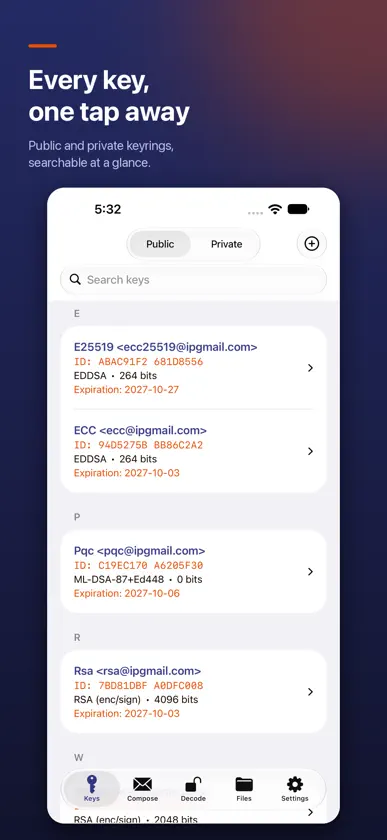
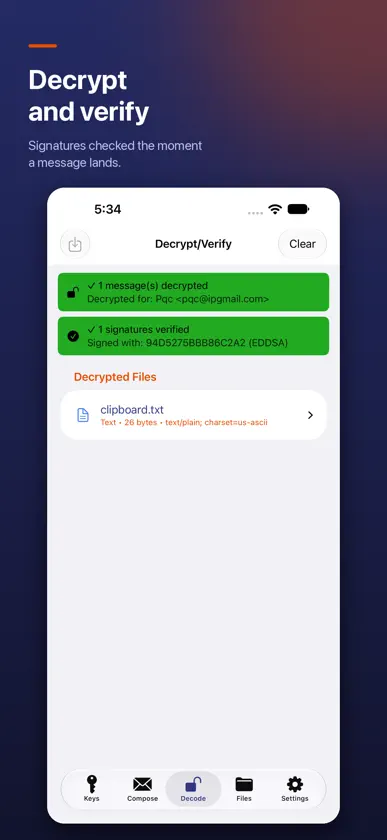
iPGMail is a complete OpenPGP client for iPhone and iPad. Encrypt, decrypt, and digitally sign email and files using the same RFC 9580 / RFC 4880 standard you already use with GnuPG, Mailvelope, Thunderbird, ProtonMail's PGP exports, and any other OpenPGP-compatible tool. Bring your existing PGP identity to iOS or generate a new one in the app. Your private keys are stored in a private local database with the highest data-protection class and are unlocked only by Touch ID or Face ID. All cryptography runs locally — your keys and message content never leave your device. CRYPTO & INTEROPERABILITY • OpenPGP v4 and v6 (RFC 9580 / RFC 4880, RFC 6637) — fully interoperable with GnuPG, Mailvelope, Thunderbird, ProtonMail PGP exports, and any other compliant tool • Post-quantum encryption (RFC 9980): import, encrypt to, and verify signatures from hybrid ML-KEM + ML-DSA keys, which pair NIST-standardized post-quantum algorithms with proven elliptic-curve cryptography • Optional post-quantum key generation: create v6 ML-DSA-65 + ML-KEM-768 or ML-DSA-87 + ML-KEM-1024 keys (turn on in Settings › Advanced) • Public-key algorithms: RSA, DSA, ECDSA, EdDSA (Ed25519, Ed448), ECDH (Curve25519, X448), ML-KEM, ML-DSA • Symmetric ciphers including AES-256, with modern AEAD encryption on PGP v6 (SEIPDv2) messages • PGP/MIME for encrypted email; standard ASCII-armored output for any plain-text channel • Detached and inline signatures; sign-only mode for authenticated but readable messages • Symmetric (password-based) file encryption • Encrypt to multiple recipients in a single message, mixing classic and post-quantum keys EMAIL • Send encrypted email directly from the app via SMTP — works with iCloud, Gmail, Outlook / Hotmail, Yahoo, AOL, Fastmail, GMX, Yandex, mail.ru, QQ, Comcast, and any custom SMTP server • Google OAuth2 for password-free Gmail authentication • Reply with quoted plaintext ("> " prefix) so encrypted threads read like normal email • Or hand off to your default mail app via the standard iOS share sheet KEY MANAGEMENT • Generate new keypairs in-app with strong defaults (ECC or RSA) • Import existing public and private keys (ASCII-armored or binary) • Search SKS / hkps key servers and Keybase to find recipient keys • Attach your public key to outgoing messages so recipients can import it directly • Inspect key flags, expiration, signatures, and user IDs FILES • Quick Look preview of decrypted content in-place • Receive encrypted attachments directly from iOS Mail.app — no copy/paste required • Read .pgp, .gpg, .asc, and .sig files from anywhere via the Files app, AirDrop, iCloud Drive, Dropbox, or the system clipboard • Open URL handler for the x-ipgmail:// scheme so other apps can hand work to iPGMail iPAD-OPTIMIZED • Sidebar navigation and full keyboard shortcut support • Optimized layouts for Split View and Stage Manager PRIVACY POSTURE • Private keys are stored locally in a secured private database and unlocked only by Touch ID / Face ID • All encryption, decryption, signing, and verification happens on-device • No account creation, no cloud middleman, no third-party access to your message content • Open standard — your keys and messages stay portable to any other OpenPGP tool, on any platform WHO IT'S FOR Built for journalists, activists, security professionals, lawyers, developers, and anyone who already uses PGP on the desktop and wants the same workflow on iOS. Bring your existing key, decrypt your inbox, sign and send — without surrendering custody of your keys to anyone.
What's new
Version 2026.45.2 · Nov 6, 2026
Siri, Shortcuts and Spotlight support * Ask Siri: "Decrypt clipboard with iPGMail" opens the Decode tab and decrypts the message you copied. "Encrypt clipboard for NAME with iPGMail" encrypts the copied text for that person and puts the encrypted message back on the clipboard. * New Shortcuts actions: Encrypt Text, Encrypt File, Decrypt Text and Decrypt File. Encrypt for one or more keys, sign with your own key, or require a valid signature before anything is decrypted. Use them in your own shortcuts and automations. * Encrypted messages and files you create from Siri or Shortcuts are also saved in the Files tab. * Find your keys in Spotlight by name, email, key ID or fingerprint, and tap one to open it in iPGMail (iOS 18 or later). Or say "Show key in iPGMail". * Your app lock still applies: when iPGMail is locked with a PIN or Face ID, it asks you to unlock before decrypting or showing a key, and it asks for a key's password when needed. * Prefer to keep key names out of Spotlight and Siri? Turn off "Show Keys in Spotlight & Siri" in Settings. * Siri phrases and actions are available in English, German and Spanish.
More from Wyllys Ingersoll


You might also like
 Easy PGPSabri BASOGLU
 Pocket-pgpMAGNUS FINSTAD
 PGPony: PGP & GPG EncryptionKevin Stewart
 GPG DecryptLaurent Ach
 Keywave - PGP EncryptionWilliam Kelley
 Paranoia Text Encryption LiteFrantisek Dvorak
 TextCrypt - Encrypted StorageEleetra (Private) Limited
 Disk DecipherRichard Huveneers
 WispPGPMarco Janssen
 OnionShareLockdown Systems