
Camera Metadata Border
Victor Alfonso Martinez Alvarez
5.0(4)Photo & VideoAges 4+
Screenshots




About this app
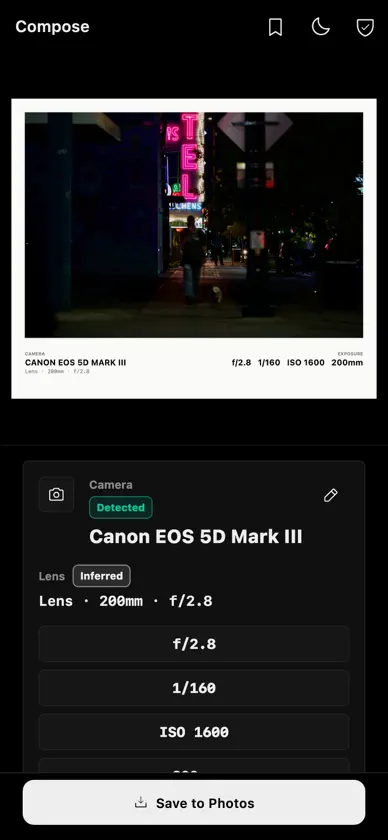
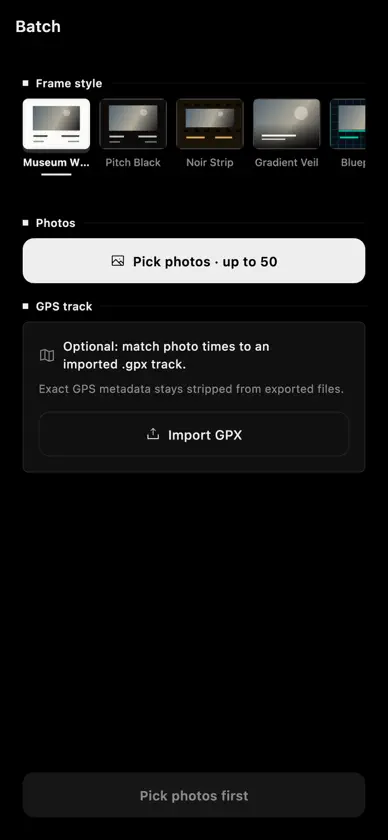
Camera Metadata Border turns hidden EXIF data into clean photo frames for photographers who want camera settings to stay visible in the final image. Pick a photo from your library, choose a frame style, and export a polished image with metadata such as camera model, lens, aperture, shutter speed, ISO, focal length, capture date, and optional location handling. Everything is rendered on your device, so your photos do not need to be uploaded to a server or tied to an account. WHY PHOTOGRAPHERS USE IT - Share the settings behind a favorite shot - Create clean camera-setting borders for social posts, portfolios, prints, and photo challenges - Keep lens, exposure, and date information attached to exported images - Build a consistent look across a set of photos - Preserve privacy by removing exact GPS data by default EXIF AND CAMERA METADATA The app reads common photo metadata and formats it into a readable border instead of leaving it buried in a file inspector. Use it as an EXIF viewer when you want to check the details, then turn those details into a finished frame. FRAME STYLES Start with Museum White for a classic gallery-style mat. Pro unlocks additional looks including Pitch Black, Minimal Center, Gradient Veil, Noir Strip, and Blueprint. Each style is designed to make camera information legible without overwhelming the photo. BATCH EXPORT Export up to 50 framed photos at once with a consistent metadata layout. Useful for shoots, travel sets, client selects, and social posts where every image should carry the same clean camera-notes style. MANUAL METADATA EDITING Some photos, scans, shared files, or edited exports have incomplete EXIF data. Fill in or correct missing fields before you export so the final frame still includes the right camera story. CAMERA PROFILES Save reusable camera metadata presets for manual lenses, vintage cameras, film scans, screenshots, or edited files. Profiles make it faster to apply consistent information across multiple exports. PRIVACY FIRST Your photo library stays on your device. The app does not require an account and does not upload your images to a cloud service. Exact GPS location is stripped from exports by default, with controls to remove, approximate, or keep location metadata when needed. PRO FEATURES Upgrade to Pro to remove ads, unlock five extra frame styles, and enable batch export. Terms of Use: https://camerametadata.com/terms.html Privacy Policy: https://camerametadata.com/privacy.html
What's new
Version 1.0.2 · Jun 9, 2026
Fixes Pro purchase configuration so subscriptions load correctly and improves the upgrade experience.
In-app purchases
The most popular purchases on the App Store.
- Camera Border Pro YearlySubscription$9.99 / year
- Camera Border Pro MonthlySubscription$1.99 / month
- Camera Metadata Border Pro YearlySubscription$9.99 / year
- Camera Metadata Border Pro MonthlySubscription$1.99 / month
More from Victor Alfonso Martinez Alvarez
 US Citizenship Prep 2026Victor Alfonso Martinez Alvarez
 Aprende Inglés para TrabajarVictor Alfonso Martinez Alvarez
 Play Guitar Chords & ScalesVictor Alfonso Martinez Alvarez
 Bilingual Bible Verse & PrayerVictor Alfonso Martinez Alvarez
 Music Binaural Radio 08Victor Alfonso Martinez Alvarez
 Quinceanera Photo PlannerVictor Alfonso Martinez Alvarez
 Puppy Name Finder: Dog NamesVictor Alfonso Martinez Alvarez
 Photo Edits 08 - RAW FiltersVictor Alfonso Martinez Alvarez
You might also like
All apps like Camera Metadata Border → Lumencam | Pocket CameraNikita Pishchugin
 Lentico: Profile Pic MakerMartin Siptak
 Henshu — Photo Editorjosuar ochoa
 Campera - Point & Shoot CameraALEX RICHARD CAMP
 Pucam - Photo & Video AlbumsCarreras LLC
 EXIFrame - Photo EXIF FrameBytefig LLC
 Reframe – Photo Layout EditorDouglas Neish
 F8 Frame: Photo Borders江宾 武
 Razr - Street CameraMuhammad Afif Maruf
 Exifill - Add Exif Framesakatech