
Catchtype
Hebbian AI Co., Ltd.
4.3(3)UtilitiesAges 4+
Screenshots


About this app
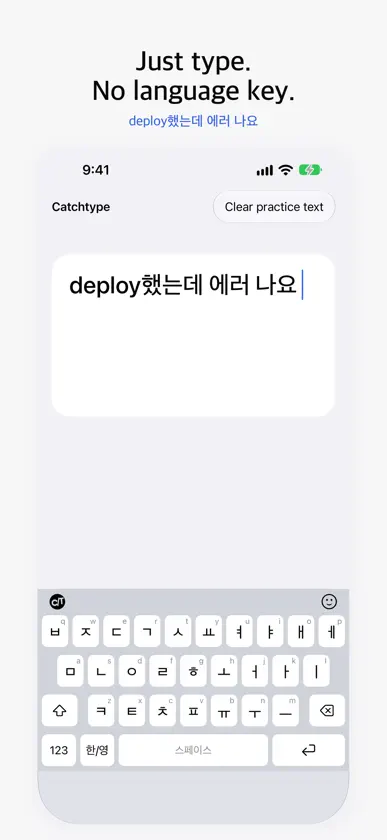
Catchtype (캐치타입) is a Korean–English auto-switching keyboard (한영 자동 전환): type Korean and English without pressing the language key. It decides word by word whether you meant Korean or English and fixes it as you type: Korean typed in the English state (ㅋㅋㅋ, 넵), Korean attached to English words (deploy했는데, AI로), and English typed in the Korean state (review). When it becomes sure, it also fixes the words before. HOW TO USE 1. Go to Settings > General > Keyboard > Keyboards > Add New Keyboard and choose Catchtype. 2. In a text field, tap the globe key to switch to Catchtype. 3. Just type, without minding Korean or English. If spq typed in the English state gives 넵, it is on. You can also try the Catchtype keyboard inside the app before turning it on. WHAT IT DOES • One layout: each key shows its Dubeolsik jamo and its English letter. • Splits words that switch language inside them (AI로, API를, React에서). • Leaves text alone when unsure. It is built to avoid changing what should stay as typed. • Undo a change with the first slot of the bar above the keys, or with the language key (twice quickly after a space). • Hold delete to keep deleting. • iOS uses its own keyboard in some fields, such as passwords and phone numbers. PRIVACY • Allow Full Access is optional and used only for key vibration, syncing settings and learned words between the app and the keyboard, and pasting what you just copied from the suggestion bar. What you copied is read on the device only: when you tap Paste, or, if you set Paste from Other Apps to Allow in Settings, when the keyboard comes up, to show its start. The keyboard contains no network code and works fully without it. • Every decision is made on the device. What you type never leaves it. • "Learned Words" (words you undo), your "Always Convert" words, recent emoji and the Hanja you pick stay on this device. • No network access, and nothing leaves the device. To find dropped keys and to show the review prompt at a good moment, the keyboard keeps counts on the device (numbers only, no text), and these counts are not sent either. Contact: hebbianai@gmail.com
What's new
Version 1.1.19 · Nov 11, 2026
• The emoji panel now offers far more emoji • The keyboard's height now matches the iPhone's own keyboard • In the app's settings, put a key such as a comma or question mark next to the space bar, and choose the long-press delay • Hold the space bar and slide up or down to move the cursor between lines more reliably, also in longer text • The suggestion bar also offers the punctuation mark you are likely to type next • On the number and symbol pages, the 한/영 key switches the language and goes straight back to the letters • Fixed the split keyboard on the unfolded iPhone Duo sometimes coming up unsplit with delete not working • Automatic Korean/English switching and typo fixes are more accurate • Clearer steps for turning on Allow Full Access • Bug fixes and stability improvements
More from Hebbian AI Co., Ltd.


You might also like
All apps like Catchtype → HanKey - Korean KeyboardSUNHO CHOI
 Thokey: Mechanical KeyboardPaulus (KR)
 Chat PDF: PDF MakerTap Tap Slide
 Clutter - Screenshot Organizerhayoung jin
 Battery Life Health: Pro CheckLeopoldo Perez Ortiz
 FoxPeek: Device SpecsXiamen Infinity Starway Technology Co., Ltd.
 Mobile IDentification App행정안전부
 네이버 스마트보드 - Naver SmartboardNAVER Corp.
 Widgetik: Custom WidgetsANDREI RUSTI
 ICN SMARTPASS (인천공항 스마트패스)인천국제공항공사