
Engly Reader
Kumar Manikant Gautam
No ratings yetEducationAges 17+
Screenshots



About this app
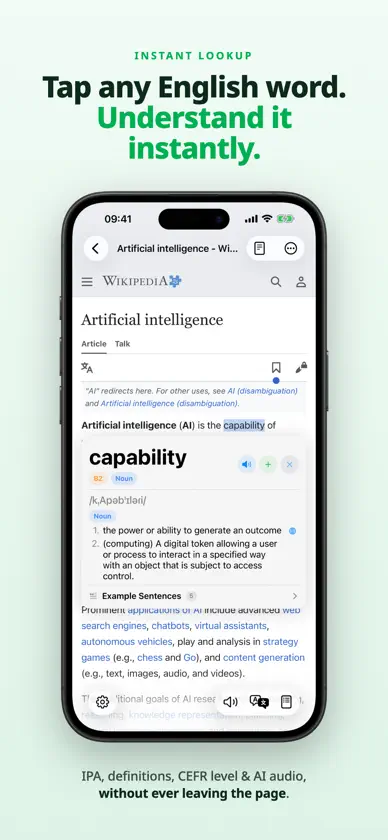
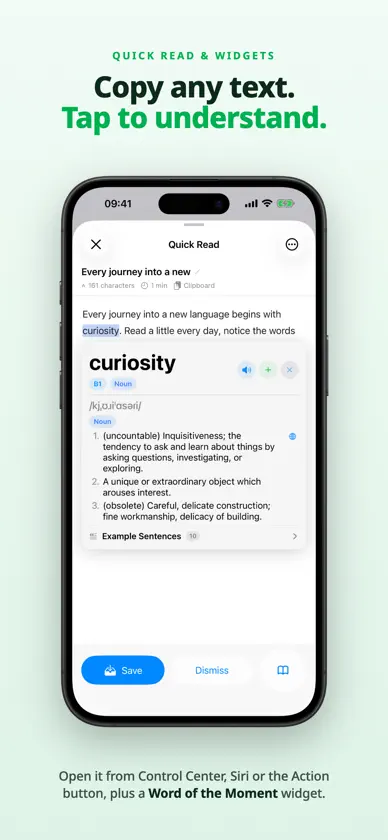
Engly Reader turns everything you read into an English lesson. Open an article, a book, a document or a video, tap any word you don't know, and instantly see its meaning, pronunciation and CEFR level — without leaving the page. TAP ANY WORD • Clear English definitions grouped by part of speech • IPA pronunciation for every word • Hear words and passages read aloud by natural on-device voices • Optional translation of definitions into your own language LEARN BY CEFR LEVEL • Every word is graded A1, A2, B1, B2, C1 or C2 • Browse word lists for each level • Color words by level to spot what's worth learning • Page Words: every word on a page sorted by difficulty, so you can preview before you read READ ANYTHING • Web articles in a clean, distraction-free reader • PDF, EPUB, Word (DOCX), PowerPoint (PPTX), Markdown and plain text • Scan printed pages with the camera and tap the words • Highlight passages and add notes WATCH AND LISTEN • Audio and video player with tappable, synced subtitles • YouTube videos with tappable captions • On-device transcription for media without subtitles • Text-to-speech that highlights each word as it reads DISCOVER • Hand-picked English channels, podcasts and news for learners • Follow sources, listen in the background and read along with tappable transcripts REVIEW AND REMEMBER • Save words together with the sentence you found them in • A short daily review brings words back when they're due • Organize words into lists and export them as text, CSV or Markdown • Your library and words sync across devices with iCloud QUICK READ & WIDGETS • Copy text anywhere and open it with tappable words from Control Center, Siri or the Action button • A Word of the Moment widget from your CEFR level on your Home Screen HOW IT WORKS 1. Add an article, document, book or video 2. Read or watch 3. Tap any word you don't know 4. Save it and review it later Whether you're preparing for an exam, reading the news, studying for work or just enjoying a book, Engly Reader meets you at your level and grows with you. Free to try. Unlock everything with a one-time purchase — no subscription.
What's new
Version 1.1 · Nov 10, 2026
Engly Reader 1.1 is a big update: • Discover: a new tab of hand-picked English channels, podcasts and news. Follow sources, play episodes in the background and read along with tappable transcripts. • Quick Read & Widgets: open copied text with tappable words from Control Center, Siri or the Action button, and add a Word of the Moment from your CEFR level to your Home Screen. • Daily Review: words you're learning come back when they're due. Start a short review from the Saved tab and track your daily goal. • Highlights & Notes: select text in any article to highlight it and add a note. • Save the Sentence Too: saved words keep the sentence you found them in, shown in your lists and included in exports. • One Voice Screen: choose Kokoro or Qwen3 and preview 28 English voices in one place. • Tidier Settings, a new app icon, and many fixes and performance improvements.
In-app purchases
The most popular purchases on the App Store.
- Start 7-Day Free TrialConsumableFree
- One Time PurchaseConsumable$9.99
More from Kumar Manikant Gautam


You might also like
All apps like Engly Reader → LibroLangWilman Garcia
 BrainPower TrainingCodePower ApS
 K C Public School PandogaRadical Point LLP
 Comprehensy: Learn LanguagesNormabase Inc.
 BookLingoFabrizio Demaria
 Model Essays for TOEFL, IELTSLan Huong
 BuRead: read and keep wordsDmitrii Efremov
 MemohausValerii Lavrishchev
 Wordy ExtensionWordy Sp z o. o.
 AIで英語 - AIコーチとつくる、実戦の英語力Nueva Holding Inc.